Modern Adventures in Azure Privilege Escalation

Azure has been growing rapidly over the past few years
As of June 2026, there were over 200 services, 897 built-in Azure RBAC roles, and 22,018 different permissions. The attack surface of Azure has also increased with this growth. There are also a number of new and updated tools that give us insight into the Azure attack surface like AzureHound, ScEntra, Cirro, and ROADRecon.
This blog aims to dig into the fundamentals of Azure RBAC and privilege escalation, Attribute Based Access Control (ABAC), and how focusing on individual permissions can uncover privileged attack paths. This blog includes some additional content that was not included in our Troopers 26 talk.
We are not the first researchers to dig into Azure privilege escalation techniques and Azure RBAC. Check out the Previous Research section towards the end of the blog for the fantastic prior work in this area.
TL;DR
- Azure ABAC is becoming more common in built-in roles and should be evaluated during privilege escalation mapping.
- Mapping techniques to Azure RBAC permissions provides a more thorough review of privilege escalation vectors in both built-in and custom roles.
- A specific version of an ARM API endpoint can be used to help map permissions to roles.
- Identifying important permissions combined with this API can give a more thorough map of privilege escalation vectors.
- This allowed us to discover a built-in role that could have allowed arbitrary privilege escalation to Owner through unconstrained role assignment.
- This was reported to MSRC on 6/8 and was fixed on 6/22.
Role Based Access Control ( RBAC ) – Basics
Azure Role Based Access Control (RBAC) defines who has access to what resources in Azure. Key concepts that make up Azure’s RBAC model:
- Resource Hierarchy:
Organizational structure for Azure with different levels of inheritance. Management Groups > Subscriptions > Resource Groups > and Resources. - Scope:
The level at which a role assignment is set. For example, a role assignment set at the Subscription level is inherited to all Resource Groups and Resources below. - Role Definitions:
Collections of permissions defined in JSON.
Includes built-in (Microsoft created and managed) and custom (customer defined) roles. - Role Assignments:
Specifies the scope, role definition, and principal that is being granted access.
- Permissions:
Actions that describe an operation on a resource.
Typically starts with the Provider and includes a resource type and then an action verb.- For example,
Microsoft.KeyVault/vaults/writecan be bucketed in allowed Actions or Not Actions in a role definition.
- For example,
- Control Plane vs Data Plane:
Role definitions contain properties for Actions and Data Actions. These correspond to the Control plane and the Data plane.- The Control plane typically refers to management type actions, like starting a VM.
- The Data plane refers to actions related to data access in a service, like reading a Key Vault secret.
For the sake of this blog, the Permissions and Control Plane vs Data Plane are the most important concepts.
Permissions can be as broad as * or as granular as Microsoft.KeyVault/vaults/secrets/getSecret/action. Wildcards can appear as standalone permissions or can be nested in different parts of a permission string. Wildcards can also be used in both Control plane or Data plane permissions. The separation between the Control plane and Data plane is important, since in most cases the line between management type actions and data access actions is strictly held. However, there are cases where Control plane permissions can allow for data access.
Attribute Based Access Control (ABAC)
Attribute Based Access Control (ABAC) is an access control model that focuses on attributes of objects or principals. Right now, you will likely see ABAC being used in built-in RBAC roles or when finer grained access needs to be granted to Storage Accounts. ABAC combined with RBAC can allow for constrained delegation scenarios. For example, role assignments granting the Owner role can have an optional ABAC condition applied to constrain the roles or target principals for role assignment by this highly privileged role.
Under the hood, ABAC uses a unique format to apply Conditions. Conditions are made up of actions, expressions, and attributes. These are what define the constrained delegation conditions for a built-in role. Take for example the Condition applied to the built-in Key Vault Data Access Administrator role. This is found in the permissions.condition property of the role definition. This is a bit overwhelming to read as its written in the role definition and is pretty printed below for readability.
There are two Conditions in this statement and they are separated by the AND. In the first Condition, the Action starts with !(ActionMatches{ and the Expression starts with @Request. The Action contains an operation or permission a principal can take on a resource. The Expression below will evaluate to true or false depending on the attribute, operator, and expected value in the statement.
The example Condition shows the ActionMatches{ statement matching for .../roleAssignments/write. If the action checked matches, the Expression is evaluated.
In the @Request, if a RoleDefinitionId matches any of the GUIDs in the list (truncated for readability), then the role assignment write operation is allowed. If not, then the role assignment is denied.
Put in plain terms:
The Key Vault Data Access Administrator role can create or delete role assignments for only the following roles in the specified list:
- Key Vault Administrator
- Key Vault Certificates Officer
- …….
(
   (
      !(ActionMatches{'Microsoft.Authorization/roleAssignments/write'})
   )
   OR
   (
      @Request[Microsoft.Authorization/roleAssignments:RoleDefinitionId]
      ForAnyOfAnyValues:GuidEquals{00482a5a-887f-4fb3-b363-3b7fe8e74483,
      a4417e6f-fecd-4de8-b567-7b0420556985, ...}
   )
)
AND
(
   (
      !(ActionMatches{'Microsoft.Authorization/roleAssignments/delete'})
   )
   OR
   (
      @Resource[Microsoft.Authorization/roleAssignments:RoleDefinitionId]
      ForAnyOfAnyValues:GuidEquals{00482a5a-887f-4fb3-b363-3b7fe8e74483,
      a4417e6f-fecd-4de8-b567-7b0420556985, ...}
   )
)
So why does ABAC matter when we are talking about modern privilege escalation vectors in Azure? ABAC is used heavily in built-in roles in Azure, almost exclusively for Microsoft.Authorization/roleAssignments/write. Microsoft uses ABAC to apply constrained delegation to privileged permissions that could allow for excessive access.
Using the example we just reviewed, the constrained delegation around the Key Vault Data Access Administrator role ensures that this role can only grant specifically defined Key Vault roles to other principals. Without the Condition, a user could abuse this role to arbitrarily grant roles to escalate privileges. ABAC is also important to review in conjunction with RBAC role assignments. Again, using the same example, if we were to review the Key Vault Data Access Administrator role without reviewing the attached ABAC condition, it may appear to allow privilege escalation via arbitrary role assignment. Reviewing ABAC and RBAC ensures that effective permissions and real vectors are identified.
A Note on ABAC Bypasses
ABAC can be a great way to constrain delegation and reduce privilege escalation vectors. However, there are a few things to keep in mind when integrating ABAC into roles or role assignments to avoid bypasses.
If you have used the Azure Portal to assign a role recently, you may have noticed the “Conditions” tab that pops up when assigning privileged roles, like Owner. The “Allow user to assign all roles except privileged administrator roles Owner, UAA, RBAC (Recommended)” Condition is Recommended by Microsoft and has this description:
Select this option to allow user to assign all roles except the privilege roles Owner, RBAC and UAA to any principal.
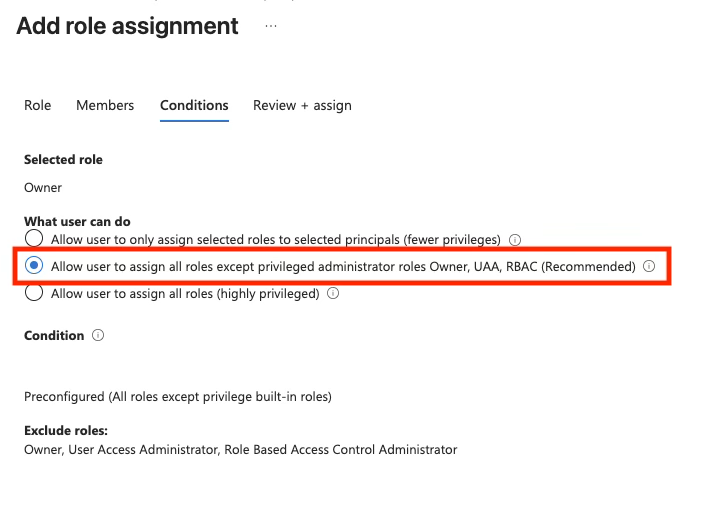
This is straight forward enough and the actual Condition that gets attached to the role assignment looks like so (pretty printed for readability):
(
   (
      !(ActionMatches{'Microsoft.Authorization/roleAssignments/write'})
   )
   OR
   (
      @Request[Microsoft.Authorization/roleAssignments:RoleDefinitionId] ForAnyOfAllValues:GuidNotEquals {8e3af657-a8ff-443c-a75c-2fe8c4bcb635, 18d7d88d-d35e-4fb5-a5c3-7773c20a72d9, f58310d9-a9f6-439a-9e8d-f62e7b41a168}
   )
)
AND
(
   (
      !(ActionMatches{'Microsoft.Authorization/roleAssignments/delete'})
   )
   OR
   (
      @Resource[Microsoft.Authorization/roleAssignments:RoleDefinitionId] ForAnyOfAllValues:GuidNotEquals {8e3af657-a8ff-443c-a75c-2fe8c4bcb635, 18d7d88d-d35e-4fb5-a5c3-7773c20a72d9, f58310d9-a9f6-439a-9e8d-f62e7b41a168}
   )
)
This looks extremely similar to the example we reviewed in the last section of this blog. The Actions are matching on Role Assignment write and delete. And if either match, if the role definition id does NOT match any of the ids in the specified list, the expression evaluates to true and the role assignment write or delete is allowed. And the GUIDs in the list correspond to Owner, User Access Administrator, and Role Based Access Control Administrator. This lines up with the description from the Portal.


So, how can this Portal Recommended Condition be bypassed?
There are two things to assess: the Action and Expression.
Taking the Expression first, we know that the Condition is attempting to constrain roles that can be granted by using the comparison operator GuidNotEquals and checking against a list of explicitly blocked roles. The intended effect is to explicitly allow any other role besides the roles in the list to be assigned.
So, if there is another built-in or custom role that allows for Microsoft.Authorization/roleAssignments/write and is NOT Owner, User Access Administrator, or Role Based Access Control Administrator, then being granted that role would take priority over the Condition and allow for the bypass.
Second, taking the Action statement, the constrained delegation of this Condition is targeting two privileged permissions: Role Assignment write and delete.
The Condition triggers when these two Actions are matched. However, the Conditions are not matching on any other privileged permissions like Microsoft.Authorization/roleDefinitions/write.
This permission allows a principal to create or update custom roles, including arbitrary definitions for the permissions and scope of a custom role.
So, any principal with the recommended Portal ABAC Condition applied to the Owner or User Access Administrator role can:
- Create a custom role and define the Actions in the custom role with
*orMicrosoft.Authorization/roleAssignments/write- Note – this is possible because the Owner and User Access Administrator roles include
Microsoft.Authorization/roleDefinitions/write
- Note – this is possible because the Owner and User Access Administrator roles include
- Use their constrained Owner or User Access Administrator role to assign themselves or another principal the custom role (effective Owner or UAA).
- The unconstrained custom role will take priority over the constrained Owner/UAA role when being assigned to themselves, effectively bypassing the ABAC condition.
This is not the most impactful ABAC bypass, since the roles being constrained by this recommended condition are roles like Owner. However, the same concepts can be applied when assessing other Conditions. This was reported to MSRC and the ticket was closed with a status of Complete – “by design”.
Privilege Escalation Categories
After considering the RBAC fundamentals, ABAC, and our experience testing in Azure, we came up with the following categories for classifying Privilege Escalation vectors. The categories below include an example permission that is representative of the privilege escalation category. These are also inspired by a fantastic talk Seth Art gave at fwd:cloudsec NA this year. Check out that talk and his pathfinding.cloud project!
- Direct Escalation (RBAC): Highly privileged permissions that allow for direct privilege escalation.
- Ex.
Microsoft.Authorization/roleAssignments/write
- Ex.
- Execution and Managed Identity Access: Permission sets that allow for access to Managed Identity (System or User assigned) enabled resources.
- Ex.
Microsoft.Compute/virtualMachines/runCommand/action
- Ex.
- User Assigned Managed Identity Access: Permission sets allowing arbitrary assignment of a User Assigned Managed Identity to a controlled resource.
- Ex.
Microsoft.ManagedIdentity/userAssignedIdentities/assign/action
- Ex.
- Secrets Access (Indirect Escalation): Permissions that allow access to service specific secrets that can grant elevated access to the resource.
- Ex.
Microsoft.Storage/storageAccounts/listkeys/action
- Ex.
- Dependent Service Control: Permissions that allow access to a supporting service that grants privilege escalation in the primary service.
- Ex. Storage Account access with
Microsoft.Storage/storageAccounts/listkeys/actionleads to compromise of Notebooks and Managed Identities in the Azure Machine Learning Service
- Ex. Storage Account access with
Why Focus on Permissions
Many tools and methodologies review privilege escalation vectors based on Roles. While there is nothing wrong with this, looking at a granular permissions level can allow for more robust and thorough privilege escalation vector mapping. Creating a list of known permissions and linking each of those to privilege escalation categories allows mapping to go beyond the standard “privileged” built-in roles of Owner, Contributor, and User Access Administrator. While these most common roles are still important, there are 897 built-in roles in Azure RBAC at the time of writing this blog. Some of those roles will inevitably contain privileged permissions to achieve their intended business purpose where that purpose may include multiple different services. This also includes custom roles that can then be more thoroughly reviewed. In addition, this also allows for easier review of ABAC conditions where individual permissions will always be involved in some way.
Mapping Permissions to Roles
Assuming that we have a list of target permissions to review, how do we go about mapping these to roles in Azure? I originally started this process years ago gathering all role definitions, doing manual resolution of wildcards, and checking Actions against Not Actions. It can still be done this way, but luckily there is an undocumented version of a known ARM API to help. This endpoint version was originally proxied via the Azure Portal and the endpoint allows the caller to specify permission(s) in the request and the server will return a filtered list of built-in and custom roles that include the permission(s). The version handles checking Actions vs Not Actions but does require some client-side handling of Data Actions (to be expected since it is undocumented). The significance here is that given a list of defined ”dangerous” permissions that have been categorized by privilege escalation vector, the API will return all roles that contain each set of permissions.
The API endpoint is the Role Definitions List endpoint, version 2023-07-01-preview. The permissions are provided in the hasAllPermissions filter in the example below.
> $Path = "/subscriptions/.../providers/Microsoft.Authorization/roleDefinitions?`$filter=hasAllPermissions('Microsoft.Authorization/elevateAccess/Action')&api-version=2023-07-01-preview"

> $resp = Invoke-AzRestMethod -Method GET -Path $Path

> $resp | Select -ExpandProperty Content | ConvertFrom-Json | Select @{n="roleName";e={$_.value.properties.roleName}}

roleName
--------
{Owner, User Access Administrator}
The best way to demonstrate the API in action is with an example, so let’s say we want to review all Roles that contain the Microsoft.Storage/storageAccounts/listkeys/action.
This is a significant permission because while it is classified as a Control Plane action, it allows principals to gain access to Storage Account Shared Access Keys.
These Shared Access Keys allow for full data access to the Data Plane in a Storage Account including in Blob Storage and File Shares. Running this permission against the API, the API returns 22 Built-in roles.
There are two interesting takeaways from this example:
- This could grant unintended access to Storage Accounts, depending on the scope at which these roles are being assigned. For example:
- Assigning at the Subscription level grants access to the Shared Access Keys of every Storage Account in the Subscription.
- Administrators might not expect roles like: Azure AI Administrator, Log Analytics Contributor, or Virtual Machine Contributor to have full data access to Storage Accounts.
- Awareness of the scope of role assignments and properly segmenting out resources more important than ever.
Owner
Contributor
App Compliance Automation Administrator
Avere Contributor
Azure AI Administrator
Azure Migrate Decide and Plan Expert
Azure Migrate Execute Expert
Azure Migrate Owner
Azure Red Hat OpenShift File Storage Operator
Azure Red Hat OpenShift Image Registry Operator
Azure Red Hat OpenShift Service Operator
DevTest Labs User
Disk Snapshot Contributor
Log Analytics Contributor
Logic App Contributor
Reader and Data Access
SqlMI Migration Role
SqlVM Migration Role
Storage Account Contributor
Storage Account Key Operator Service Role
Virtual Machine Contributor
VM Restore Operator
MSRC Finding
As a result of prepping for our Troopers 26 talk and this blog, we inadvertently discovered a privilege escalation vector in a built-in role. Using the methodology and permissions mapping described in this blog, the “Anyscale Platform Administrator Role” was identified as allowing for arbitrary privilege escalation. This role could be assigned in production environments, allowed for escalation to Owner, and acted as an equivalent to the Owner, User Access Administrator, and Role Based Access Control Administrator.
This “Anyscale Platform Administrator Role” contained the highly privileged
Microsoft.Authorization/roleAssignments permissions for /write and /delete
Per Microsoft, this allow principals to Create a role assignment at the specified scope.
There are 28 built-in roles that have this permission, but only
4 roles had this permission without any ABAC Conditions applied
1. Owner
2. User Access Administrator
3. Role Based Access Control Administrator
4. Anyscale Platform Administrator Role
The other roles all contain ABAC Conditions to constrain delegation related to /roleAssignments/write, like the “Key Vault Data Access Administrator” role we discussed in the blog. This role contains an ABAC Condition that only allows the assignment of specific Key Vault related roles. The “Anyscale Platform Administrator Role” acts as an equivalent to the Owner, User Access Administrator, and Role Based Access Control Administrator roles in this way, as it lacks ABAC Conditions. The old role definition:
{
  "properties": {
    "roleName": "Anyscale Platform Administrator Role",
    "type": "BuiltInRole",
    "description": "Provides full access to Anyscale Cloud and resources as well as admin features such as usage and resource notifications.",
    "assignableScopes": [
      "/"
    ],
    "permissions": [
      {
        "actions": [
          "Microsoft.Authorization/roleAssignments/write",
          "Microsoft.Authorization/roleAssignments/delete",
          "Microsoft.Authorization/*/read",
          "Anyscale.Platform/*/read",
          "Anyscale.Platform/*/write",
          "Anyscale.Platform/*/delete"
        ],
        "notActions": [],
        "dataActions": [
          "Anyscale.Platform/admin/action",
          "Anyscale.Platform/*/read",
          "Anyscale.Platform/*/write",
          "Anyscale.Platform/*/delete"
        ],
        "notDataActions": []
      }
    ],
    "createdOn": "2026-05-04T15:08:01.0130877Z",
    "updatedOn": "2026-05-04T15:08:01.0130877Z",
    "createdBy": null,
    "updatedBy": null
  },
  "id": ".../3e9f3756-203e-4734-a0b8-4b68691ffae3",
  "type": "Microsoft.Authorization/roleDefinitions",
  "name": "3e9f3756-203e-4734-a0b8-4b68691ffae3"
}
With the combination of these issues, this could allow unintended privilege escalation for both intended principals or compromised principals with this role. Microsoft has since adjusted this role to remove the highly privileged Role assignment write and delete permissions.
{
  "properties": {
    "roleName": "Anyscale Platform Administrator Role",
    "type": "BuiltInRole",
    "description": "Provides full access to Anyscale Cloud and resources as well as admin features such as usage and resource notifications.",
    "assignableScopes": [
      "/"
    ],
    "permissions": [
      {
        "actions": [
          "Microsoft.Authorization/*/read",
          "Anyscale.Platform/*/read",
          "Anyscale.Platform/*/write",
          "Anyscale.Platform/*/delete"
        ],
        "notActions": [],
        "dataActions": [
          "Anyscale.Platform/admin/action",
          "Anyscale.Platform/*/read",
          "Anyscale.Platform/*/write",
          "Anyscale.Platform/*/delete"
        ],
        "notDataActions": []
      }
    ],
    "createdOn": "2026-05-04T15:08:01.0130877Z",
    "updatedOn": "2026-06-17T18:40:51.2411347Z",
    "createdBy": null,
    "updatedBy": null
  },
  "id": ".../3e9f3756-203e-4734-a0b8-4b68691ffae3",
  "type": "Microsoft.Authorization/roleDefinitions",
  "name": "3e9f3756-203e-4734-a0b8-4b68691ffae3"
}
MSRC Timeline
- 6/8/2026 – Ticket submitted and case opened
- 6/15/2026 – Behavior confirmed by MSRC
- 6/19/2026 – Issue confirmed as duplicate
- 6/22/2026 – Case status marked as Complete – Duplicate
- 8/3/2026 – Start coordinated vulnerability disclosure process
- 9/3/2026 – Blog published
Previous Research
- Andy Robbins has done a lot of privilege escalation focused research in Entra and Azure including: Service Principal abuse, Container Registry tasks, Managed Identity attacks, Key Vaults, and Graph API permissions.
- https://medium.com/specter-ops-posts/abusing-azure-container-registry-tasks-1f407bfaa465
- https://medium.com/specter-ops-posts/managed-identity-attack-paths-part-1-automation-accounts-82667d17187a
- https://medium.com/specter-ops-posts/managed-identity-attack-paths-part-2-logic-apps-52b29354fc54
- https://medium.com/specter-ops-posts/managed-identity-attack-paths-part-3-function-apps-300065251cbe
- https://medium.com/specter-ops-posts/abusing-azure-app-service-managed-identity-assignments-c3adefccff95
- https://medium.com/specter-ops-posts/microsoft-breach-what-happened-what-should-azure-admins-do-da2b7e674ebc
- https://medium.com/specter-ops-posts/azure-key-vault-tradecraft-with-bark-24163abc8de3
- Ryan Hausknecht created the PowerZure tool and has blogged on Virtual Machine and Storage Account attacks. He also created the Azure Threat Research Matrix, which mapped Azure specific TTPs to MITRE ATT&CK like categories.
- Katie Knowles has done research in Azure secrets access, Key Vault access policy abuse, Entra OUs, Copilot abuse, and Entra Agent ID.
- Seth Art recently created the pathfinding.cloud project and gave a talk at fwd:cloudsec NA on identifying novel privilege escalation vectors in AWS with AI.
Recommendations
Azure has been growing rapidly over the last few years and privilege escalation vector mapping has gotten more complex. Hopefully this blog has demonstrated a way of reviewing privilege escalation vectors by focusing on permissions first. For Azure administrators, the core fundamentals for securing RBAC still apply and are more important than ever.
- Ensure that workloads are logically segmented. Subscriptions can be used to enforce that segmentation. For example, one of Microsoft’s recommended landing zone architectures segments out critical identity resources into a dedicated Subscription.
- Review every role (even the built-in ones) for unexpected permissions before assignment.
- Ensure that each assigned role follows the principle of least privilege. Reduce usage of highly privileged roles like Owner, Contributor, User Access Administrator, and Role Based Access Control Administrator.
- Assign the least privileged role at the most narrow scope possible.
Test your modern enterprise’s Azure cloud defenses with NetSPI





Explore More Blog Posts

Authorization Differential Testing in Salesforce
NetSPI Salesforce expert Aussan explores how holding identity steady across UI API, GraphQL, and custom @AuraEnabled Apex methods reveals hidden authorization gaps.

PHP2Shell Unauthenticated RCE on PHP: CVE-2026-109618 & CVE-2026-109619
The PHP project has disclosed two critical vulnerabilities, CVE-2026-109618 and CVE-2026-109619, affecting all PHP installations that serve web requests. Both vulnerabilities carry a CVSS 4.0 score of 9.2 (Critical).

Introducing the NetSPI Platform MCP
Discover how the new NetSPI Platform Model Context Protocol (MCP) integration gives you a live view of vulnerabilities in your environment and the speed of remediation needed to counter fast-paced attackers.