Administrating the Administrator, An OCI Identity Domains Permission Bypass

Introduction
While Oracle Cloud Infrastructure (OCI) has a smaller share of the cloud market (compared to AWS, Azure, or GCP), it still provides many of the same core service categories needed to support modern cloud workloads. For example, OCI Object Storage maps conceptually to services like Amazon S3 or Google Cloud Storage, while OCI Compute serves a similar role to EC2 or Google Compute Engine.
These similarities made OCI an ideal research target. It was familiar enough that I could leverage existing cloud security mental models, but might receive less scrutiny leaving certain components unexplored. I’ve always been drawn to the smaller corners of a technology space, where there are fewer established assumptions and more room to uncover something new.
As I was learning OCI, I started by building a suite of OCI-focused tools to support enumeration and future research. While investigating the OCI-specific concept of identity domains (via my tool creation), I identified a bug that got my name added to the June 2026 critical security update patch. In essence, a separate authorization model within identity domains failed to deny lower-level administrator functionality from creating API keys for the identity domain administrator of the identity domain (even though password/email resets were denied).
Hypothesis:
2 different APIs, 2 different Authorization Models, 2 different Segments of Code (SDK): Indicates that 2 separate teams failed to communicate authorization expectations of their shared resources ( API keys )
TL;DR
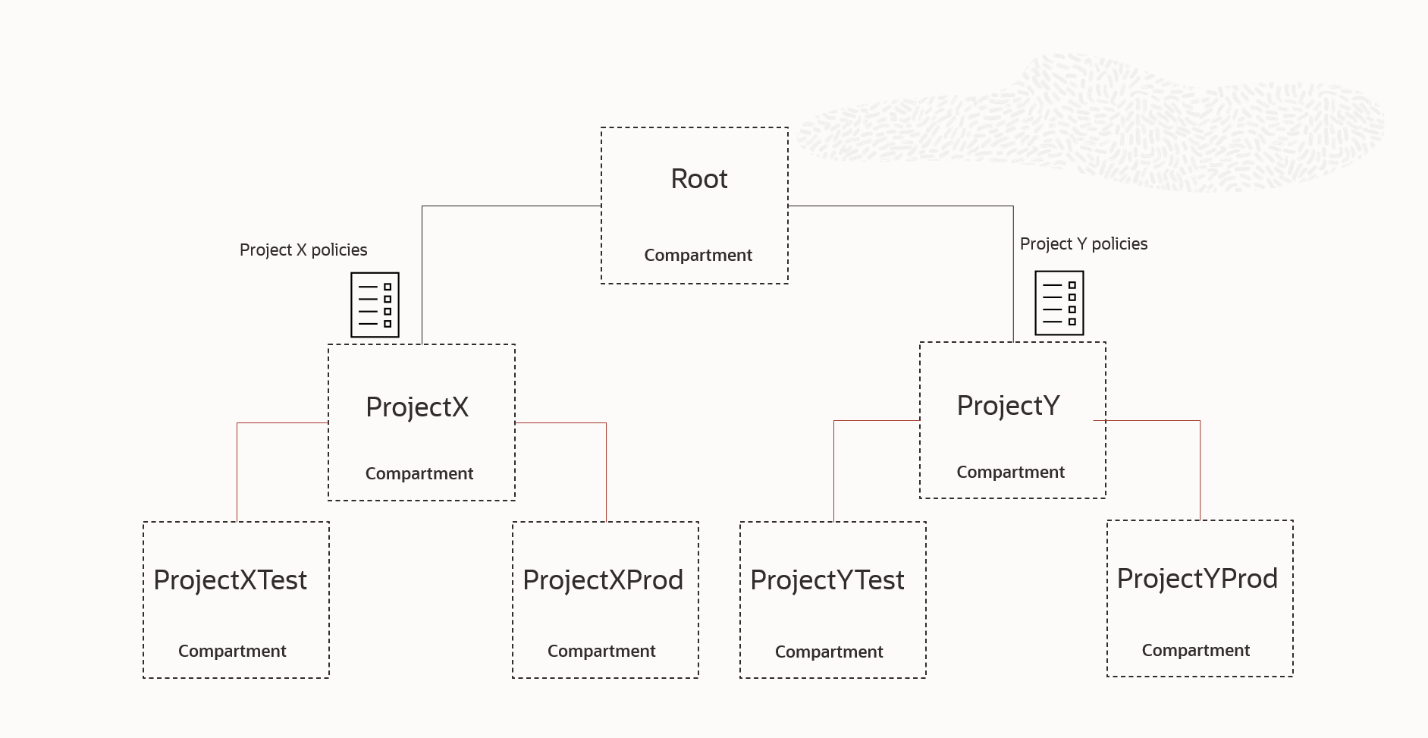
- Policies are attached to compartments (similar to AWS accounts or GCP projects) at which permissions propagate downwards in the overall compartment tree hierarchy.
- Thus, OCI has two related but distinct authorization models: the more narrowly scoped OCI-specific Identity Domain Roles and traditional OCI IAM policies more aligned with other traditional cloud IAM models.
- In some cases, both authorization models can affect access to the same underlying API actions like creating a user API key with the Python SDK, for example, offering two different endpoints to perform similar actions.
- You can think of these as logical containers for IAM resources, rather than one flat IAM namespace. Unlike traditional IAM, they are not really synonymous with AWS/GCP and are an OCI-specific feature.
- Identity domains are a part of determining the overall principal identity. A user called “Scott” can be in two different identity domains, referencing either Scott in IAM policies requires the inclusion of the identity domain because they are two separate principals (ex. “IDD1/Scott” & “IDD2/Scott”).
Talks Thus Far
BSides San Diego 2026
If you want to dive deeper into fundamental knowledge this recorded talk from BSides San Diego 2026 does an in-depth analysis although of all tools noted here including a lexical parser for policy statements, Burp Suite plugin, and enumeration / graphing python OCI framework.
fwd:cloudsec 2026
For a more interactive walkthrough of OCI identity domains which is the primary focus on this blog, the video (right) covers the identity domains portion of my fwd NA 2026 presentation:
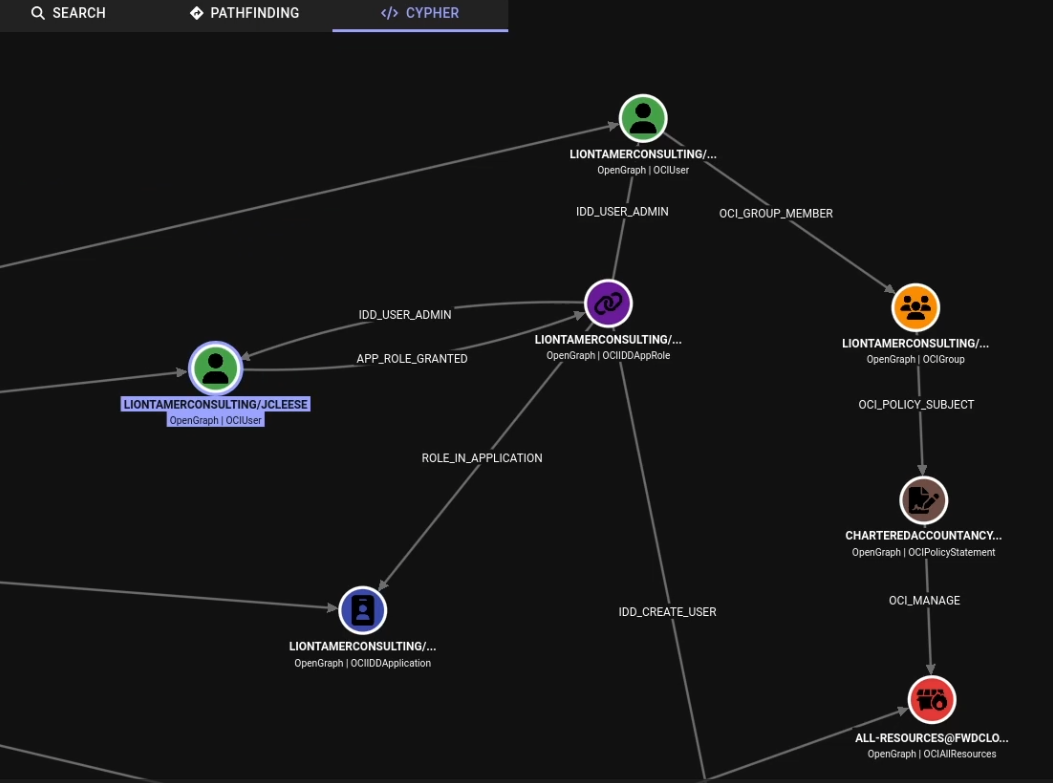
The fwd:cloudsec talk covered the path shown below: an administrator role inside an identity domain may not directly have classic OCI IAM permissions, but it may allow control over a user or group that does have permissions through OCI IAM.
In graph terms, this creates a pivot point between identity-domain administration and traditional OCI resource authorization.

Quick OCI 101
Compartments/Tenants
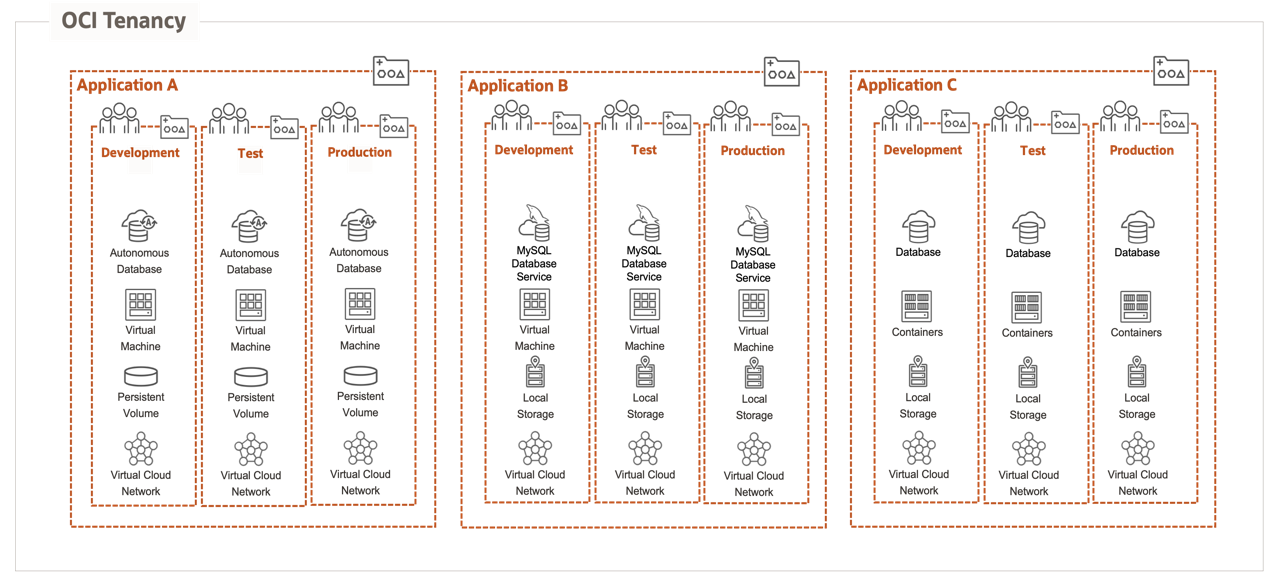
OCI logically organizes cloud resources into compartments. If you are coming from AWS or GCP, you can loosely think of compartments as serving a similar organizational purpose to AWS accounts or GCP projects, although the comparison is not exact. Compartments are used to group resources, scope access, and organize an OCI tenancy.
For example, the Object Storage service exists across the OCI environment, but individual buckets created through that service are placed into specific compartments. A user might create some buckets in CompartmentA and others in CompartmentB, with access controlled separately for each compartment.
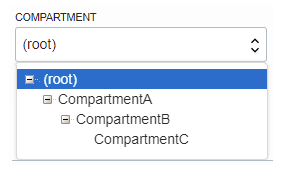
Compartments can also be nested. At the top of this nested hierarchy is the root compartment, commonly referred to as the “tenant compartment”. For simplicity, you can think of the tenant compartment as any other compartment in that you can create resources in it as well. The tenant compartment just has a slightly different Oracle Cloud Identifier (OCID). An OCID as a quick aside is similar to an AWS ARN or GCP resource identifier, it’s just a unique identifier every cloud resource has.
OCI IAM Policies
Policies are the fundamental building block of classic OCI IAM. OCI policies are written as sentence-style statements that describe who can do what, to which resources, and in which compartment.
For example: “Allow group Group1 to manage buckets in CompartmentA“
At a high level, IAM policies follow a familiar IAM pattern: a principal is granted a set of permissions over a resource type within a specific scope.
The implementation is different from AWS or GCP, but the general idea is similar.
Because compartments are nested,
& policies are attached to compartments, permissions can flow downward from parent compartments to child compartments.
In other words, a policy attached higher in the compartment hierarchy may grant access to resources in compartments beneath it, subject to any conditions included in the policy.
Interestingly these OCI statements are created and gathered as shown above, as lexical sentences. There is no JSON, YAML, etc. serialization methods OCI offers. This would involve a ton of regex and parsing to even begin analyzing a large list of statements.
I built a tool to convert these OCI IAM policy statements into JSON for easier analysis: github.com/netspi/oci-lexer-parser. This can be used in any tools to analyze a list of JSONS instead of a list of freeform sentences.
Identity Domains
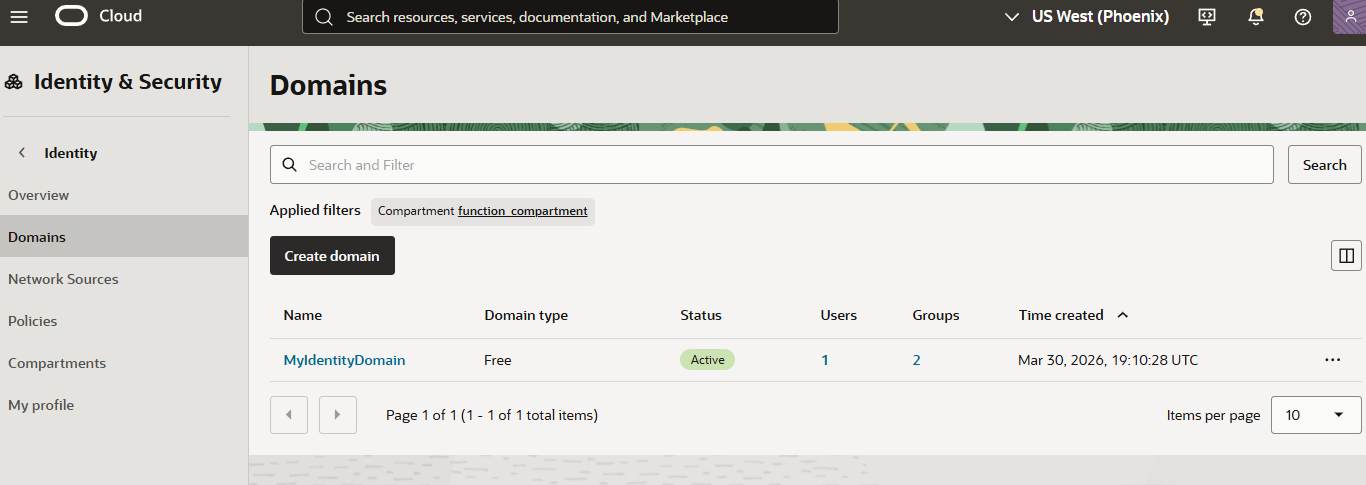
Moving into more OCI-specific territory, OCI has identity domains. An identity domain is a logical grouping of IAM-related resources such as users, groups, dynamic groups, federation settings, password policies, and related identity configuration.
Identity domains are just like any other OCI resource and can be created in compartments with arbitrary names. From what I have seen, a default identity domain at the tenant level is created automatically and is often used when an identity domain is not explicitly referenced. In general, I’ve observed this default identity domain is just called “Default”. Identity domains names are used when identifying a principal.
An organization might have both IdentityDomainA and IdentityDomainB, each containing a user named WebbinRoot.
Even though the usernames are the same, these are separate IAM identities represented logically as two separate people because they live in different identity domains.
To disambiguate them, OCI references the identity domain as part of the principal name, such as: IdentityDomainA/WebbinRoot or IdentityDomainB/WebbinRoot
The same concept applies to groups. If IdentityDomainA contains a group named GroupA, an OCI IAM policy referencing that group might look like this: Allow group IdentityDomainA/GroupA to use buckets in CompartmentA
Applications and AppRoles
I should note I have found the documentation for app roles, applications, and grants a bit sparse or hard to understand. The descriptions below are how I understand the mechanisms at this point in time but would encourage you to do your own research if a point does not seem to align with behavior.
Within identity domains, OCI supports “applications” and users/groups can be assigned to “AppRoles” on those applications through “grants”. Per the name, AppRoles are not the same thing as classic OCI IAM policies. OCI IAM policies authorize access to OCI resources such as buckets, instances, and compartments. Identity domain AppRoles, on the other hand, authorize actions within the identity domain itself, such as administering users, groups, applications, or identity-domain settings. They involve more direct assignments of users and groups to the specified roles which in turn are scoped or assigned to a specific application.
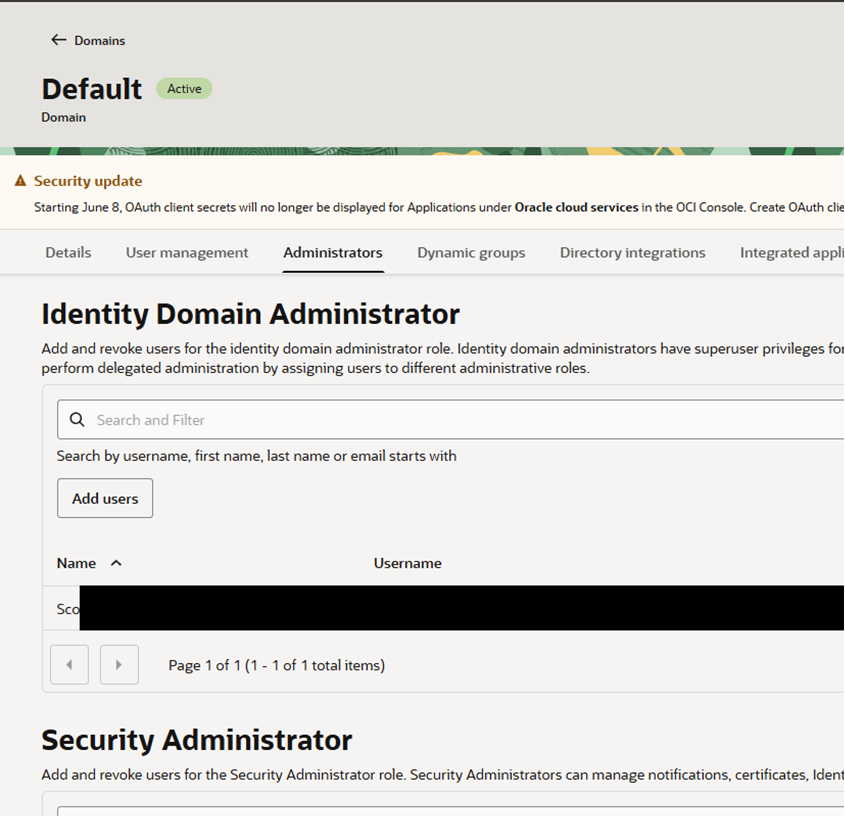
Now, when you click into an identity domain in the OCI console, you will see there are some predefined roles like “Identity Domain Administrator” or “User Manager” under the “Administrators” tab that are already present upon identity domain creation. As I just mentioned, OCI documentation generally describes AppRoles as being assigned to applications. But the default administrator roles, such as Identity Domain Administrator and User Administrator, are already present in a new identity domain. So, the natural question is: what application are these roles attached to if I did not create one?
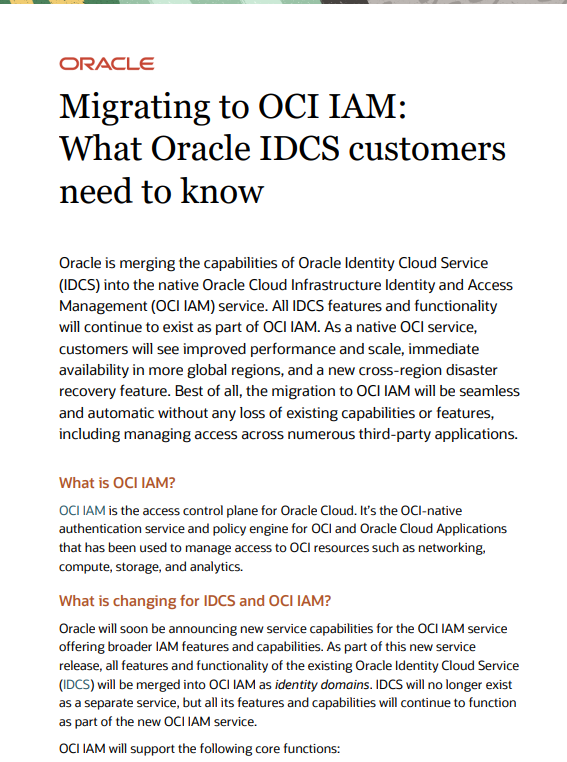
My understanding is that this is related to Oracle’s earlier Identity Cloud Service (IDCS) product being integrated into OCI. As part of that integration, the identity-domain administration model appears to be represented through this built-in IDCS application and its associated AppRoles. The TLDR is the “IDCS_Application” appears to be a system defined pre-existing background application that is tied to all the default administrator roles, so being assigned a role on the IDCS_Application would allow access to all identity resources.
Using the Python SDK, we can enumerate the applications and AppRoles in an identity domain. Tools such as OCInferno shown below can also surface this relationship. When doing so, these built-in administrator roles appear as AppRoles associated with a pre-existing IDCS application.
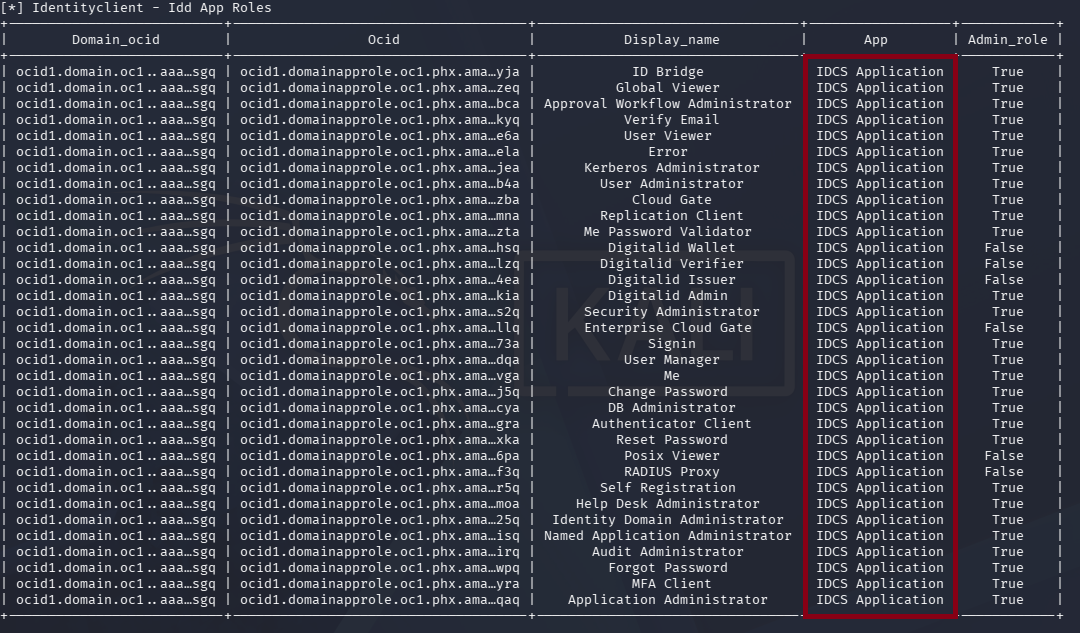
Built-in IDCS Application
Two Workflows for One Goal
By now, you may have noticed that OCI can expose two separate authorization paths for similar resources: classic OCI IAM policies and Identity Domain application roles. For example, suppose we want to create a long-lived API key for an IAM user named WebbinRoot, who resides in the Default identity domain. Assume that IdentityDomainA also exists elsewhere in the tenancy, such as within CompartmentABC.
There are two ways we can potentially obtain the required permissions:
- OCI IAM policies: If the caller has permissions through a classic OCI IAM policy, such as:
Allow group CallerGroup to manage users in compartment CompartmentABCthe caller can create an API key through the classic OCI IAM API. - Identity Domain roles: If the caller has been assigned an administrator role such as Identity Domain Administrator in the Default domain, the caller can also obtain user-management permissions over WebbinRoot.
These are separate and additive authorization models.
A principal can have the relevant OCI IAM policies without having any Identity Domain application roles, or have an Identity Domain role without having the corresponding OCI IAM permissions. In either case, the principal may be able to perform the same logical operation against the same underlying user resource.
The API Path Depends on the Identity Domain
Before continuing, it is worth taking a brief aside to explain how the API paths relate to these permission models.
Each authorization model can be exercised through its own API endpoints, but there is some nuance around when each API can actually be used. Both authorization models can apply to resources associated with Identity Domains, but the API you use depends on the domain and, in some cases, how the required permissions were granted.
The classic OCI IAM CLI/API path operates against the Default identity domain. For users in non-Default identity domains, or when using Identity Domain permissions against users in the Default domain, you need to use the Identity Domains SCIM API.
This means that even if a principal has the necessary classic OCI IAM policy permissions, the classic /20160918 API does not appear to work for users outside of the Default domain. Instead, the SCIM API must be used.
In other words:
- Classic OCI IAM API (/20160918)
→ works with the Default domain.
- Identity Domains SCIM API (/admin/v1)
→ can be used for users in Identity Domains
( including the Default domain )
The following examples demonstrate each scenario:
Classic API: Permissions Granted Through an OCI IAM Policy
#  oci iam user api-key upload \
 --user-id ocid1.user.oc1..aaaaaaaawz4zmfs5qug2no24plzqfc4b7vkh3q52pwuepyidbl5wgjmzpkra \
 --key-file ~/.oci/oci_api_key_public.pem \
 --profile DEFAULT_2
{
 "data": {
 "fingerprint": "0a:33:67:5e:6d:a8:08:45:8c:c5:c5:36:1a:df:68:dc",
 "inactive-status": null,
 "key-id": "ocid1.tenancy.oc1..[TRUNCATED]",
 "key-value": "-----BEGIN PUBLIC KEY-----[TRUNCATED]\n-----END PUBLIC KEY-----",
 "lifecycle-state": "ACTIVE",
 "time-created": "2026-08-15T19:08:58.653000+00:00",
 "user-id": "ocid1.user.oc1..aaaaaa[TRUNCATED]"
 },
 "etag": "b5b8a9cc076f46ca887c8a3021e0424c"
}
POST /20160918/users/ocid1.user.oc1..aaaaaaaawz4zmfs5qug2no24plzqfc4b7vkh3q52pwuepyidbl5wgjmzpkra/apiKeys HTTP/1.1
user-agent: Oracle-PythonSDK/2.181.1 (python 3.13.12; x86_64-Linux) Oracle-PythonCLI/3.89.1
Accept-Encoding: gzip, deflate, br
accept: application/json
[TRUNCATED]
Content-Length: 471
date: Sat, 15 Aug 2026 19:08:56 GMT
host: identity.us-phoenix-1.oci.oraclecloud.com
x-content-sha256: D0pqMiEm12dTZa1bntB6IkImgAZkYp9WB1eSKkjEr6o=
authorization: Signature algorithm="rsa-sha256",headers="date (request-target) host content-length content-type x-content-sha256",keyId="ocid1.tenancy.oc1..aaaaa[TRUNCATED]/ocid1.user.oc1..aaaaaaaarfw6k63nn[TRUNCATED]/2b:2a:04:5f:ba:93:40:d4:ec:a9:58:42:ca:02:76:90",signature="BGd+SR910eC[TRUNCATED]",version="1"

{"key": "-----BEGIN PUBLIC KEY-----[TRUNCATED]\n-----END PUBLIC KEY-----\n"}
HTTP/1.1 200 OK
Date: Sat, 15 Aug 2026 19:08:58 GMT
[TRUNCATED]
Pragma: no-cache
Location: https://identity-control-plane-core.svc.ad1.r2/20160918/users/ocid1.user.oc1..aaaaaaaawz4zmfs[TRUNCATED]/keys/ocid1.tenancy.oc1..aaaaaaaagmctwyv2ud[TRUNCATED]/ocid1.user.oc1..aaaaaaaawz4zmfs[TRUNCATED]/0a:33:67:5e:6d:a8:08:45:8c:c5:c5:36:1a:df:68:dc
Content-Type: application/json
Content-Length: 938

{
 "timeCreated" : "2026-08-15T19:08:58.653Z",
 "userId" : "ocid1.user.oc1..aaaaaaaawz4zmfs5q[TRUNCATED]",
 "fingerprint" : "0a:33:67:5e:6d:a8:08:45:8c:c5:c5:36:1a:df:68:dc",
 "keyValue" : "-----BEGIN PUBLIC KEY-----[TRUNCATED]\n-----END PUBLIC KEY-----",
 "keyId" : "ocid1.tenancy.oc1..aaaaaaaagmctw[TRUNCATED]/ocid1.user.oc1..aaaaaaaawz4zmfs[TRUNCATED]/0a:33:67:5e:6d:a8:08:45:8c:c5:c5:36:1a:df:68:dc",
 "lifecycleState" : "ACTIVE"
}
Identity Domains SCIM API: Permissions Granted Through an Identity Domain Role
# cat /tmp/api_key.json
{
 "schemas": [
 "urn:ietf:params:scim:schemas:oracle:idcs:apikey"
 ],
 "key": "-----BEGIN PUBLIC KEY-----[TRUNCATED]n-----END PUBLIC KEY-----\n",
 "fingerprint": "0a:33:67:5e:6d:a8:08:45:8c:c5:c5:36:1a:df:68:dc",
 "user": {
 "ocid": "ocid1.user.oc1..aaaaaaaakrwllzzebd[TRUNCATED]"
 }
}
oci identity-domains api-key create \
 --endpoint "https://idcs-1b46[TRUNCATED].identity.oraclecloud.com" \
 --from-json file:///tmp/api_key.json \
 --profile TARGETUSER2
{
 "data": {
 "compartment-ocid": "ocid1.compartment.oc1..aaaaaaaaaxg6mhon[TRUNCATED]",
 "delete-in-progress": null,
 "description": null,
 "domain-ocid": "ocid1.domain.oc1..aaaaaaaayzh65taz6kw[TRUNCATED]",
 [TRUNCATED – See HTTP Response Below]
 "etag": "e6ac9312b5ea4c908f4742d72b932f04",
 "opc-total-items": "-1"
}
POST /admin/v1/ApiKeys HTTP/1.1
user-agent: Oracle-PythonSDK/2.181.1 (python 3.13.12; x86_64-Linux) Oracle-PythonCLI/3.89.1
[TRUNCATED]
Content-Length: 699
date: Sat, 15 Aug 2026 19:01:43 GMT
host: idcs-1b46[TRUNCATED].identity.oraclecloud.com
x-content-sha256: NBHRiNEqbBiuSMFDX9ARAMQcUFjQwdOYJ0G5MXKPeqY=
authorization: Signature algorithm="rsa-sha256",headers="date (request-target) host content-length content-type x-content-sha256",keyId="ocid1.tenancy.oc1..aaaaaaaagmctwy[TRUNCATED]/ocid1.user.oc1..aaaaaaaazra4evbt6[TRUNCATED]/51:52:3f:bb:b6:69:79:f6:63:04:22:b5:a9:d4:a2:b1",signature="jIvZWeVV83K[TRUNCATED]",version="1"

{"schemas": ["urn:ietf:params:scim:schemas:oracle:idcs:apikey"], "fingerprint": "0a:33:67:5e:6d:a8:08:45:8c:c5:c5:36:1a:df:68:dc", "key": "-----BEGIN PUBLIC KEY-----[TRUNCATED]\n-----END PUBLIC KEY-----\n", "user": {"ocid": "ocid1.user.oc1..aaaaaaaakrwllzzebd[TRUNCATED]"}}
HTTP/1.1 201 Created
Date: Sat, 15 Aug 2026 19:01:45 GMT
Content-Type: application/json;charset=utf-8
Content-Length: 2270
[TRUNCATED]
x-envoy-decorator-operation: admin.idcs-data-plane.svc.cluster.local:9246/*
Server: Oracle Identity Cloud Service
x-frame-options: deny
[TRUNCATED]

{"idcsLastModifiedBy":{"type":"User","value":"173c95[TRUNCATED]","display":"John Cleese","ocid":"ocid1.user.oc1..aaaaaaaazra4evbt6[TRUNCATED]","$ref":"https://idcs-1b46f36384304fe383d6b72c2cae0a26.identity.oraclecloud.com:443/admin/v1/Users/173c95[TRUNCATED]"},"idcsCreatedBy":{"type":"User","ocid":"ocid1.user.oc1..aaaaaaaazra4evbt6[TRUNCATED]","display":"John Cleese","value":"173c95[TRUNCATED]","$ref":"https://idcs-1b46[TRUNCATED].identity.oraclecloud.com:443/admin/v1/Users/173c95[TRUNCATED]"},"meta":{"version":"e6ac9312b5ea4c908f4742d72b932f04","created":"2026-08-15T19:01:45.545Z","lastModified":"2026-08-15T19:01:45.545Z","resourceType":"ApiKey","location":"https://idcs-1b46[TRUNCATED].identity.oraclecloud.com:443/admin/v1/ApiKeys/91135f0997884b02912d3ce723893146"},"fingerprint":"86:f1:55:29:61:7d:86:5d:63:b5:28:1d:e2:82:b4:4d","user":{"value":"da4f387de2b64ad4b407c7b73b72889a","ocid":"ocid1.user.oc1..aaaaaaaakrwllzzebd[TRUNCATED]","display":"Herbert Anchovy","name":"hanchovy","$ref":"https://idcs-1b46[TRUNCATED].identity.oraclecloud.com:443/admin/v1/Users/da4f3[TRUNCATED]"},"id":"91135f0997884b02912d3ce723893146","ocid":"ocid1.credential.oc1..aaaaaaaaoctwpdfjsvbj5qvlqg4uqaskiic2pjarp6jo2ufpyarm7edzujvq","key":"-----BEGIN PUBLIC KEY-----[TRUNCATED]\n-----END PUBLIC KEY-----","schemas":["urn:ietf:params:scim:schemas:oracle:idcs:apikey"],"domainOcid":"ocid1.domain.oc1..aaaaaaaayzh65t[TRUNCATED]","compartmentOcid":"ocid1.compartment.oc1..aaaaaaaaaxg6m[TRUNCATED]","tenancyOcid":"ocid1.tenancy.oc1..aaaaaaaagm[TRUNCATED]"}
Identity Domains SCIM API: Permissions Granted Through an OCI IAM Policy
Interestingly, the same SCIM API can also be used when the caller’s authorization comes from classic OCI IAM policies rather than an Identity Domain administrator role.
# cat /tmp/api_key.json | jq .
{
 "schemas": [
 "urn:ietf:params:scim:schemas:oracle:idcs:apikey"
 ],
 "key": "-----BEGIN PUBLIC KEY-----[TRUNCATED]\n",
 "fingerprint": "0a:33:67:5e:6d:a8:08:45:8c:c5:c5:36:1a:df:68:dc",
 "user": {
 "ocid": "ocid1.user.oc1..aaaaaaaazra4evbt[TRUNCATED]"
 }
}

oci identity-domains api-key create \
 --endpoint "https://idcs-1b46[TRUNCATED].identity.oraclecloud.com" \
 --from-json file:///tmp/api_key.json \
 --profile ClaudeTest
{
 "data": {
 "compartment-ocid": "ocid1.compartment.oc1..aaaaaaaaaxg6mho[TRUNCATED]",
 "delete-in-progress": null,
 "description": null,
 "domain-ocid": "ocid1.domain.oc1..aaaaaaaayzh65taz6[TRUNCATED]",
 [TRUNCATED – See HTTP Response Below]
 "etag": "37d1793a430944da900219b08eb6ef2e",
 "opc-total-items": "0"
}
POST /admin/v1/ApiKeys HTTP/1.1
user-agent: Oracle-PythonSDK/2.181.1 (python 3.13.12; x86_64-Linux) Oracle-PythonCLI/3.89.1
Accept-Encoding: gzip, deflate, br
accept: application/json, application/scim+json
[TRUNCATED]
Content-Length: 699
date: Sat, 15 Aug 2026 18:54:22 GMT
host: idcs-1b46[TRUNCATED].identity.oraclecloud.com
x-content-sha256: cdKzJmINNqwYtvrTvc22vZ5jja7OCD1Wvuxg1X/BMUs=
authorization: Signature algorithm="rsa-sha256",headers="date (request-target) host content-length content-type x-content-sha256",keyId="ocid1.tenancy.oc1..aaaaaaaagmctwyv2[TRUNCATED]/ocid1.user.oc1..aaaaaaaapol6pbym[TRUNCATED]/86:f1:55:29:61:7d:86:5d:63:b5:28:1d:e2:82:b4:4d",signature="eaU5YIxYb[TRUNCATED]",version="1"

{"schemas": ["urn:ietf:params:scim:schemas:oracle:idcs:apikey"], "fingerprint": "0a:33:67:5e:6d:a8:08:45:8c:c5:c5:36:1a:df:68:dc", "key": "-----BEGIN PUBLIC KEY[TRUNCATED]\n-----END PUBLIC KEY-----\n", "user": {"ocid": "ocid1.user.oc1..aaaaaaaazra4e[TRUNCATED]"}}
HTTP/1.1 201 Created
Date: Sat, 15 Aug 2026 18:54:22 GMT
Content-Type: application/json;charset=utf-8
Content-Length: 2171
Connection: keep-alive
[TRUNCATED]
x-envoy-decorator-operation: admin.idcs-data-plane.svc.cluster.local:9246/*
Server: Oracle Identity Cloud Service
x-frame-options: deny
vary: origin
Strict-Transport-Security: max-age=31536000; includeSubDomains
[TRUNCATED]

{"idcsLastModifiedBy":{"type":"User","value":"OCI User","display":"Scott [TRUNCATED]","ocid":"ocid1.user.oc1..aaaaaaaapol6pbym[TRUNCATED]","$ref":"https://idcs-1b46[TRUNCATED].identity.oraclecloud.com:443/admin/v1/Users/OCI User"},"idcsCreatedBy":{"type":"User","ocid":"ocid1.user.oc1..aaaaaaaapol6pbym[TRUNCATED]","display":"Scott Weston","value":"OCI User","$ref":"https://idcs-1b46[TRUNCATED].identity.oraclecloud.com:443/admin/v1/Users/OCI User"},"meta":{"version":"37d1793a430944da900219b08eb6ef2e","created":"2026-08-15T18:54:22.668Z","lastModified":"2026-08-15T18:54:22.668Z","resourceType":"ApiKey","location":"https://idcs-1b46[TRUNCATED].identity.oraclecloud.com:443/admin/v1/ApiKeys/ab3e09ab960142b0b17c038b9d5abe59"},"fingerprint":"86:f1:55:29:61:7d:86:5d:63:b5:28:1d:e2:82:b4:4d","user":{"value":"173c95[TRUNCATED]","ocid":"ocid1.user.oc1..aaaaaaaazra4e[TRUNCATED]","display":"John Cleese","name":"jcleese","$ref":"https://idcs-1b46[TRUNCATED].identity.oraclecloud.com:443/admin/v1/Users/173c95[TRUNCATED]"},"id":"ab3e09ab960142b0b17c038b9d5abe59","ocid":"ocid1.credential.oc1..aaaaaaaahaqlaf4ioxdnm7l2xicdq6elxwkcfpszecjoca7alxsde7mnawiq","key":"-----BEGIN PUBLIC KEY-----[TRUNCATED]\n-----END PUBLIC KEY-----","schemas":["urn:ietf:params:scim:schemas:oracle:idcs:apikey"],"domainOcid":"ocid1.domain.oc1..aaaaaaaayzh65taz[TRUNCATED]","compartmentOcid":"ocid1.compartment.oc1..aaaaaaaaaxg6m[TRUNCATED]","tenancyOcid":"ocid1.tenancy.oc1..aaaaaaaagmctwy[TRUNCATED]"}
Finding the Vulnerability
Having gone through the basics of OCI and untangled the classic OCI IAM and Identity Domain AppRole authorization models, I began looking more closely at what each AppRole could actually do.
The documentation is somewhat sparse in this area in my opinion, and the capabilities of each administrator role are often left to a degree of common sense and inference. My initial expectation was that Identity Domain AppRoles would provide interesting avenues for lateral movement and privilege escalation within an Identity Domain. For example, if I compromised a user with the User Administrator role, could I then target other users in the same Identity Domain who had additional permissions through classic OCI IAM policies?
To build the relevant edges in my BloodHound graph for OCInferno (see the talk recordings above), I needed to understand the actual authorization boundaries of each Identity Domain AppRole. Because the documentation did not fully spell out limitations, I resorted to testing the roles individually and building my own authorization matrix.
One of the first questions I wanted to answer was whether administrator roles could modify other administrator roles within the same Identity Domain. For example, could a User Administrator modify a user who had been assigned the Identity Domain Administrator role? If so, that could potentially provide a path from User Administrator to Identity Domain Administrator. And if that worked in one direction, was the reverse also possible?
To keep the testing isolated, I assigned my test principals to a dedicated test Identity Domain and gave them zero traditional OCI IAM permissions. This meant that any access observed during testing had to come exclusively from their Identity Domain AppRoles.
I quickly found that, although these boundaries are not clearly documented, OCI does appear to enforce protections between the different Identity Domain administrator roles. For example, when I authenticated as a user with the User Administrator role and attempted to change the email address of a user assigned the Identity Domain Administrator role, the request failed.
Looking at the underlying network traffic made the boundary even more explicit. The error indicated that the principal did not have permission to modify an Identity Domain Administrator. I unfortunately did not capture a screenshot of the response, but the network-level error was essentially along the lines of: "You can't modify this user because they are an Identity Domain Administrator."
While disappointing for my privilege-escalation hopes and dreams, this result made sense. However, it also highlighted an important consideration: an OCI user is associated with more than just a username, password, and email address. There are other credentials and authentication mechanisms tied to the user such as static API signing keys.
This led me to investigate the User Manager administrator role, which should have even fewer permissions than the User Administrator role. While doing so, I came across what appeared to be relevant documentation in Oracle’s endpoint authorization reference: docs.oracle.com
This behavior makes sense from a security perspective. If a User Administrator could simply modify or take over an Identity Domain Administrator, the separation between the administrator roles would provide considerably less value.
It was during this testing that I encountered the unexpected behavior described below, which ultimately led to the issue I referenced in Oracle’s advisory. The procedures for this are listed below. My hypothesis is the API key belongs both to OCI classic IAM policies and Identity Domain AppRoles and the duplication of APIs and permissions led to this being missed.
Procedures
1
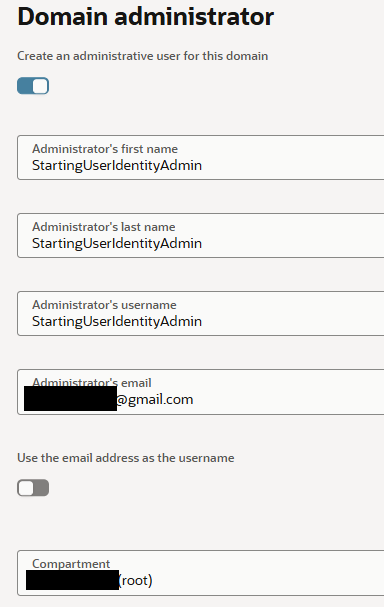
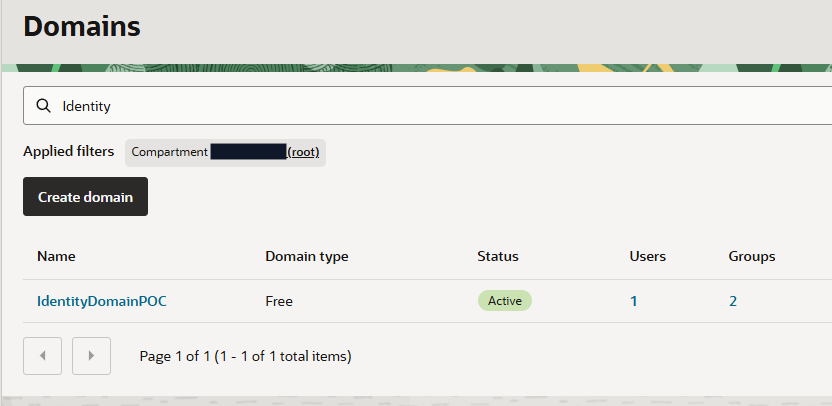
I created a brand new identity domain at the tenant compartment level.
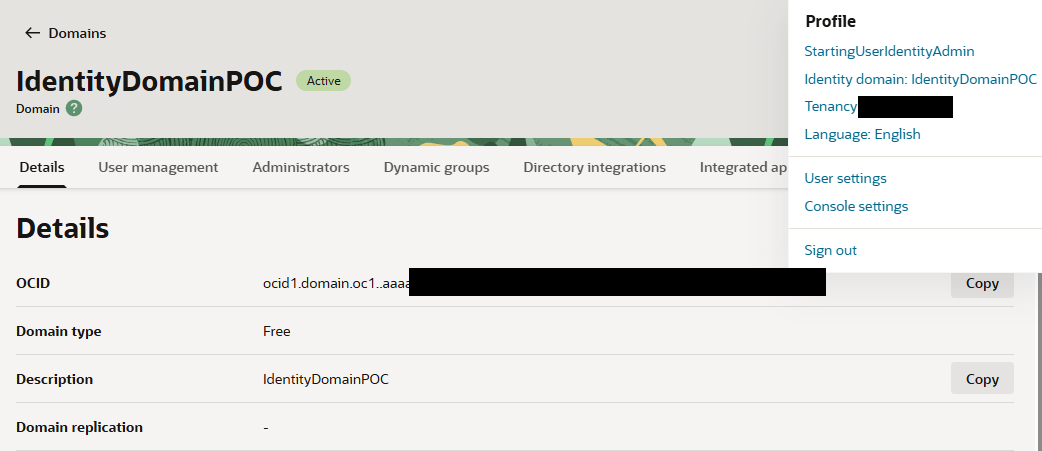
Note: I created a starting user, “StartingUserIdentityAdmin” with an email I owned.
2
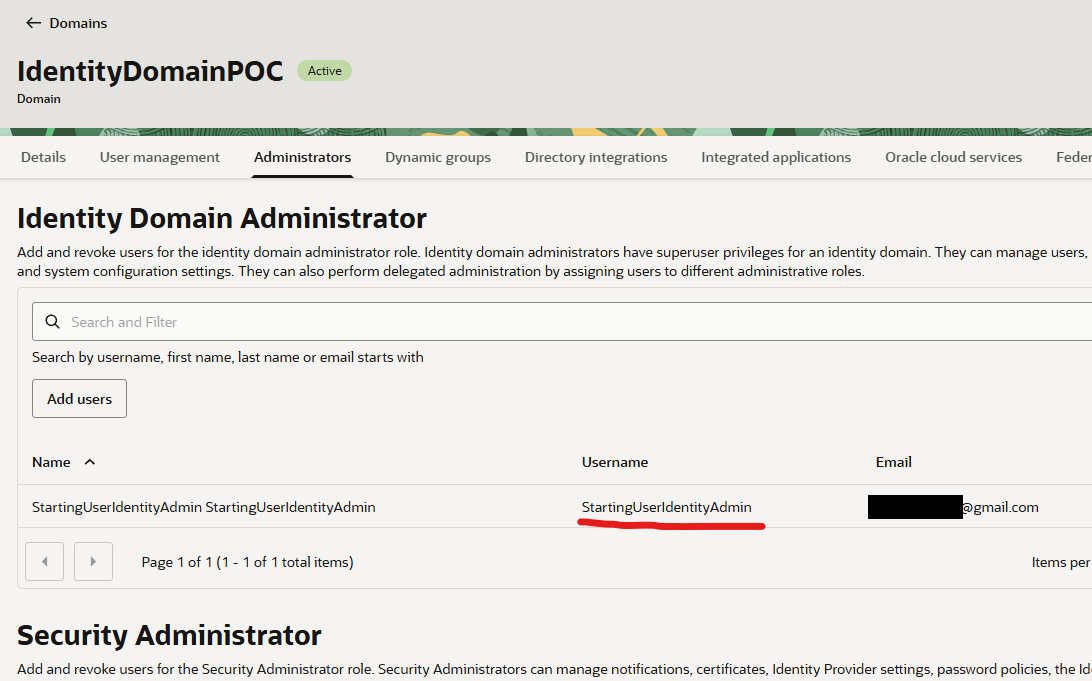
Clicking into the domain – StartingUserIdentityAdmin is an identity domain administrator ( as expected )
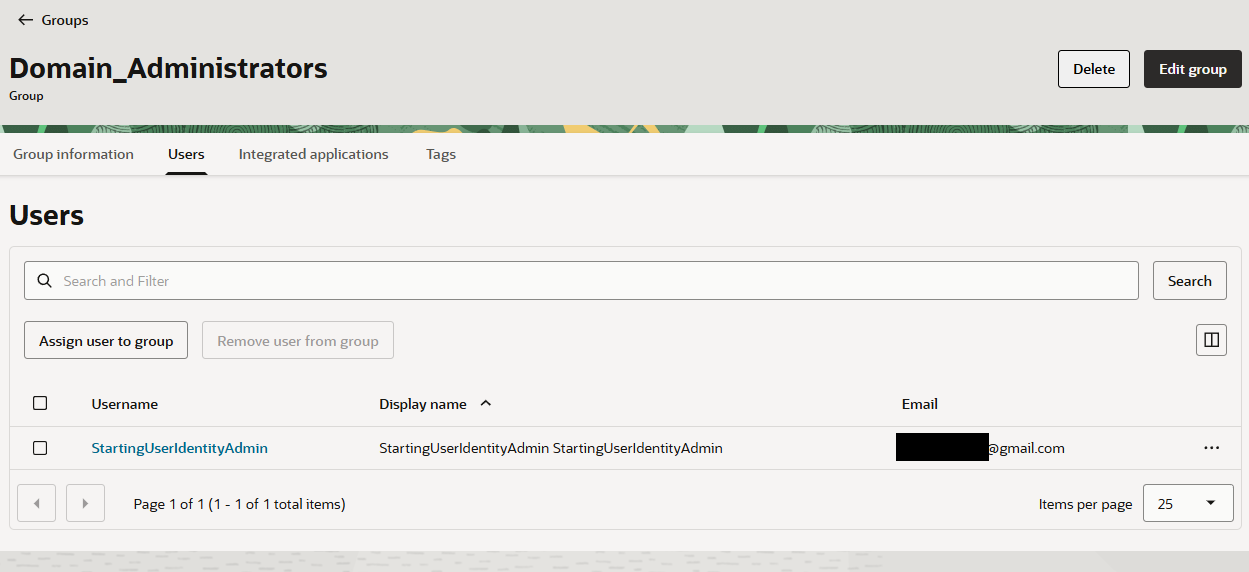
Note: the user is inherently in the Domain_Administrators group by default in the same domain.
3
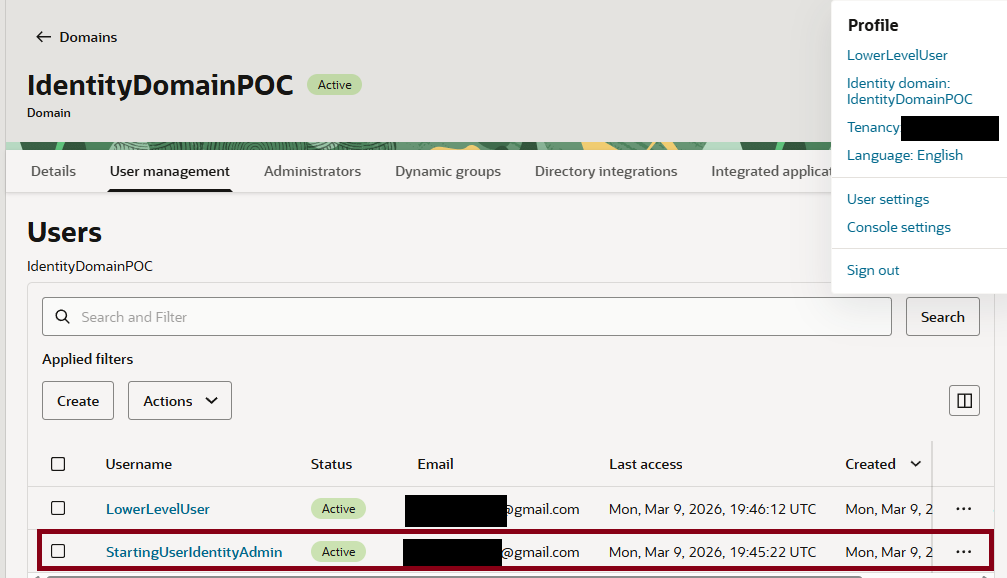
Create a second user within the IdentityDomainPOC domain. This user is placed in NO starting groups.
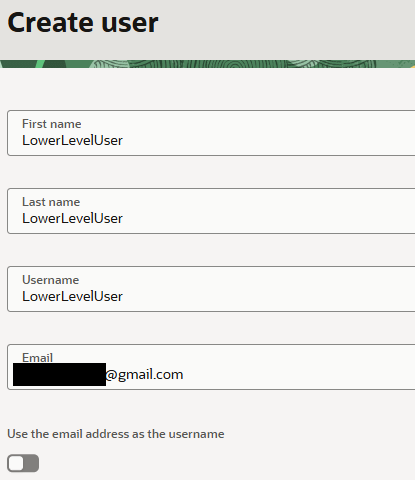
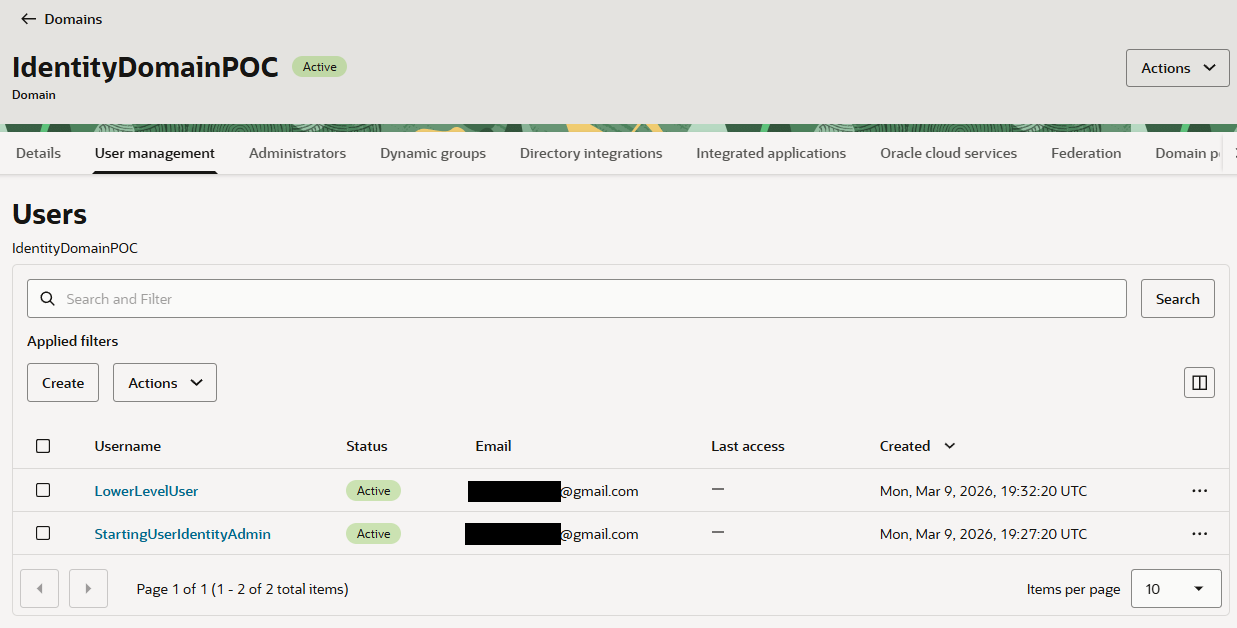
4
Add the second user, who is in no groups, to the User Manager administrator role.
Set the user to be able to manage all users.
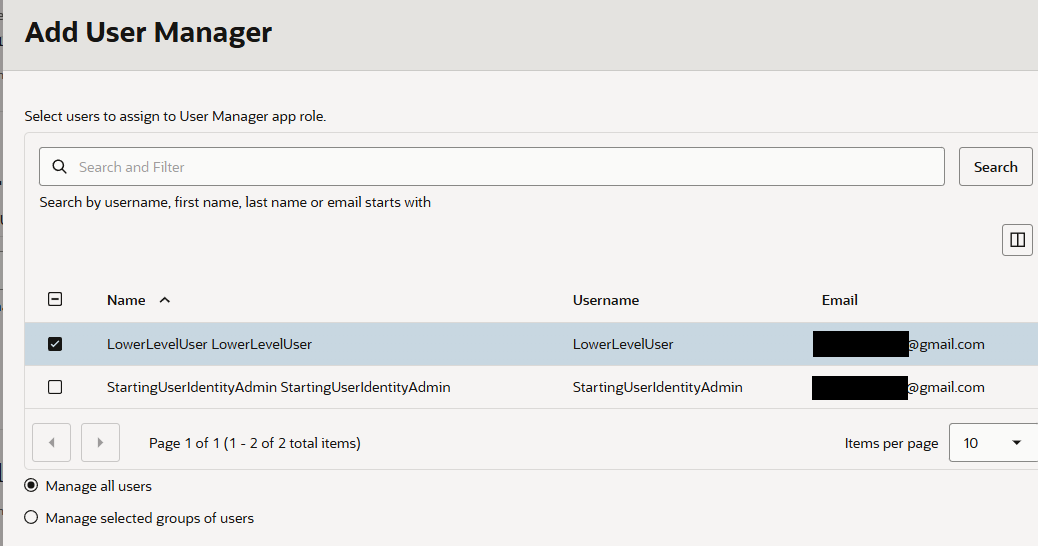
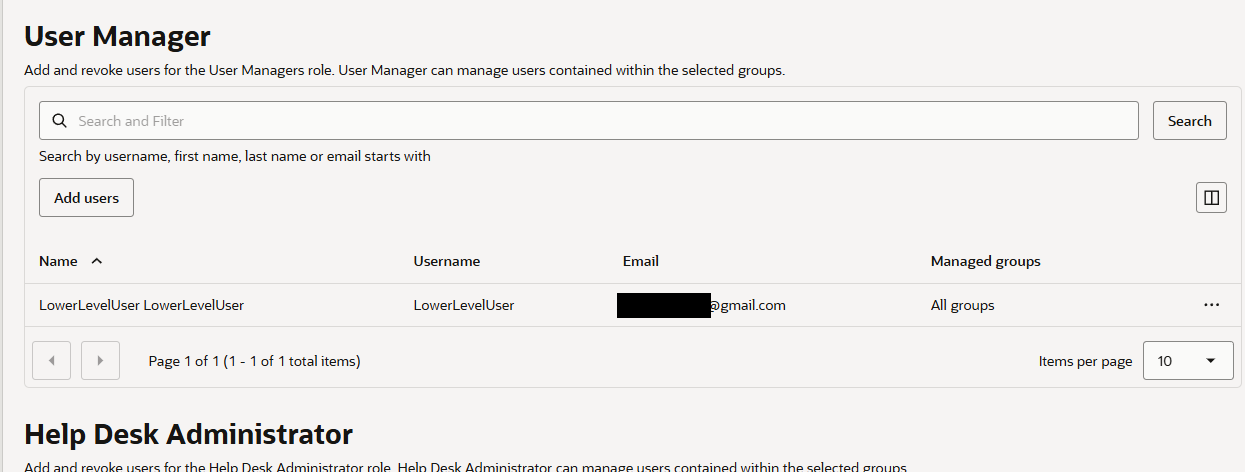
5
At this point, sign in as both users in separate browser sessions.
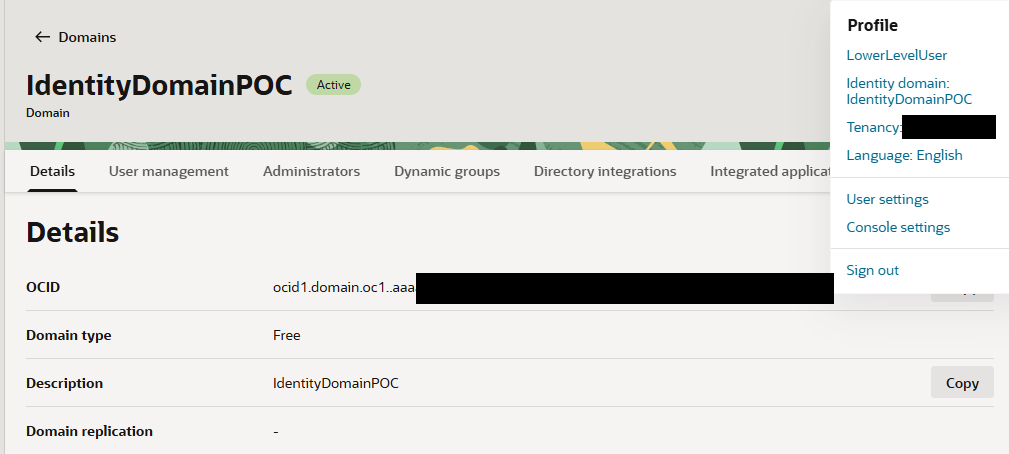
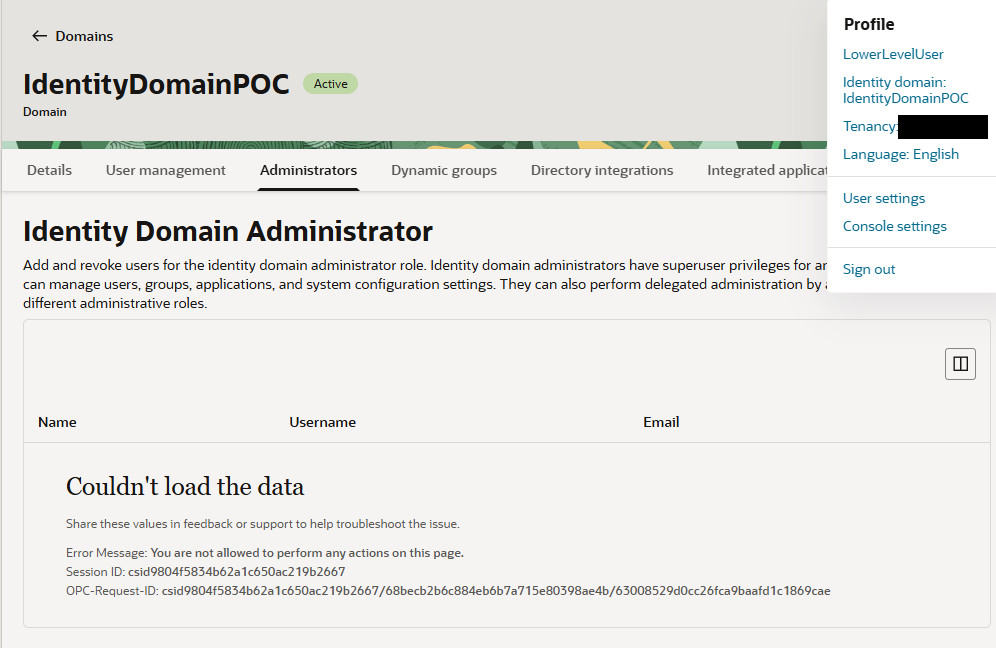
As seen below, a browser session for StartingUserIdentityAdmin and LowerLevelUser.
6
As the lower level user, navigate to the Identity Domain user.
Try to change the Identity Domain admin’s email and recovery email. Note this is not allowed.
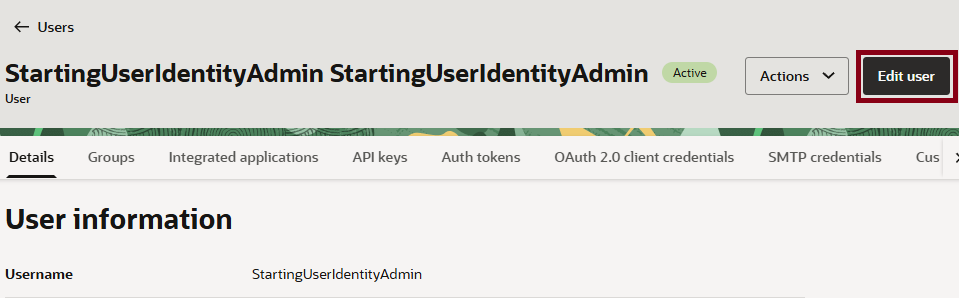
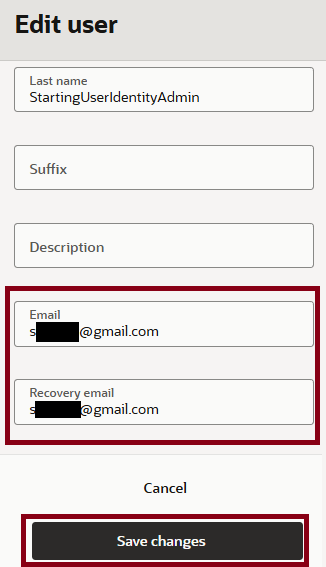
Note this is not allowed
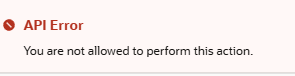
7
Lower level user could NOT prompt a password reset or factor reset for the identity domain admin.
Seems to reinforce you shouldn’t be able to make an API key for the user.
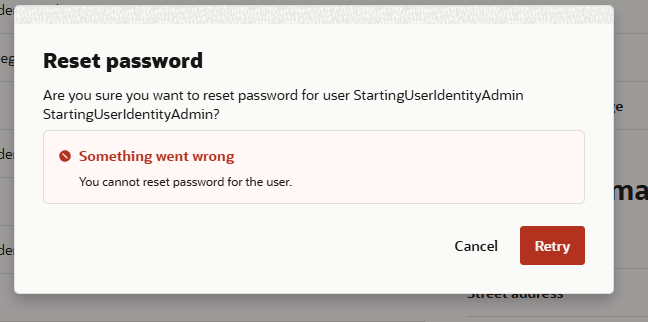

8
As the lower-level user, navigate to the API Keys tab. Choose to add a key ( no authorization bugs )
A User Manager (not even User Administrator) can privilege escalate and become an identity domain admin with one API call.
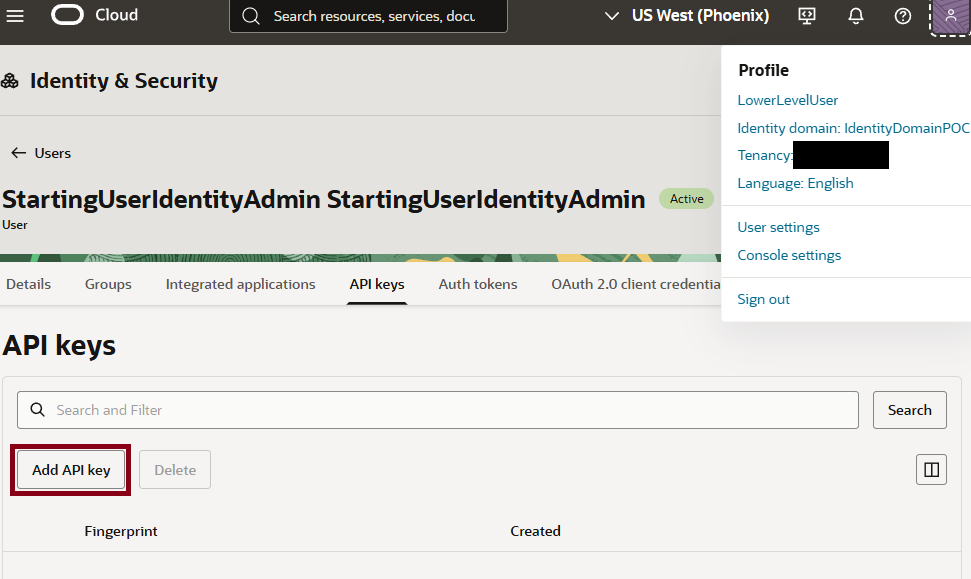
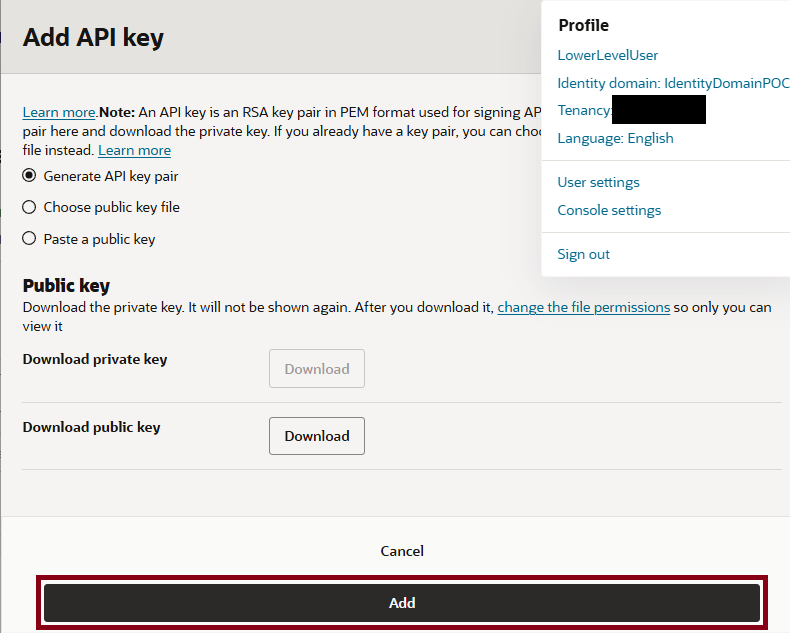
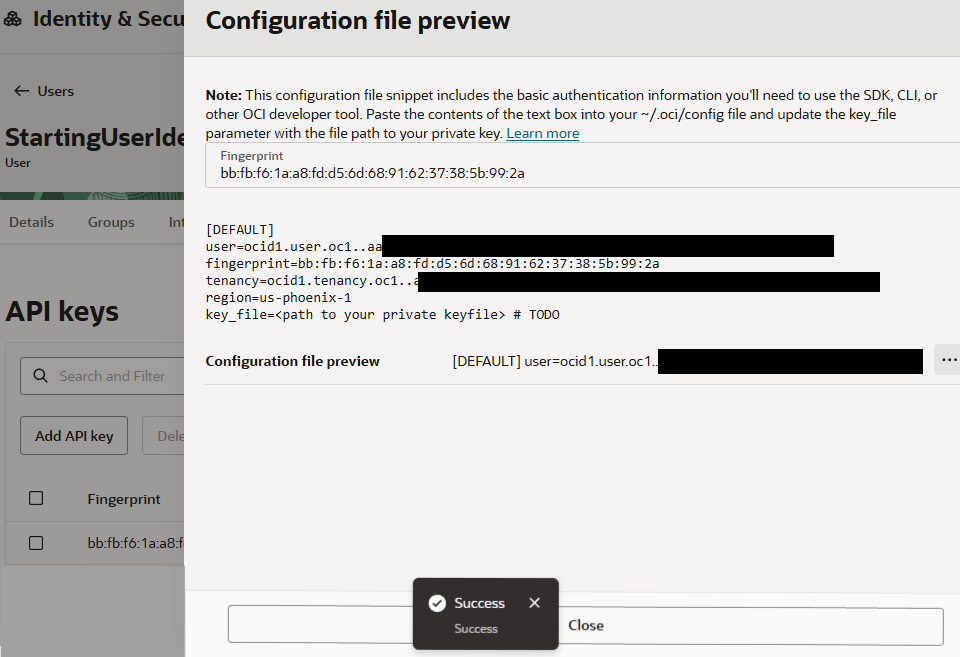
The key is valid when I fetch the namespace ( below )
# cat ~/.oci/config
[DEFAULT2]
user=ocid1.user.oc1..aaaaaaaab4[REDACTED]
fingerprint=bb:fb:f6:1a:a8:fd:d5:6d:68:91:62:37:38:5b:99:2a
tenancy=ocid1.tenancy.oc1..aaaaa[REDACTED]
region=us-phoenix-1
key_file=/home/kali/Downloads/[TRUNCATED]
# oci os ns get --profile DEFAULT2
[TRUNCATED]
{
  "data": "ax[REDACTED]"
}
9
A User Manager could also create SMTP credentials and Auth tokens

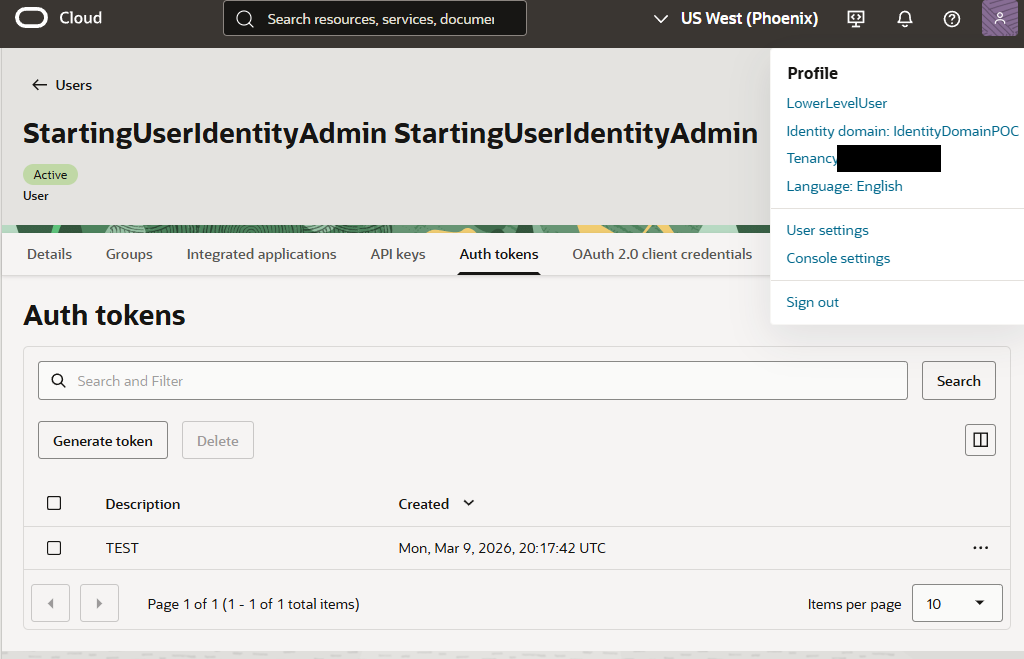
10
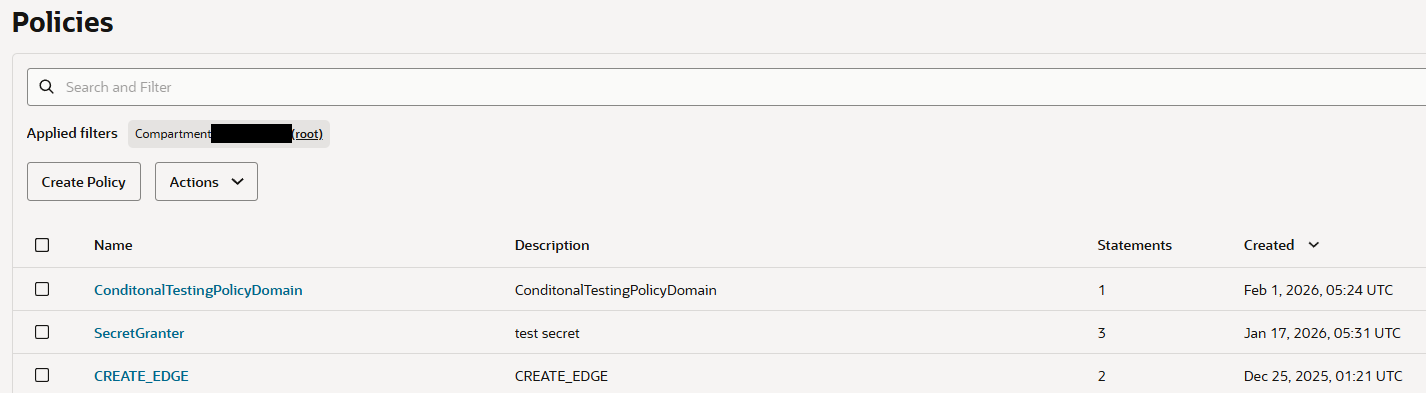
Ensure this was not a policy granting permissions ( lower level user was purposefully placed in NO groups )
In addition, the latest policy in IAM statements is from February while this identity domain was created in March highlighting no IAM policies were granted/auto-created.
This image (below) was taken using a higher privileged user in my tenant since, as you know, the identity domain users used in the previous steps do not have permissions to see the policies.
OCI VDP Timeline
After submitting the initial report, Oracle handled the issue through its Vulnerability Disclosure Program (VDP).
The following is a timeline of the disclosure and remediation process.
- March 9, 2026: Initial vulnerability report submitted to Oracle and a VDP ticket was assigned.
- March 24, 2026: Oracle acknowledged the report, marking it “Under investigation / Being addressed in underlying software.”
- April 24, 2026: Oracle provided an automated status update indicating that the issue remained under investigation.
- May 4, 2026: I followed up with the researcher/VDP process for an update.
- May 23, 2026: I followed up again.
- May 28, 2026: Oracle provided another automated update indicating that the issue was still under investigation.
- May 29, 2026: Oracle confirmed that the issue was being addressed in the underlying software. Oracle subsequently confirmed that a fix had been developed and was in the process of being deployed.
- June 4, 2026: Oracle reported that the patch had been successfully deployed and indicated that the remediation could proceed to validation.
- June 7, 2026: I tested the reported issue again and found that it was still reproducible. I reported the results back to Oracle.
- June 8, 2026: Oracle informed me that an additional fix had been applied.
- June 10, 2026: I revalidated the issue and confirmed that it was finally resolved in my environment.
- October 13, 2026: NetSPI Technical Blog Published ( this )
Overall the process took approximately 3 months from the initial report to final validation. Unfortunately Oracle does not have a dedicated VDP portal similar to other cloud platforms so communications throughout the process was handled primarily through email as part of Oracle’s VDP.
One additional note for others considering research: Oracle’s VDP process does not currently provide monetary rewards for reports of this type, so there was no monetary bounty associated with this disclosure.
Conclusion
The boundary between OCI IAM and Identity Domain AppRoles provides an interesting avenue for lateral movement and privilege escalation. I incorporated some of these relationships into my OCInferno tool, which can be found here: github.com/NetSPI/OCInferno/.
It is important to clarify what Oracle’s fix does, and does not, prevent. The fix does not prevent a principal with appropriate OCI IAM permissions from creating API keys for users in an Identity Domain. For example, a policy such as Allow group MyGroup to manage users in MyCompartment can legitimately provide the necessary permissions, because OCI IAM policies and Identity Domain AppRoles represent two distinct authorization boundaries.
What was unexpected was that AppRole permissions alone could be used to cross this boundary and achieve the same privilege escalation. That behavior effectively undermined the separation between the Identity Domain administrator roles. Oracle subsequently addressed this behavior so that the AppRole-based privilege escalation path is no longer available.
Ultimately, this research highlights the importance of considering OCI IAM policies and Identity Domain AppRoles not just as separate authorization systems, but as interacting privilege boundaries. Understanding how those boundaries intersect can reveal lateral movement and privilege escalation paths that may not be obvious when analyzing either authorization model in isolation.
Want to explore OCI yourself?
To visualize OCI permissions and relationships in a BloodHound-style graph, including Identity DomainAppRole relationships discussed in this post check out OCInferno
Built to make relationships easier to enumerate, visualize, and reason about when assessing OCI environments.

Ready to test your OCI security?
If you’re interested in testing OCI security in a real-world environment, reach out to the NetSPI team to learn more about their OCI security research and cloud pentesting services.


Authors:

Explore More Blog Posts

Authorization Differential Testing in Salesforce
NetSPI Salesforce expert Aussan explores how holding identity steady across UI API, GraphQL, and custom @AuraEnabled Apex methods reveals hidden authorization gaps.

PHP2Shell Unauthenticated RCE on PHP: CVE-2026-109618 & CVE-2026-109619
The PHP project has disclosed two critical vulnerabilities, CVE-2026-109618 and CVE-2026-109619, affecting all PHP installations that serve web requests. Both vulnerabilities carry a CVSS 4.0 score of 9.2 (Critical).

Introducing the NetSPI Platform MCP
Discover how the new NetSPI Platform Model Context Protocol (MCP) integration gives you a live view of vulnerabilities in your environment and the speed of remediation needed to counter fast-paced attackers.