Introducing the NetSPI Platform MCP

Introducing the NetSPI Platform Model Context Protocol
The new NetSPI Platform MCP gives you a live view of the vulnerabilities in your environment and the speed of remediation needed to counter fast-paced attackers.
Queryable, actionable, and available directly inside the AI tools your team already use


What is Model Context Protocol ( MCP )?
MCP is an open-source standard for connecting AI tools to data sources. What previously required specific knowledge of API formats and parameters can now be handled through a natural language query to an AI system. This is what allows an AI agent to send an email on your behalf or give you a daily briefing on what happened in Slack while you were out of office. Software engineers have taken advantage as well.
How the NetSPI Platform MCP Helps
Instead of relying solely on static PDF reports, which need to be distributed to stakeholders across your organization, now you can get live insights into which vulnerabilities to prioritize and ship fixes in minutes, not days.
With more code than ever being generated by AI tools, the speed of development is increasing. On the other side of the equation, cybersecurity professionals are increasingly being asked to review more code and remediate vulnerabilities faster.
Let’s look at a common use case, where a web application is going through a pentesting by one of NetSPI’s expert consultants. This example shows how developers leveraging NetSPI Platform’s Model Context Protocol (MCP) integration with Claude Code can now query findings via natural language, map OWASP categories, prioritize vulnerabilities, and draft fix-ready pull requests in minutes.

Connect: NetSPI Platform MCP integration to your AI client
First we connect the Platform MCP server to Claude Desktop.
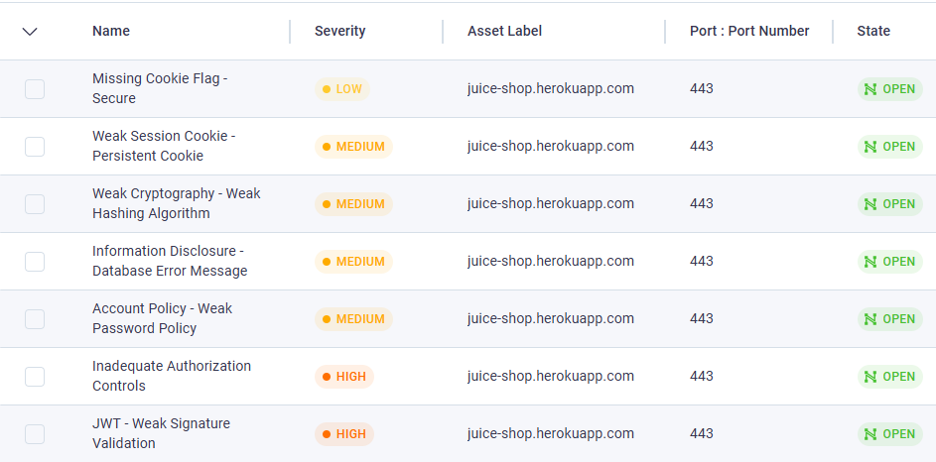
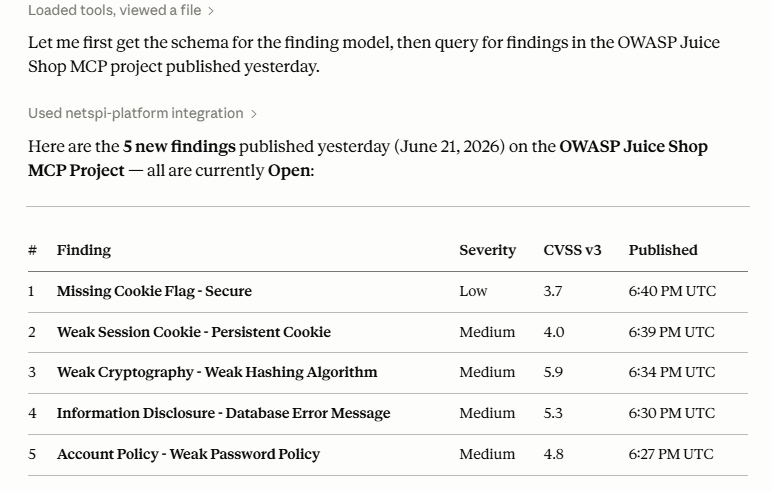
Query findings: Ask your AI client for a report of new findings
Can you take a look at <project_name> and tell me all the new findings that were published yesterday?
Prioritize: Rank Vulnerabilities and Add Context
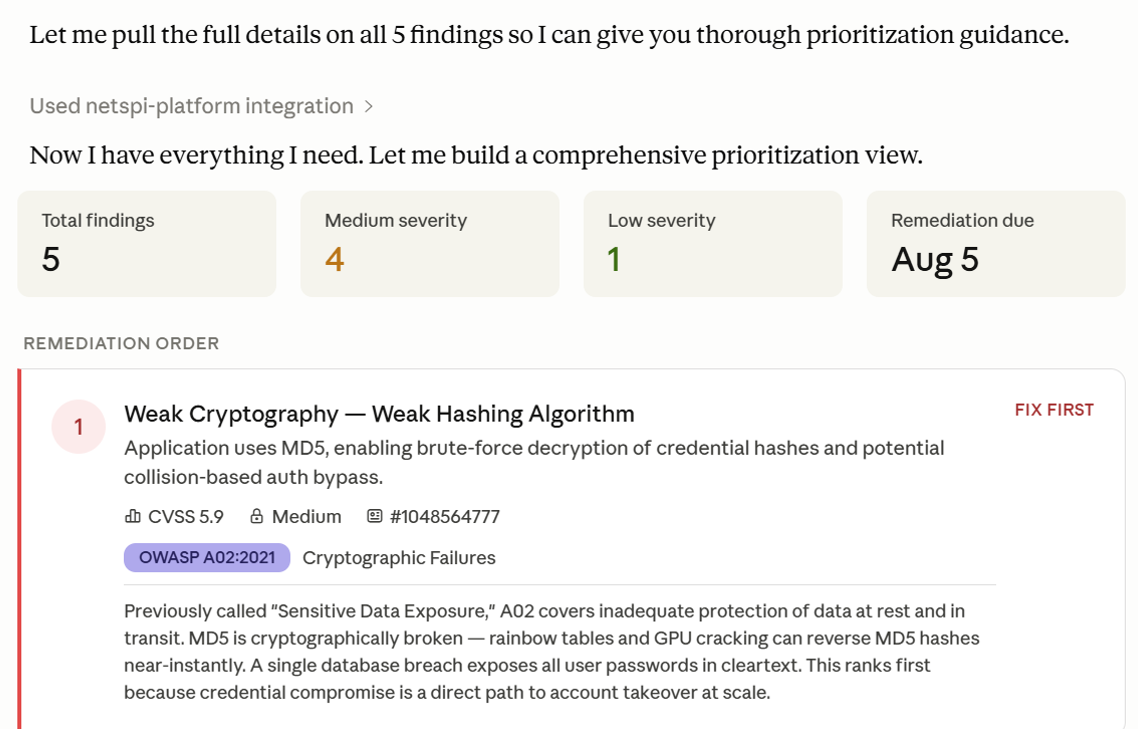
Let’s figure out which ones we should work on and add some more context. In this case we’re adding additional OWASP Top 10 information, but often our clients will have custom formats or use cases for these findings. The possibilities are endless.
Help me prioritize which vulnerabilities to remediate first and give the OWASP category for each one with some context.
Draft fixes: AI drafts a PR for each high severity fix
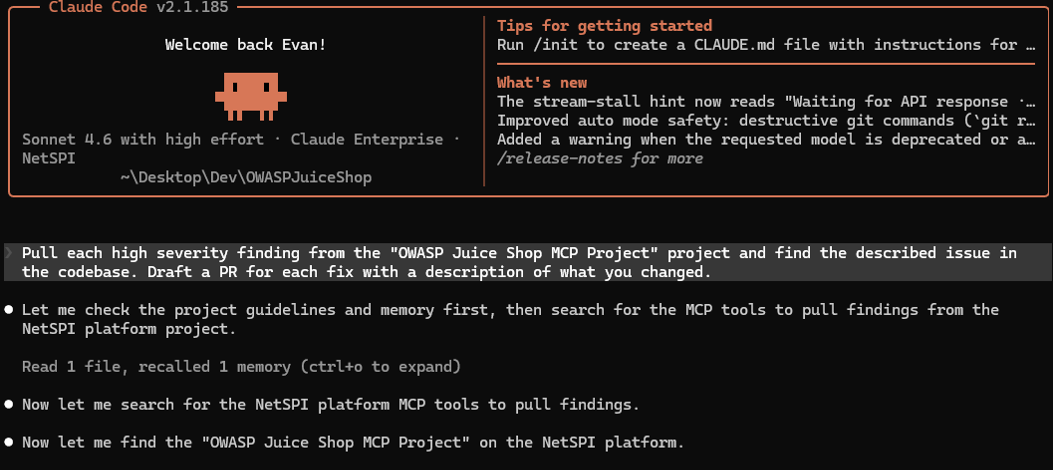
Let’s jump over to Claude in a terminal now and start working on some fixes. Some of those high severity vulnerabilities look important.
Pull each high severity finding from the <project_name> project and find the described issue in the codebase. Draft a PR for each fix with a description of what you changed.
Review PRs: GitHub Pull Requests & Open Tickets
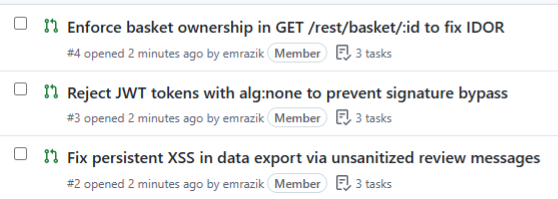
We have already started the vulnerability remediation process in just a few minutes! GitHub now has a few pull requests available for review.
Conclusion
We hope this short demonstration provides you with a useful example of how you can use the NetSPI Platform MCP, but the greatest value will come from integrating it into your own organization. Here are a couple of ideas to explore:
- Allow different stakeholders in your organization to explore this data.
- Whether it is a software engineer pushing a code fix or an executive looking for a summary of an organization’s security posture, you may be surprised by the use cases.
Explore the NetSPI Platform & Agentic MCP Integration


Authors:

Explore More Blog Posts

Authorization Differential Testing in Salesforce
NetSPI Salesforce expert Aussan explores how holding identity steady across UI API, GraphQL, and custom @AuraEnabled Apex methods reveals hidden authorization gaps.

PHP2Shell Unauthenticated RCE on PHP: CVE-2026-109618 & CVE-2026-109619
The PHP project has disclosed two critical vulnerabilities, CVE-2026-109618 and CVE-2026-109619, affecting all PHP installations that serve web requests. Both vulnerabilities carry a CVSS 4.0 score of 9.2 (Critical).

Administrating the Administrator, An OCI Identity Domains Permission Bypass
Discover how a permission bypass in Oracle Cloud Infrastructure (OCI) identity domains allowed lower-level administrator roles to create API keys for Identity Domain Administrators, leading to an unauthenticated privilege escalation path.