DNS Tunneling with Burp Collaborator

DNS tunneling, in my opinion, is the niftiest data exfiltration method there is. For those not familiar, check out Section 3 from SANS’s “Detecting DNS Tunneling” whitepaper here.
Our Mobile Application Practice Lead, Aaron Yaeger, recently taught me how easy it is to use Burp Collaborator for DNS tunneling. Exfiltrating data like that was a bit time consuming to do manually, so I set out to automate this task for use in all environments. I automated this task by creating an extension for Burp Suite using the built-in Burp Collaborator API, with a private Burp Collaborator server to parse incoming DNS requests and recreate the tunneled data. The two main ways to use this extension are:
Environments with Burp Suite
In this magical and unlikely environment, the tester has access to Burp Suite on both ends and this extension is installed. In that case the tester goes to the extension on their local box, starts the listening Collaborator instance, and enters the Burp Collaborator address and the data to be exfiltrated on the compromised box’s Burp instance (for full instructions see here).
Environments with Bill and Linus
However, on most compromised boxes there is no Burp Suite, but a scripting engine is usually available (Powershell/Bash). For these environments, I have written Bash and Powershell scripts to tunnel data to Collaborator. These scripts will base32 encode, chunk, and perform DNS queries with the data. The execution chain for a tester looks like this:
- Copy over the tunneling script to the compromised box
- Click “Start Listening” on the DNS Tunnel extension on the box they want to exfiltrate data to (take note of the Collaborator server address)
- Start the script on the compromised box, copy in the Collaborator server address and filename to exfiltrate, and click go
- After the data is sent click “Poll now” on the receiving machine and the data will be present
A demo starting at step 2 is below (click to enlarge):
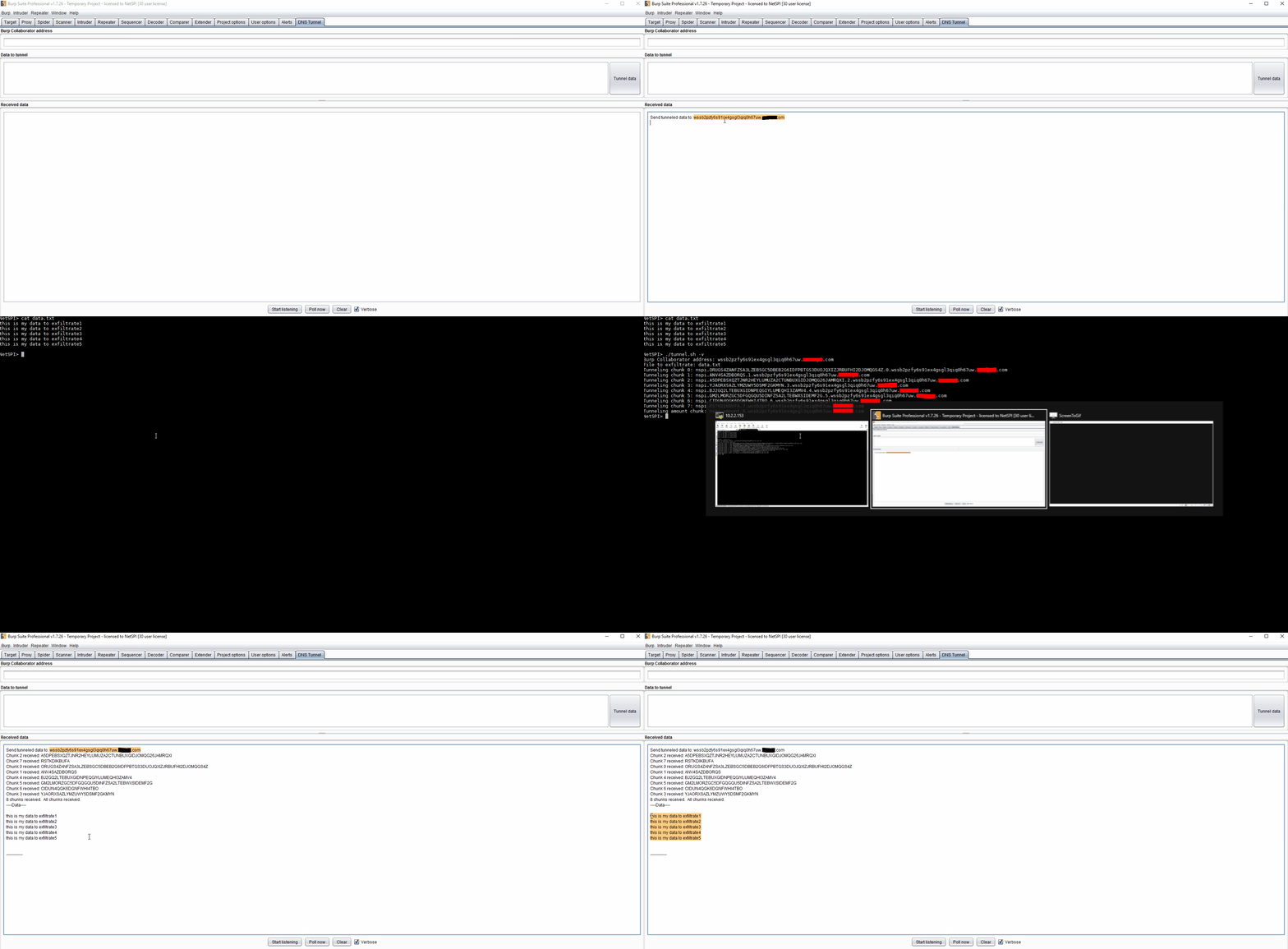
This is the closest to point-and-shoot that I’ve seen for DNS tunneling, which makes me hope it will give pen testers access to a tool that might have been harder for them to access in the past. Another great alternative for tunneling is dnscat2, so definitely check that out to see if it fits your needs. Since I’m a big fan of blue teaming I’ll reference the article I posted at the beginning for Detecting DNS Tunneling by Greg Farnham. I should point out that this extension will only work with a private Burp Collaborator Server, as Burp Suite (rightly) doesn’t want their domain getting flagged as malicious when this extension sends hundreds of requests.
Contributing
What is being released today is the 1st revision of this tool. Due to that, it means everything was done the way it popped into my head. If you think there are better ways things could be implemented please feel free to make a pull request or create an issue on Github.
You can download the tool at https://github.com/NetSPI/BurpCollaboratorDNSTunnel.
Explore More Blog Posts

PHP2Shell Unauthenticated RCE on PHP: CVE-2026-109618 & CVE-2026-109619
The PHP project has disclosed two critical vulnerabilities, CVE-2026-109618 and CVE-2026-109619, affecting all PHP installations that serve web requests. Both vulnerabilities carry a CVSS 4.0 score of 9.2 (Critical).

Introducing the NetSPI Platform MCP
Discover how the new NetSPI Platform Model Context Protocol (MCP) integration gives you a live view of vulnerabilities in your environment and the speed of remediation needed to counter fast-paced attackers.

Administrating the Administrator, An OCI Identity Domains Permission Bypass
Discover how a permission bypass in Oracle Cloud Infrastructure (OCI) identity domains allowed lower-level administrator roles to create API keys for Identity Domain Administrators, leading to an unauthenticated privilege escalation path.