Quick! To the HyperTerminal

It’s not every day that we run into kiosks, terminals, etc. that have HyperTerminal as one of the available applications. This may be a corner case, but it’s another example to add to Scott’s blog about break out methods. In this example, we encountered a terminal setup, where the system was a fairly locked down Windows XP machine. HyperTerminal was one of the only applications in the start menu, and other functionality (shortcut keys, right-click, run) was not available. The method here is pretty simple, but now you can add HyperTerminal as another program to use for breaking out.
Steps to Exploit
First off, we want to open up HyperTerminal and create a new connection to write to. In this example, we’ll just use our non-connected COM1 port as a connection. This is pretty easy to set up, it’s more or less clicking next until you are dropped into the HyperTerminal window below.
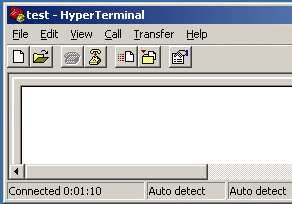
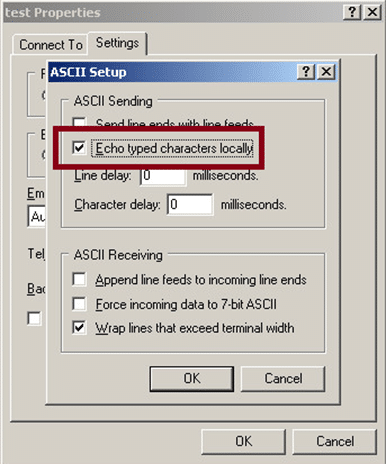
We will want to save the text that we’re typing to the HyperTerminal screen, so select Transfer, then Capture Text.
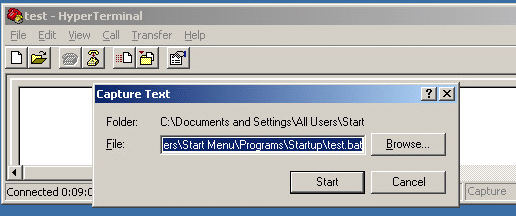
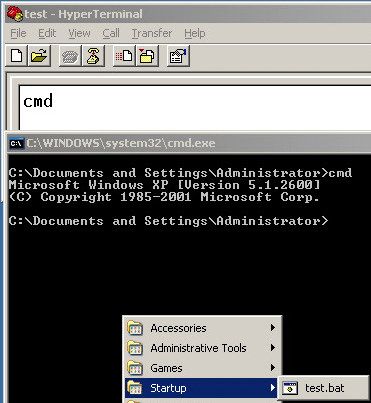
Since the user we are using has rights to write to the startup folder, we are just going to save a batch file that will run at the user’s next logon (C:Documents and SettingsAll UsersStart MenuProgramsStartuptest.bat). You may not have rights to save there, but you might have access to save the file to another location that you could run the script from. Once the capture is started, type the command(s) that you want to run into the HyperTerminal window and stop the capture. Here we are just going to type cmd and stop, so that the script will pop up a cmd shell when we login. You have plenty of other possible programs that you could run here.
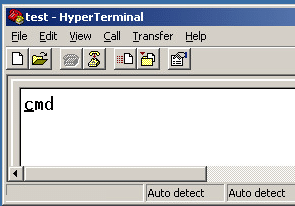
We can see in the example screen that the test.bat file was saved to the startup folder and when the script is executed, a command shell pops up.
Conclusion
You may never have to use HyperTerminal to break out, but keep it in mind if you are locked out of other routes. For our sysadmin readers, don’t allow HyperTerminal on your terminals, kiosks, etc.
Explore More Blog Posts

“StyleSmuggler” – Adobe Commerce, Adobe Commerce B2B, and Magento RCE (CVE-2026-75650): Overview and Takeaways
Adobe disclosed CVE-2026-7565, dubbed “StyleSmuggler,” on September 7th, 2026. The vulnerability, which received a maximal initial CVSS score of 10.0, affects Adobe Commerce, Adobe Commerce B2B, and Magento Open Source. The flaw allows an unauthenticated network-based attacker to execute arbitrary code by injecting PHP through Magento's email template engine.

Modern Adventures in Azure Privilege Escalation
Azure has been growing rapidly over the past few years As of June 2026, there were over 200 services, 897 built-in Azure RBAC roles, and 22,018 different permissions. The attack surface of Azure has also increased with this growth. There are also a number of new and updated tools that give us insight into the […]
A New Era for Offensive Security
Today, NetSPI and Synack announced a definitive agreement to merge, backed by KKR, forming the industry’s leading offensive cybersecurity platform.