Auditing Salesforce Permission Hierarchies with ForceHound
The Problem Nobody Graphs
Salesforce organizations are designed to be dynamic, evolving as a business grows. Over time, an organization naturally accumulates layers of access: a profile for a new department, permission sets for specialized tasks, and sharing rules to refine data visibility as teams expand. When multiplied by hundreds of users and various integrated applications, the resulting web of permissions becomes a complex “identity graph” that requires modern tools to manage effectively.
In previous posts, we explored the importance of secure development practices in Apex and the need for robust governance over third-party Connected App integrations. By visualizing these individual configurations as a unified graph of relationships, organizations can more easily identify redundant access and ensure that even low-privilege sessions remain strictly within their intended boundaries.
The UNC6040 campaign made this visibility more urgent, as it targeted Salesforce orgs through malicious Connected Apps in 2025. This demonstrated that while Salesforce provides a secure foundation, organizations must actively manage the trust debt that can accumulate over years of operation.
Our solution to this is ForceHound, an open-source Python collector that builds a BloodHound CE identity graph allowing teams to audit their Salesforce environment. This can be installed locally or downloaded using PyPi here: pypi.org/project/forcehound/. ForceHound is also available on GitHub: github.com/NetSPI/ForceHound
Why Attack-Path Analysis for Salesforce?
While Active Directory has had BloodHound since 2016, Salesforce has lacked a similar model structure until the recent open sourcing of SpecterOps OpenGraph technology allowing the graphing of arbitrary programs.
In Salesforce, permissions are computed as a union across multiple layers:
- Profiles + Permission Sets + Permission Set Groups:
A user’s effective permissions are the union of their profile, all assigned permission sets, and all permission set groups (which themselves contain permission sets). Permission Set Groups can also contain Muting Permission Sets that suppress specific permissions granted by the group’s constituent permission sets. Outside of muting sets, there’s no deny mechanism. - Object-Level Security + Field-Level Security + Record-Level Security:
Three independent axes of access control. A user can have object access but not field access, or field access but not record access. - Role Hierarchy:
Vertical access inheritance. A manager in the role hierarchy can see records owned by users below them, depending on OWD settings.
- Groups and Queues:
Lateral access distribution across organizational boundaries. - Connected Apps:
OAuth trust boundaries that grant external applications access to org data, often with broader scope than intended. - Organization-Wide Defaults (OWD):
The baseline sharing model that determines whether records are private, public read-only, or public read/write before any other sharing rule applies.
If you’re coming from an AD background, this table maps the concepts:
| Salesforce Concept | Rough AD/Azure Equivalent | ForceHound Node |
|---|---|---|
| Profile | Primary role assignment (one per user, mandatory) | SF_Profile |
| Permission Set | Additional Group Membership | SF_PermissionSet |
| Permission Set Group | Nested Group | SF_PermissionSetGroup |
| Role Hierarchy | Manager hierarchy (no direct AD equivalent; controls record visibility inheritance) | SF_Role |
| Organization-Wide Defaults | Default ACLs | SF_Organization properties |
| Connected App | Registered OAuth App / Service Principal | SF_ConnectedApp |
| Share Object | Explicit ACE on a resource | SF_Record edges |
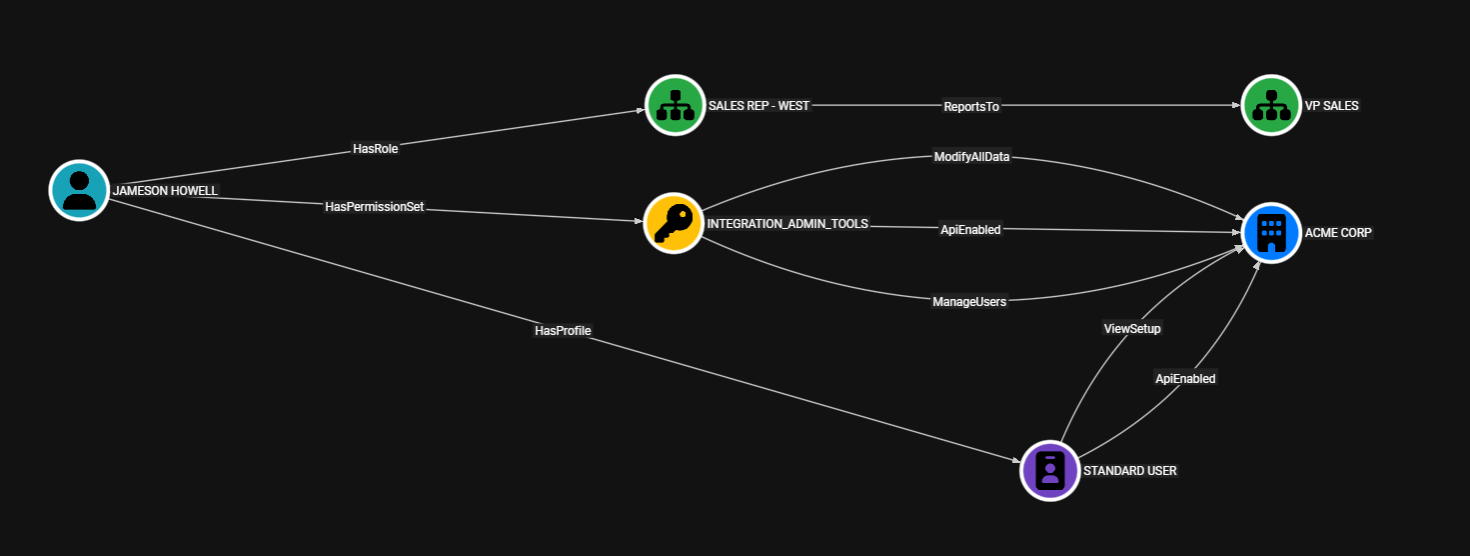
ForceHound makes these relationships queryable as a graph. Questions like “which users can reach ModifyAllData through any combination of profile, permission set, and permission set group assignments?” become a Cypher query instead of a spreadsheet exercise.
How ForceHound Works: Three Collection Modes
ForceHound supports three collection modes to accommodate different levels of access within an org.
API Mode (--collector api)
This is the privileged path that uses simple_salesforce against the Salesforce REST API and requires a user with ApiEnabled and sufficient object visibility, typically a system administrator.
This method will execute up to 20 SOQL queries via query_all() (which handles pagination automatically), covering the full identity surface:
- Users
- Profiles
- PermissionSets
- PermissionSetGroups
- PermissionSetGroupComponents
- PermissionSetAssignments
- Roles
- Groups
- GroupMembers
- QueueSobject
- EntityDefinitions
- ObjectPermissions
- FieldPermissions
- ConnectedApps
- SetupEntityAccess
- Organization details
- Share Objects
python -m forcehound \
  --collector api \
  --instance-url "https://yourorg.my.salesforce.com" \
  --username "$SF_USERNAME" \
  --password "$SF_PASSWORD" \
  --security-token "$SF_SECURITY_TOKEN" \
  -o graph.json
Authentication supports both session tokens (--session-id) and username/password/security-token combinations. Environment variables are supported for all credentials. Prefix any flag name with FORCEHOUND_ (e.g., FORCEHOUND_USERNAME, FORCEHOUND_BH_TOKEN_ID).
Aura Mode (--collector aura)
This is the low-privilege option, and the default mode. It uses Lightning/Aura framework endpoints, the same ones the Salesforce browser UI calls. No ApiEnabled permission required, no admin access needed. You just need a browser session.
Extract the sid cookie, aura.context, and aura.token from your browser’s DevTools (Network tab, any Aura request), and ForceHound will enumerate the org’s identity graph using those same endpoints.
python -m forcehound \
  --collector aura \
  --instance-url "https://yourorg.lightning.force.com" \
  --session-id "$SID_COOKIE" \
  --aura-context "$AURA_CONTEXT" \
  --aura-token "$AURA_TOKEN"
Aura mode collects Users (with full Profile capability data via relationship field traversal), PermissionSets (with all 15 capability permissions), Roles, Groups, GroupMembers, and managed-package namespaced objects. Collection runs asynchronously via aiohttp with 30 concurrent workers by default (--max-workers to tune).
What Aura cannot collect: PermissionSetGroupComponent relationships (the membership links between Permission Set Groups and their constituent Permission Sets), ObjectPermissions (CRUD grants), FieldPermissions (FLS), ConnectedApps, Share objects, and Organization-Wide Defaults. These require REST API access.
On a red team engagement, this is significant. From a standard user session with zero admin privileges, you can build a partial identity graph that reveals role hierarchies, group memberships, and which profiles grant dangerous capabilities like ModifyAllData.
Both Mode (--collector both)
Runs Aura first to collect the identity core (users, profiles, roles, groups, permission sets), then supplements with API queries covering what Aura can’t reach: PermissionSetGroupComponent relationships, ObjectPermissions CRUD, FieldPermissions, EntityDefinition metadata, ConnectedApps, SetupEntityAccess, and Organization-Wide Defaults. The result is the same complete graph you’d get from the API collector alone, but with fewer SOQL queries hitting your org’s REST API. Aura requests don’t count against the Salesforce API quota, so the Aura collector handles as much as it can before handing off to the API for the rest.
Use this mode when you have both low-privilege browser access and API credentials. This is common during authorized assessments where the client provides credentials but you also want to capture what the Aura session reveals independently. Aura shows what a browser user can enumerate. The API fills in the structural relationships that make the graph complete.
The graph builder merges results from both collectors. Nodes are deduplicated by ID, with kinds unioned and properties merged. Edges are deduplicated by the tuple of (source, kind, target). If the Aura session has expired or fails, the collector falls back to full API mode automatically.
# Both mode: Aura session + API credentials for supplemental queries
python -m forcehound \
  --collector both \
  --instance-url "https://yourorg.lightning.force.com" \
  --session-id "$SID_COOKIE" \
  --aura-context "$AURA_CONTEXT" \
  --aura-token "$AURA_TOKEN" \
  --api-instance-url "https://yourorg.my.salesforce.com" \
  --username "$SF_USERNAME" \
  --password "$SF_PASSWORD" \
  --security-token "$SF_SECURITY_TOKEN"
What ForceHound Sees: The Identity Graph
ForceHound produces a graph with 12 custom node types and over 40 edge kinds. Here’s what those edges represent.
Capability Edges (15 System Permissions)
These are the permissions that matter most for privilege escalation:
- ModifyAllData
- ViewAllData
- AuthorApex
- ManageUsers
- CustomizeApplication
- ManageProfilesPermissionsets
- AssignPermissionSets
- ManageRoles
- ManageSharing
- ManageInternalUsers
- ResetPasswords
- ApiEnabled
- ViewSetup
- ViewAllUsers
- ManageDataIntegrations
Each capability edge connects a Profile or PermissionSet to the Organization node, indicating that the entitlement grants that system-level capability. If you’ve read our previous Connected App post, you’ll recall the attack chain where the attacker exfiltrated Apex source code, found hardcoded AWS credentials stored in a Custom Metadata Type, and pivoted from the Salesforce Org to the company’s AWS infrastructure. ForceHound maps exactly which profiles and permission sets grant dangerous capabilities and which users are assigned to them.
CRUD Edges (7 Per Object)
CanCreate, CanRead, CanEdit, CanDelete, CanViewAll, CanModifyAll, and CanViewAllFields. These edges show which permission sets and profiles can touch which objects, derived from ObjectPermissions records. In a large org, this produces tens of thousands of edges. If you only care about identity paths and capability escalation, use --skip-object-permissions to omit them entirely.
Field-Level Security Edges
CanReadField and CanEditField connect permission sets and profiles to individual field nodes, derived from FieldPermissions records. A FieldOf edge links each SF_Field to its parent SF_Object. Use --skip-field-permissions to omit these if you’re focused on identity paths rather than data-level access.
Connected App Edges
The CanAccessApp edge connects Profiles and PermissionSets to ConnectedApps. ForceHound distinguishes between explicit access (admin-approved apps with SetupEntityAccess grants restricting access to specific entitlements) and implicit access (non-admin-approved apps where every Profile in the org gets a synthetic CanAccessApp edge).
The Connected App Attack Scenario I wrote about previously relied on apps that weren’t restricted to specific profiles. ForceHound makes those implicit trust boundaries visible. When you see that 29 Connected Apps have CanAccessApp edges from every profile, you’re looking at your attack surface.
Share Object Edges
Three edge kinds handle record-level access: Owns (record ownership), ExplicitAccess (explicit sharing grants from Share objects), and InheritsAccess (ControlledByParent inheritance chains, primarily from AccountShare lateral access to child Contacts, Opportunities, and Cases).
ForceHound dynamically discovers all queryable Share objects in the org. It doesn’t rely on a hardcoded list. The EntityDefinition query finds every object ending in “Share” that’s queryable, then collects sharing records from each.
Organization-Wide Defaults
Stored as properties on the SF_Organization node: DefaultAccountAccess, DefaultContactAccess, DefaultOpportunityAccess, DefaultLeadAccess, DefaultCaseAccess, and DefaultCampaignAccess.
These are the baseline access levels that sharing rules, role hierarchy, and manual shares build upon. If DefaultAccountAccess is “ReadWrite,” your sharing rules are largely irrelevant for accounts.
Empirical CRUD Probing
ForceHound’s API and Aura collectors build their permission graphs from metadata: ObjectPermissions records, Profile capability flags, PermissionSet assignments. This is how Salesforce says your permissions work. Salesforce administrators know that what the metadata describes and what actually happens at runtime don’t always agree.
The --crud flag takes a different approach. Instead of reading permission metadata, it tests what the current user can actually do. For every accessible object in the org, ForceHound attempts to create a record, edit it, and (in --aggressive mode) delete it. The results are recorded as CrudCanCreate, CrudCanRead, CrudCanEdit, and CrudCanDelete edges in the graph. These edges represent proven access, not inferred access.
# Empirical CRUD probing (Aura mode)
python -m forcehound \
  --collector aura \
  --instance-url "https://yourorg.lightning.force.com" \
  --session-id "$SID_COOKIE" \
  --aura-context "$AURA_CONTEXT" \
  --aura-token "$AURA_TOKEN" \
  --crud \
  -o crud_results.json
The prober handles dependency ordering automatically. Salesforce objects reference each other through lookup and master-detail relationships. You can’t create a Contact without an AccountId if the field is required. ForceHound builds a dependency graph via topological sort and probes parent objects first so that child objects have valid reference IDs available when they need them.
A few flags are worth knowing:
| Flag | What It Does |
|---|---|
--crud | Enable CRUD probing (create, read, edit). Self-created records are cleaned up automatically. |
--aggressive | Edit every record (reveals record-level sharing differences) and delete one existing record per object type. Protected identity objects are excluded from deletion unless --unsafe is passed. |
--unsafe | Allow delete-probing of protected identity/config objects (User, Profile, PermissionSet, Role, etc.) by deleting the self-created record. Requires --aggressive. |
--crud-dry-run | Show what would be probed without executing any DML |
--crud-objects Account, Contact | Limit probing to specific objects |
--crud-concurrency 10 | Tune concurrent probe requests (default: 5) |
--crud-max-records 50 | Cap records tested per object in aggressive edit mode (default: no cap) |
In --aggressive mode, ForceHound saves a deletion log (forcehound_deletions_<timestamp>.json) recording every record it deletes, including the full field state of each record before deletion. Protected identity objects (User, Profile, PermissionSet, etc.) are excluded from deletion by default unless --unsafe is explicitly passed.
The difference between metadata-derived CRUD edges and empirically-proven CRUD edges is important on engagements. Telling a client “your ObjectPermissions say this user can create Account records” is one thing. Telling them “we created an Account record with this user’s session and here’s the proof” is another.
BloodHound CE Integration
ForceHound outputs BloodHound-compatible JSON and can upload directly to a BloodHound CE instance.
The --upload flag triggers a three-step upload workflow: create an upload job, send the graph JSON, and trigger ingestion. The --setup flag is a standalone operation that registers 12 custom node types with distinct Font Awesome icons and color codes (teal users, purple profiles, gold permission sets, red connected apps) and then exits. The visual distinction matters when you’re staring at a graph with thousands of nodes. Run --setup once before your first upload.
The --new-format flag outputs OpenGraph v1 format with metadata.source_kind: "Salesforce", which enables Cypher queries scoped to the Salesforce graph. The --clear-db flag wipes the existing graph before upload for clean collections.
# First run: register custom node types
python -m forcehound --setup \
  --bh-url "http://localhost:8080" \
  --bh-token-id "$TOKEN_ID" \
  --bh-token-key "$TOKEN_KEY"

# Collect, clear DB, upload
python -m forcehound --collector api \
  --instance-url "$INSTANCE_URL" \
  --session-id "$SESSION_ID" \
  --new-format \
  --upload \
  --clear-db \
  --bh-url "http://localhost:8080" \
  --bh-token-id "$TOKEN_ID" \
  --bh-token-key "$TOKEN_KEY"
The BloodHound CE client uses Python stdlib only: urllib for HTTP and HMAC-SHA256 for request signing. No requests dependency.
Audit Logging
Red team engagements require accountability. If you’re running ForceHound against a client’s production org, you need a reviewable artifact that answers who ran it, when it ran, and what it touched.
The --audit-log flag produces a timestamped JSONL file (forcehound_audit_<timestamp>.jsonl) that records every HTTP interaction with the Salesforce org. Three verbosity levels control the detail:
| Level | What’s Recorded | Use Case |
|---|---|---|
--audit-log 1 | Timestamp, operation, target object, HTTP status | Quick activity ledger, one line per request, greppable |
--audit-log 2 | Level 1 + request duration, HTTP headers, error detail | Operational debugging during collection |
--audit-log 3 | Level 2 + full request body and full response body | Forensic reconstruction, complete record of every request and response |
The log format is JSONL with fields aligned to the OCSF API Activity schema (class_uid 6003). Enterprise SOC teams already have SIEM normalization rules for OCSF. A ForceHound audit log at level 3 can be ingested directly into Splunk, Elastic, Microsoft Sentinel, or AWS Security Lake with minimal configuration.
# Collect with full forensic audit logging
python -m forcehound \
  --collector aura \
  --instance-url "https://yourorg.lightning.force.com" \
  --session-id "$SID_COOKIE" \
  --aura-context "$AURA_CONTEXT" \
  --aura-token "$AURA_TOKEN" \
  --audit-log 3 \
  -o graph.json
The audit log includes a session start event (with collector type, CLI arguments, and a credential warning), per-request events with sequential numbering, and a session end event with summary statistics. At level 3, no data is truncated. Every request body and response body is recorded in full. Treat level 3 logs as credential artifacts since they contain the session ID used during collection.
Performance and Scope Control
Large orgs can produce massive graphs. Several flags let you control scope:
| Flag | What It Skips | When to Use |
|---|---|---|
--skip-object-permissions--skip-field-permissions--skip-shares | SF_Object nodes + all 7 CRUD edge kindsSF_Field nodes + CanReadField/CanEditField/FieldOf edgesSF_Record nodes + Owns/ExplicitAccess/InheritsAccess edges | Identity-only analysis; dramatically reduces output size Skip field-level security detail Orgs with millions of sharing records |
--active-only | Inactive user accounts | Focused on current attack surface |
For identity-path analysis (which users can reach which capabilities), --skip-object-permissions alone often reduces the graph by 90% or more while preserving all capability, assignment, and role hierarchy edges.
Conclusion
What I hoped to accomplish in this post was to walk through ForceHound’s collection capabilities and what it produces. The tool pulls identity and permission data from your Salesforce org using whatever level of access you have available and outputs a graph that BloodHound CE can ingest. Whether that’s a full API collection, a low-privilege Aura session, or both combined, the result is the same graph structure.
In the follow-up post, we’ll take that output and load it into BloodHound. I’ll walk through a couple of privilege escalation scenarios using Cypher queries that show how a compromised standard user can reach ModifyAllData and how Connected App exposure looks in the graph. If you’re a Salesforce administrator or security professional, I think the follow-up will change how you look at your org’s permission model.
ForceHound is open source and available at https://github.com/NetSPI/ForceHound. Thanks for reading.

Explore More Blog Posts

PHP2Shell Unauthenticated RCE on PHP: CVE-2026-109618 & CVE-2026-109619
The PHP project has disclosed two critical vulnerabilities, CVE-2026-109618 and CVE-2026-109619, affecting all PHP installations that serve web requests. Both vulnerabilities carry a CVSS 4.0 score of 9.2 (Critical).

Introducing the NetSPI Platform MCP
Discover how the new NetSPI Platform Model Context Protocol (MCP) integration gives you a live view of vulnerabilities in your environment and the speed of remediation needed to counter fast-paced attackers.

Administrating the Administrator, An OCI Identity Domains Permission Bypass
Discover how a permission bypass in Oracle Cloud Infrastructure (OCI) identity domains allowed lower-level administrator roles to create API keys for Identity Domain Administrators, leading to an unauthenticated privilege escalation path.