Quick! To the HyperTerminal

It’s not every day that we run into kiosks, terminals, etc. that have HyperTerminal as one of the available applications. This may be a corner case, but it’s another example to add to Scott’s blog about break out methods. In this example, we encountered a terminal setup, where the system was a fairly locked down Windows XP machine. HyperTerminal was one of the only applications in the start menu, and other functionality (shortcut keys, right-click, run) was not available. The method here is pretty simple, but now you can add HyperTerminal as another program to use for breaking out.
Steps to Exploit
First off, we want to open up HyperTerminal and create a new connection to write to. In this example, we’ll just use our non-connected COM1 port as a connection. This is pretty easy to set up, it’s more or less clicking next until you are dropped into the HyperTerminal window below.
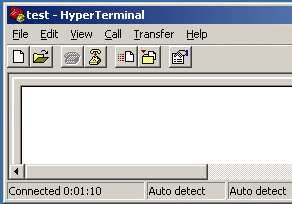
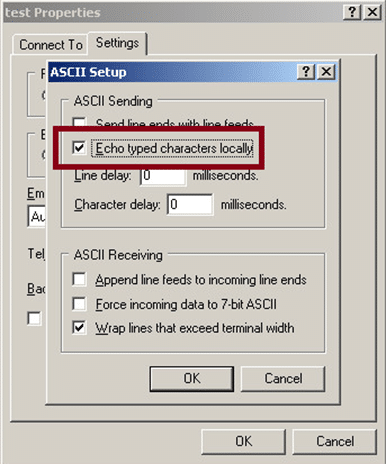
We will want to save the text that we’re typing to the HyperTerminal screen, so select Transfer, then Capture Text.
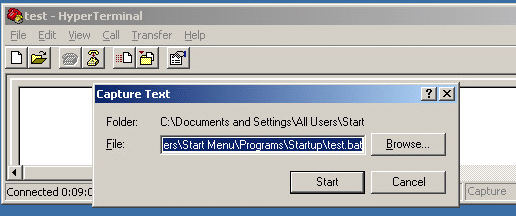
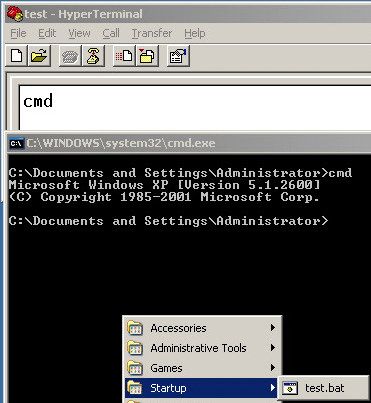
Since the user we are using has rights to write to the startup folder, we are just going to save a batch file that will run at the user’s next logon (C:Documents and SettingsAll UsersStart MenuProgramsStartuptest.bat). You may not have rights to save there, but you might have access to save the file to another location that you could run the script from. Once the capture is started, type the command(s) that you want to run into the HyperTerminal window and stop the capture. Here we are just going to type cmd and stop, so that the script will pop up a cmd shell when we login. You have plenty of other possible programs that you could run here.
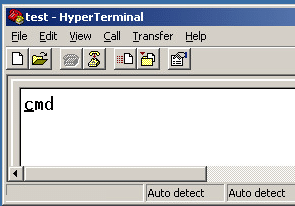
We can see in the example screen that the test.bat file was saved to the startup folder and when the script is executed, a command shell pops up.
Conclusion
You may never have to use HyperTerminal to break out, but keep it in mind if you are locked out of other routes. For our sysadmin readers, don’t allow HyperTerminal on your terminals, kiosks, etc.
Explore More Blog Posts

LiteLLM Supply Chain Compromise
A supply chain attack compromised LiteLLM versions 1.82.7 and 1.82.8 on PyPI, exfiltrating credentials and secrets to an attacker-controlled server.
Meet NetSPI’s Modern Pentesting Experience: Use Case-Driven, AI-Accelerated
The new NetSPI experience represents the next evolution of pentesting—smarter, faster, and designed for scale.

Forrester Recognizes NetSPI in Proactive Security Landscape Report
NetSPI has been recognized among Notable Vendors in the Forrester Proactive Security Platforms Landscape, Q1 2026. Learn how we unify ASM, VRM, and pentesting.